How to Give Useful Feedback on a Laptop Bag Sample
Receiving the first physical sample is one of the most useful moments in a custom laptop bag project. Measurements, materials, pocket layouts, padding, and hardware that looked reasonable in a drawing can feel very different once the bag is packed and carried.
The quality of the next sample depends heavily on the quality of the feedback. Comments such as “make it better,” “the pocket is too small,” or “add more padding” describe a reaction, but they do not give the factory a reliable revision standard.
Effective laptop bag sample feedback should identify the exact location, describe the current condition, state the required result, and provide a measurement or reference whenever possible. Each issue should have its own number, priority, image reference, and written factory response.
This guide explains how brand teams and buyers can review a laptop bag sample, turn observations into actionable comments, control revisions, and decide when the product is ready to move toward production.
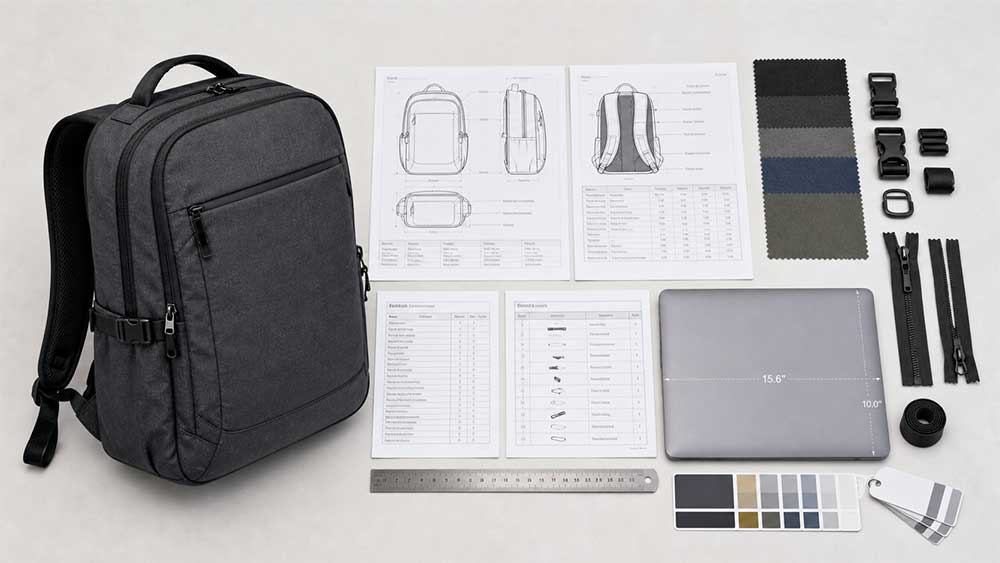
Before reviewing the sample, collect the documents and physical references that define what the factory was asked to make. Depending on the project, these may include:
Approved tech pack or design drawings
Measurement chart and agreed tolerances
Bill of materials
Fabric and lining specifications
Foam thickness or density requirements
Hardware and zipper references
Pantone colors or physical color swatches
Logo artwork and placement dimensions
Packaging and labeling requirements
Previous sample comments
Target laptop dimensions
Approved reference products or components
Without an agreed reference, it is difficult to distinguish a manufacturing mistake from a new preference.
For example, if the confirmed bag width is 400 mm but the sample measures 382 mm outside the agreed tolerance, the issue is a specification mismatch. If the sample matches the approved measurement but the buyer later decides that the bag should be wider, that is a design change.
Both can be corrected, but they should not be recorded in the same way.
If the project is still moving through design, prototype, sales sample, and pre-production stages, it helps to understand the purpose of each version in the broader laptop bag sampling process.
Review the Sample Under Realistic Use Conditions
A laptop bag should not be approved while empty on a table. Its shape, balance, access, and protective performance can change once the intended equipment is inside.
The goal at this stage is not to perform a complete bulk-production inspection. It is to identify problems that must be translated into clear revision comments.
Insert the Target Laptop
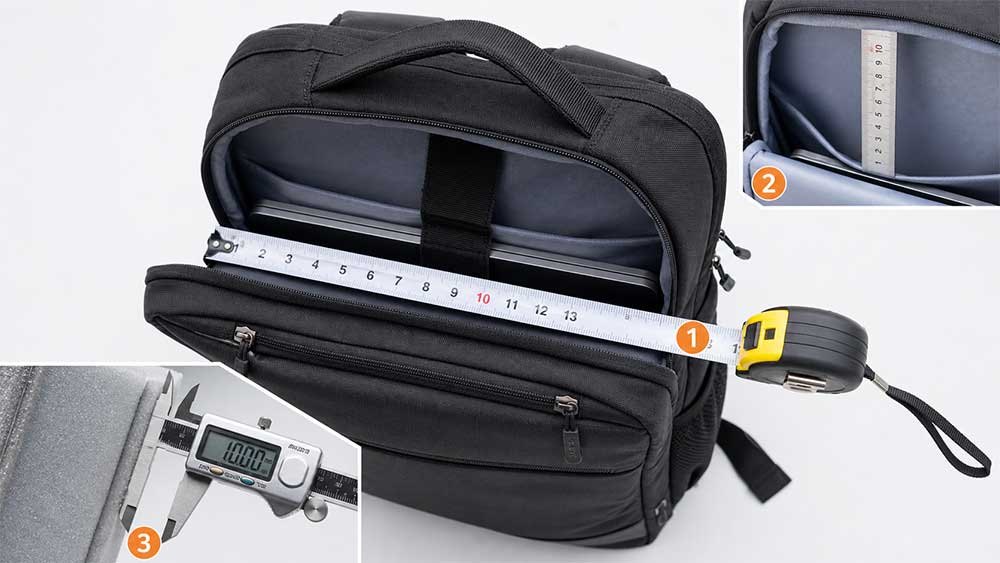
Test the compartment with the actual device or a dimensionally accurate substitute. A laptop’s advertised screen size does not describe its complete external dimensions, so two devices sold as the same screen size may fit differently.
Record the test device’s:
Width
Height
Thickness
Shape of the corners
Presence of a protective case
Check whether the laptop can be inserted and removed without forcing the zipper or lining. Observe movement inside the compartment, padding coverage, closure clearance, and contact with zipper sliders or other hard components.
If the target device has not yet been defined, use the intended device range and record the exact test dimensions. Our guide to measuring a laptop for a bag explains why external device measurements matter more than screen size alone.
Add the Other Intended Contents
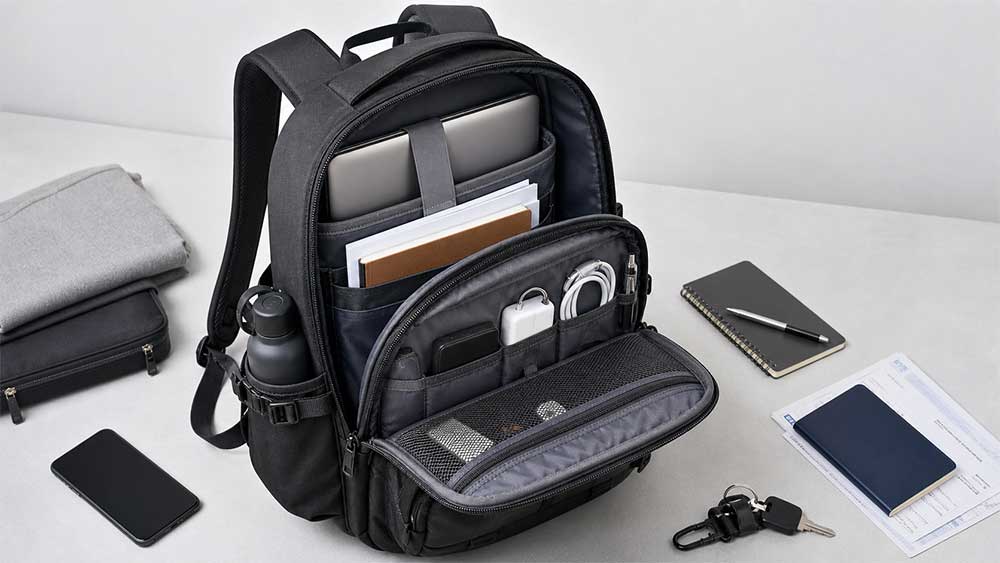
Pack the bag with the items a typical user is expected to carry, such as:
Charger and cables
Tablet
Documents or folders
Notebook and pens
Mouse and small electronics
Water bottle
Headphones
Travel accessories
Close the bag and observe its shape. A front panel that looks clean when empty may bulge once the organizer is full. A laptop compartment that fits correctly on its own may place excessive pressure on the device when the main compartment is packed.
Test the Bag at a Realistic Load
Carry the bag with a load that reflects its intended use. Check whether:
The shoulder straps remain in their adjusted position
Webbing slips through the adjusters
The load feels balanced
A removable shoulder pad stays in place
The carry handles remain comfortable
The bag leans excessively forward or backward
Hardware presses against the body
The luggage pass-through fits common trolley handles
This is not automatically a certified laboratory test. It is a practical product-use review designed to expose issues that may not be visible during a tabletop inspection.
The purpose is not to predict years of service from one sample. It is to find immediate functional problems, such as a lining catching in the zipper, an opening that is too narrow, a puller that is difficult to grip, or a pocket that becomes inaccessible when the bag is full.
Classify Each Comment Correctly
Not every requested change means that the factory made a mistake. Proper classification helps both sides determine responsibility, understand possible cost changes, and decide whether another sample is required.
Comment type
Example
Recommended handling
Specification mismatch
Approved bag width is 400 mm, but the sample measures 382 mm outside tolerance
Correct according to the approved specification
Workmanship issue
Skipped stitches, crooked logo, frayed webbing, or sticking zipper
Correct the workmanship and review the production method
Functional issue
Laptop moves excessively or the strap slips under load
Record the test conditions and define the required result
Design change
Buyer decides to add a hidden pocket after reviewing the sample
Evaluate as a new requirement, including cost and timing
Material or color mismatch
Actual fabric differs from the approved swatch
Verify the approved standard and whether a substitute was used
Subjective preference
Product does not look sufficiently premium
Translate the reaction into specific material, shape, color, hardware, or construction changes
This distinction matters. Failure to follow an approved specification is different from a buyer making a new design decision after seeing the sample.
Calling every new request a “defect” can create unnecessary disputes and make the revision history inaccurate.
Turn Subjective Reactions Into Actionable Comments
A useful sample comment should answer six questions:
Where exactly is the issue?
What is the current condition?
How was it evaluated?
What result is required in the next version?
What measurement or reference will be used?
How important is the change?
Compare these two comments.
Vague comment:
The laptop compartment is too loose. Please make it smaller.
Actionable comment:
Comment C04 — Laptop compartment: Tested with a laptop measuring 359 × 236 × 19 mm. The device moves approximately 30 mm from side to side while the loaded bag is carried. Reduce the usable internal compartment width by 15 mm while retaining enough clearance for smooth insertion and removal. Confirm the revised finished measurement before producing Sample 2.
The second version tells the pattern maker what was tested, what happened, and what result the buyer expects.
However, buyers do not always need to prescribe the construction solution. If a back panel collapses under load, describe the load, test method, and observed problem first. The factory can then assess whether the appropriate solution is different foam, an additional support sheet, revised stitching, or another structural change.
The buyer should define the required outcome. The factory should explain how that outcome can be produced consistently.
Use One Standard Feedback Format
Give every comment a permanent reference number and keep that number through all sample versions.
A practical comment sheet can include:
Field
Information to record
Comment ID
Permanent number such as C01, C02, or C03
Location
Front pocket, laptop compartment, left strap, or bottom panel
Comment type
Specification, workmanship, function, design, material, or preference
Current condition
What the sample does now or its measured dimension
Required revision
Result required in the next version
Target or reference
Measurement, Pantone code, swatch, drawing, or photograph
Priority
Must change, should change, or optional
Image reference
Corresponding marked photograph or filename
Factory response
Feasibility, proposed solution, cost, and timing
Final status
Open, revised, accepted, closed, or deferred
If a comment is cancelled, do not renumber everything below it. Permanent IDs make it easier to track an issue through the first prototype, revised sample, and pre-production sample.
Replace Relative Language With Measurements
Words such as “slightly,” “larger,” “stronger,” and “more padding” leave too much room for interpretation.
Vague feedback
More useful feedback
Make the strap longer
Increase the maximum usable strap length from 900 mm to 1,150 mm
Move the logo down slightly
Move the logo center 15 mm downward while keeping it horizontally centered
Make the pocket larger
Increase usable pocket width by 20 mm and depth by 10 mm
Add more padding
Increase the specified foam thickness from 5 mm to 8 mm
Make the opening wider
Increase the effective zipper opening from 310 mm to 350 mm
Use a better zipper
Specify the zipper type, size, finish, puller, and required performance
These figures illustrate how to write measurable comments; they are not universal specifications for laptop bags. Appropriate dimensions depend on the bag structure, target device, material, intended use, and target cost.
The measurement method should also be stated. Measuring along a curved seam may produce a different result from measuring the same panel flat in a straight line.
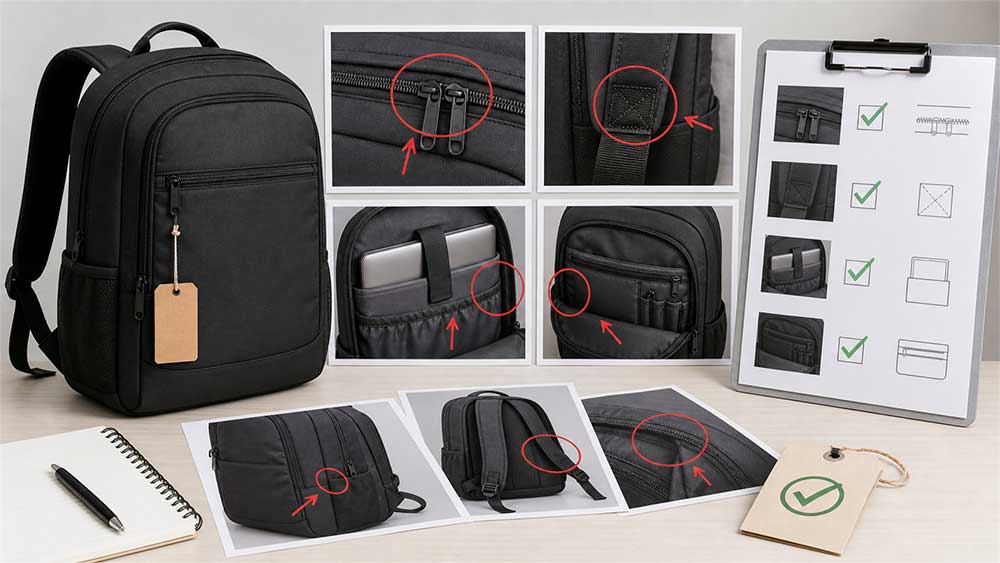
Mark Photographs and Drawings Clearly
A marked photograph can explain the location of a problem more quickly than several paragraphs, but it should still be connected to a written requirement.
When preparing marked images:
Start with a full view to establish the bag’s orientation
Add close-ups of the affected area
Use arrows, circles, and dimension lines
Place the comment ID directly on the image
Use consistent front, back, left, and right directions
Include a ruler or scale reference for dimensional issues
Match image numbers to the feedback sheet
Avoid sending a group of unexplained images across several messaging apps
The image shows where the change applies. The written comment explains what must change and how the revision will be judged.
Handle Color and Material Comments Carefully
A photograph displayed on a screen is not a reliable fabric color standard. Lighting, camera settings, monitor calibration, texture, coating, and dye lot can all affect the appearance.
Instead of writing “make the blue darker,” identify the reference that controls the decision:
Approved physical swatch
Pantone number and color system
Buyer-supplied color standard
Approved trim or previous sample
Suitable physical reference product
Pantone describes its color systems as a standardized language for communicating color through design and production. Buyers still need to specify the relevant system because a similar-looking screen color does not automatically become a production standard. Pantone provides an official explanation of its color systems.
Material comments should also describe the property that needs to change rather than relying on words such as “premium,” “soft,” or “strong.” When comparing materials used for business bags and laptop bags, relevant characteristics may include:
Surface texture
Hand feel
Fabric weight
Stiffness
Coating
Gloss level
Abrasion requirement
Water-resistance requirement
Color consistency
Crease recovery
Foam density or compression behavior
If the sample uses temporary substitute materials because the final components were unavailable, record every substitution. A sample should not become the bulk-production standard unless the team knows which temporary components will be replaced.
Control Priorities, Internal Decisions, and Factory Responses
Not every comment carries the same level of risk. A simple three-level system is usually enough.
Must Change
Use this level for issues affecting:
Laptop fit and protection
Approved specifications
Safety or core function
Required brand identity
Project-specific compliance requirements
Structures likely to cause premature failure
Critical packaging or labeling requirements
Should Change
These revisions clearly improve usability, comfort, or appearance, but the exact solution may still be discussed.
Optional Improvement
These are preferences or possible enhancements. The buyer can decide whether to adopt them after the factory explains the effect on cost, timing, weight, MOQ, and construction.
Before sending comments to the factory, appoint one internal owner to collect input from design, purchasing, sales, management, and test users. That person should remove duplicates, resolve conflicting requests, confirm priorities, check the target cost, and issue one controlled revision file.
Otherwise, one team member may request more padding while another wants a slimmer profile. Sales may ask for more pockets while purchasing is trying to protect the target price.
Email and messaging apps can help clarify a question, but confirmed decisions should return to the master feedback sheet or updated tech pack.
The factory should then respond to every comment ID in writing, confirming:
Whether the revision is accepted
Whether clarification is required
The proposed production solution
Any technical limitation
Whether the pattern or tech pack will change
The effect on price, MOQ, tooling, or lead time
Whether approval will require photographs, video, a component sample, or a new physical bag
At Vancharli Outdoor, we generally recommend consolidating sample comments into one numbered file supported by marked photographs, dimensions, and priorities. This gives the buyer, design team, pattern maker, sample room, and production team one revision standard.
A completed response column explaining how each open item will be resolved is more useful than a general reply saying, “We will make the changes.”
Check the Wider Effect of Every Revision
A seemingly small change may affect more than appearance.
Increasing laptop-compartment padding, for example, can change:
Internal capacity
Overall thickness
Seam bulk
Sewing difficulty
Material consumption
Product weight
Carton quantity
Unit price
Moving a zipper may require changes to both the shell and lining patterns. New hardware may have a higher MOQ or longer purchasing time. A molded component may require tooling. Changes to exterior dimensions may affect material yield, packaging, and freight efficiency.
Before confirming a revision, ask the supplier whether it:
Is technically feasible
Requires a pattern change
Requires new material or hardware sourcing
Creates tooling or setup costs
Requires another physical sample
Changes sample or production lead time
Affects unit price or MOQ
Creates changes elsewhere in the bag
Clear feedback does not mean the buyer must dictate every manufacturing method. It means both parties understand the required result and the commercial consequences of achieving it.
Choose the Right Approval Method and Close Every Comment
Not every small correction requires a complete new sample, but photographs are not suitable for confirming every type of change.
Photographs or video may be sufficient for:
Removing loose threads
Correcting a simple label position
Revising a minor packaging detail
Confirming an obvious visible workmanship correction
A new physical sample is usually more appropriate when evaluating:
Laptop fit
Overall dimensions or shape
Padding
Carrying comfort
Strap length and adjustment
Material hand feel
Accurate color
Structural reinforcement
Zipper opening
Load distribution
New patterns or compartments
Use an approval method that matches the risk. If the result must be touched, carried, loaded, measured, or compared with a physical color reference, do not approve it from a photograph alone.
Before approving the sample, review every row in the feedback sheet. Useful status labels include:
Open: No final solution has been agreed
Revised: The factory has completed the revision
Accepted: The buyer has checked and accepted the result
Closed: No further action is required
Deferred: The item has intentionally been postponed and responsibility recorded
A sample should not normally be approved while must-change issues remain unresolved.
The final review should confirm that:
The correct sample version is being approved
Required measurements are within agreed tolerances
Laptop fit and realistic loaded use have been tested
Materials, colors, hardware, and logo are confirmed
All temporary substitutions are documented
Packaging and labeling requirements are settled
Unimplemented decisions appear in the final specification
The supplier will retain a matching approved reference
Bulk inspection will use the approved sample and specification
After production starts, inspection should determine whether the goods match the approved standard—not reopen design questions that should have been settled during sampling. A separate laptop bag quality inspection checklist can then be used to review incoming materials, production workmanship, finished products, and shipment conditions.
Laptop Bag Sample Feedback Template
The following format can be copied into a spreadsheet, document, or tech pack:
Project name:
Product style:
Supplier:
Sample version:
Sample date:
Date received:
Review date:
Reviewed by:
Target laptop / intended load:
Reference documents:

Comment ID:
Exact location:
Comment type:
Current condition:
Test method or load condition:
Required revision:
Target measurement or reference:
Priority:
Photo / drawing reference:
Factory response:
Cost impact:
Lead-time impact:
Next approval method:
Final status:
For multiple issues, use one row or section per comment. Number every image and retain the same comment IDs in later versions.
Example of a Complete Sample Comment
The following example demonstrates a feedback format. The load and test duration are illustrative, not universal performance standards.
Comment ID: C07
Exact location: Right shoulder-strap adjuster
Comment type: Functional issue
Current condition: The webbing gradually slips through the adjuster
Test method or load condition: Bag loaded with 7 kg and carried for 20 minutes
Required revision: The adjusted strap position must remain stable under the same test conditions
Target measurement or reference: Retain the approved webbing width and maximum strap length
Priority: Must change
Photo / drawing reference: C07-A and C07-B
Factory response: Pending
Cost impact: Pending
Lead-time impact: Pending
Next approval method: Repeat the loaded carry test on Sample 2
Final status: Open
The comment does not assume that the webbing, adjuster, or stitching must be replaced. It defines the problem and the acceptance condition, allowing the development team to propose a production-ready solution.
Common Sample Feedback Mistakes
Reviewing Only the Appearance
A laptop bag is a functional product. Pack it, carry it, and test how users access its compartments and closures.
Asking the Factory to “Improve the Quality”
Quality is not a single setting that can be turned up. Identify whether the problem relates to stitching, alignment, material, construction, padding, hardware, shape, finish, or function.
Scattering Comments Across Several Channels
Separate instructions are easy to miss and may conflict. Consolidate confirmed changes into one controlled revision file.
Changing the Design Without Updating the Specification
If pockets, dimensions, materials, or components change, update the drawing, measurement chart, or bill of materials. Otherwise, old and new instructions may continue to circulate together.
Approving Physical Properties From Photographs
Photographs cannot reliably confirm material hand feel, carrying comfort, foam performance, accurate color, or laptop fit.
Ignoring Cost and Production Effects
A revision may improve the sample but move the product beyond its target price, weight, schedule, or retail position. Evaluate the full effect before approval.
Final Advice
The purpose of sample feedback is not to produce the longest possible problem list. It is to create one revision standard that the buyer, designer, pattern maker, sample room, production team, and quality team can all understand.
Test the laptop bag under realistic conditions, compare it with the approved specification, and separate manufacturing errors from new design decisions. Give each issue a permanent number and support subjective reactions with measurements, marked images, or physical references.
Finally, ask the factory to confirm feasibility, cost, timing, and the appropriate approval method. When feedback is specific, consolidated, and properly documented, each sample round can close a defined group of issues and move the product closer to a reliable production standard.
FAQ
How detailed should laptop bag sample comments be?
A comment should be detailed enough for the factory to locate the issue, understand how it was tested, complete the intended revision, and know how the result will be approved. A measurable issue supported by a marked photograph does not need an unnecessarily long explanation.
Should buyers tell the factory exactly how to fix every issue?
Not always. Buyers should define the required function, appearance, measurement, or acceptance result. For structural or production-related issues, the factory should recommend a solution that can be manufactured consistently.
Are measurements always necessary?
Measurements are strongly recommended for size, placement, clearance, and fit issues. Material feel, comfort, and appearance may require an approved swatch, physical sample, load test, or other reference instead of a dimension alone.
Does every revision require another physical sample?
No. Minor visible corrections may be confirmed through photographs or video. Changes involving fit, dimensions, comfort, padding, color, material feel, structure, or load performance usually deserve another physical review.
When is a laptop bag sample ready for production approval?
It is ready when its key dimensions and functions have been verified, materials and branding are confirmed, all must-change issues are closed, substitutions are documented, and the approved version can serve as a clear bulk-production reference.
Should both the buyer and factory retain an approved sample?
Ideally, yes. Each party should retain a matching approved sample supported by the final specification, material records, and confirmed components. This provides a shared reference for production and quality inspection.







Comments are closed