Can You Wash a Laptop Backpack? How to Clean It Safely
Most laptop backpacks can be cleaned, but many should not be fully submerged or machine-washed.
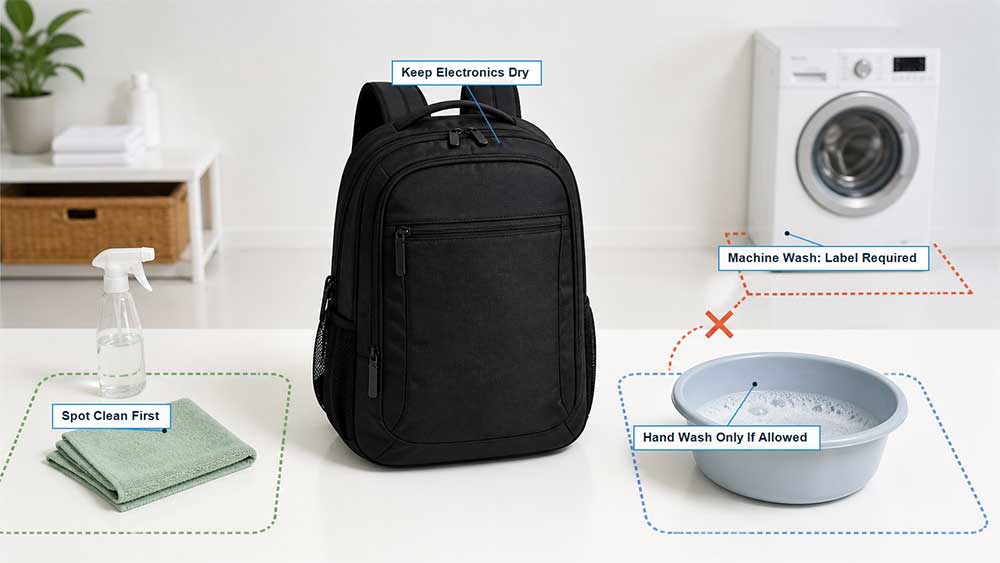
The safest method depends on the care label, outer fabric, padding, internal reinforcement, coatings, trims, logos, and electronic components. If the instructions are missing or unclear, start with spot cleaning. Hand washing may be suitable for some fabric backpacks, while machine washing should only be considered when the manufacturer specifically allows it.
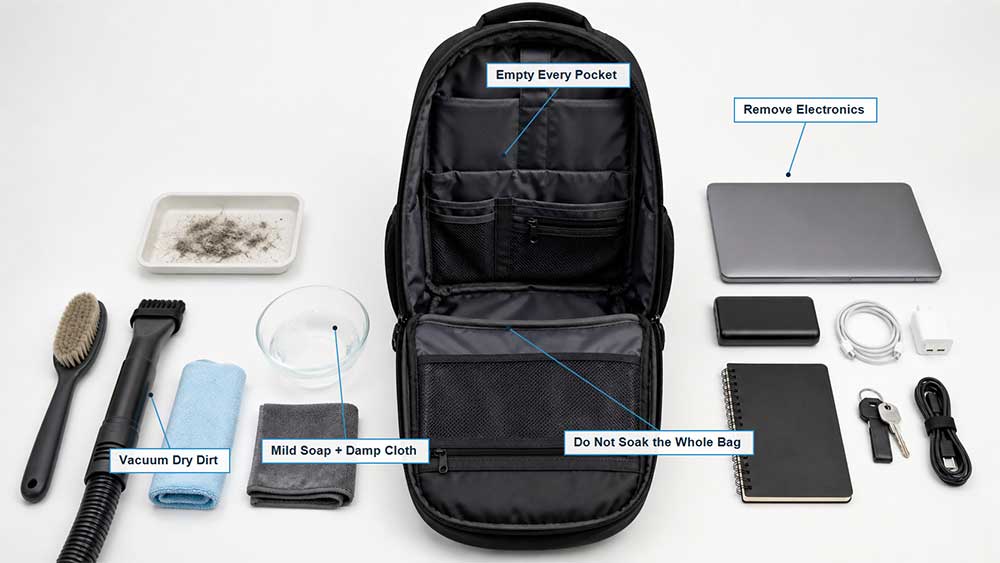
Before cleaning, remove the laptop, tablet, power bank, cables, documents, and everything else inside. Do not put your laptop back until the deepest seams, padding, and laptop compartment are completely dry.
When general online advice conflicts with the care label, follow the instructions for your exact backpack.
Why Does a Laptop Backpack Need Extra Care?
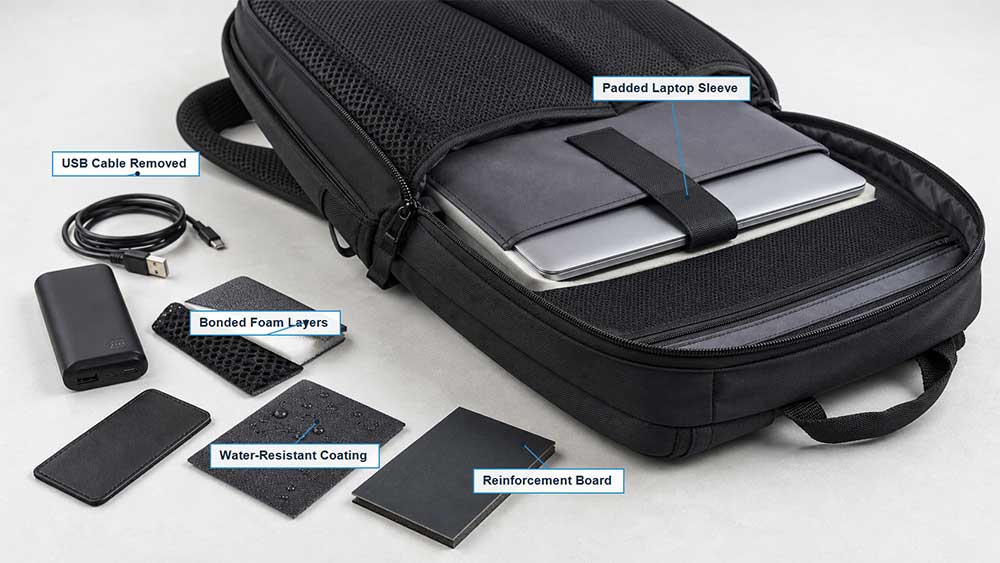
A simple fabric bag may consist mainly of outer fabric, lining, webbing, zippers, and thread. A laptop backpack can contain a much more complex mix of components:
Padded laptop sleeves
Bonded or laminated foam
Molded back panels
Water-sensitive reinforcement boards
PU or water-repellent coatings
Mesh ventilation panels
Metal and molded plastic hardware
Glued composite layers
Fixed USB extension cables
Leather, suede, or synthetic leather trims
Printed, embroidered, or heat-transfer logos
Water does not affect all these materials in the same way. Machine agitation, prolonged soaking, strong cleaning products, and high heat may crease foam, weaken bonded layers, alter coatings, deform reinforcement, or trap moisture inside the laptop compartment.
A small amount of mild soap or care-label-approved cleaner
Clean towels
A basin or sink if hand washing is allowed
A large mesh laundry bag only if machine washing is allowed
Unless the manufacturer permits them, avoid bleach, fabric softener, concentrated disinfectant, aggressive stain removers, and strong solvents.
Test any cleaner on an inconspicuous area, such as an inside seam. Let the test area dry before checking for color transfer, fading, stiffness, coating changes, adhesive bleed-through, or delamination.
How to Clean a Laptop Backpack Safely
1. Empty Every Compartment
Remove the laptop, tablet, power bank, charging cables, papers, pens, keys, detachable pouches, and anything hidden in smaller pockets.
Open every compartment, turn the bag upside down, and shake out loose debris. Use a vacuum on low suction to remove crumbs, dust, hair, and sand from seams and corners.
Do not begin wet cleaning until you have confirmed that every electronic device has been removed.
2. Remove Detachable Components
Depending on the design, take out any removable:
USB cables
Power banks
Back panels
Base boards
Frames or stays
Waist belts
Accessory pouches
Rain covers
An external USB port does not automatically make a backpack waterproof. In many designs, the port simply connects to an internal extension cable and a user-supplied power bank. This guide explains how a backpack USB charging port works.
Remove the power bank and detachable cable before cleaning. If a cable or port is permanently fixed inside the bag, avoid immersion unless the manufacturer clearly confirms that it is safe.
3. Inspect the Backpack Before Washing
Check the seams, zipper tape, shoulder-strap attachments, coating, padding, logos, prints, and decorative materials.
Full washing can make existing damage worse. A loose seam may open further, aged synthetic leather may peel, and a deteriorating coating may become sticky or separate after contact with water.
Leather and suede panels also require their own cleaning methods. Do not wash the entire backpack as if it were plain nylon or polyester simply because those materials make up most of the exterior.
4. Remove Dry Dirt First
Let mud dry before brushing it away. A soft brush can also loosen dirt around zipper teeth, piping, mesh panels, and textured fabric.
Removing as much dry debris as possible prevents mud from spreading when water is introduced.
5. Spot-Clean the Areas That Need It
Mix a small amount of mild soap with cool or lukewarm water. Dampen a soft cloth or sponge without soaking it.
Focus on high-contact areas such as:
Shoulder straps
Carry handles
Back panel
Bag bottom
Zipper pulls
Water-bottle pocket edges
Interior base
Laptop compartment opening
Blot spilled liquids instead of rubbing them outward. For an unknown stain, begin with the mildest method. Ink, grease, cosmetics, and adhesive residue may require a material-compatible cleaner, but a strong solvent can remove color or damage coatings and synthetic leather.
After cleaning, wipe the area with a second cloth dampened with clean water to remove soap residue.
If only the shoulder straps smell after a week of commuting, there is usually no reason to soak the entire backpack. Clean the high-contact areas first and see whether that solves the problem.
6. Hand-Wash Only When the Care Instructions Allow It
If hand washing is permitted, fill a basin with cool or lukewarm water and add a small amount of mild cleaner.
Clean gently with a soft cloth or brush. Avoid prolonged soaking, aggressive scrubbing, twisting, folding, or squeezing the padded laptop compartment.
Some backpacks allow the lining to be pulled outward and cleaned separately, reducing the amount of water that reaches the outer padding. Whether this is possible depends on the construction.
Rinse carefully until no cleaner remains. Soap trapped in mesh, foam, piping, or seams may leave marks, attract dirt, create stiffness, or contribute to lingering odors.
7. Press Out Moisture Without Wringing
Let excess water drain naturally. Then press clean towels against the outer fabric, lining, straps, back panel, and laptop compartment.
Do not twist or wring a padded backpack. This can crease foam, distort reinforcement, strain seams, and change the overall shape.
While the backpack is still damp, return it to its normal form and make sure the laptop sleeve, back panel, and base are not folded.
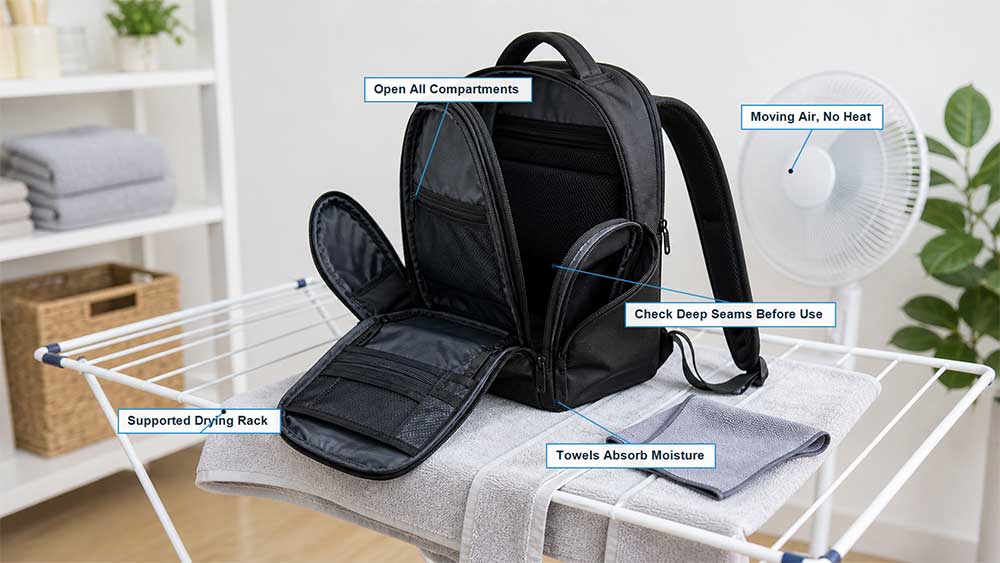
8. Air-Dry the Backpack Completely
Open every compartment and place the backpack in a shaded, well-ventilated area. Depending on its construction, hang it from a sturdy, well-supported point or lay it on a clean drying rack.
Avoid:
Tumble dryers
Radiators
Space heaters
Hot hair dryers
Direct high heat
Prolonged exposure to strong sunlight
Heat can shrink fabric, deform foam, weaken bonded layers, damage coatings, and accelerate the deterioration of synthetic leather.
A heavily padded backpack may take 24–48 hours or longer to dry, depending on padding thickness, humidity, and airflow. This is only a rough guide. The condition of the deepest seams and foam—not the clock—should determine when the bag is ready to use.
Check the base seams, back panel, straps, binding, and deepest part of the laptop compartment. If any area still feels cool or damp, continue drying.
Can You Put a Laptop Backpack in the Washing Machine?
Only if the care label or manufacturer specifically says that the backpack is machine-washable.
Do not make the decision based only on the outer fabric. A polyester shell may tolerate water, while the internal foam, reinforcement, coating, logo, leather trim, or USB components may not tolerate machine agitation.
If machine washing is expressly allowed:
Empty every pocket.
Remove the power bank, cables, frame, and detachable components.
Fasten or secure loose straps.
Place the backpack in a large mesh laundry bag or pillowcase.
Use the temperature and cycle specified on the care label.
Use a small amount of mild, bleach-free cleaner.
Avoid fabric softener and high-speed spinning unless permitted.
Remove the backpack promptly and restore its shape.
Air-dry it completely.
JanSport advises against machine washing backpacks because agitation can affect their shape and finish, catch the straps, and damage leather or suede components. This is a useful reminder that machine washing should never be the automatic choice.
How Should Different Materials and Features Be Cleaned?
Material or feature
General starting method
Main risk
Polyester
Spot clean or hand-wash if permitted
Coatings and bonded foam may still be sensitive
Nylon
Spot clean or wash gently when allowed
Abrasion, heat, and strong cleaner may affect the finish
Canvas or cotton
Use cool water and minimal agitation
Shrinkage, fading, and loss of shape
PU-coated fabric
Wipe gently with a damp cloth
Soaking and abrasion may damage the coating
Leather or suede
Use a cleaner designed for the material
Watermarks, stiffness, fading, and deformation
Synthetic leather trim
Wipe gently and dry promptly
Aged material may crack or peel
Mesh panels
Clean with a soft sponge
Snagging, stretching, and distortion
Bonded foam or molded panels
Prefer spot cleaning
Delamination, creasing, and slow internal drying
USB port or fixed cable
Remove the power source and avoid immersion
Moisture retention and corrosion
Printed or heat-transfer logo
Test first and avoid scrubbing
Cracking, lifting, or color loss
A water-resistant laptop backpack is not necessarily washable. Water resistance describes how the bag performs against light rain or splashes during use. It does not guarantee that the entire product can tolerate detergent, soaking, machine agitation, or high-speed spinning. The distinction is explained further in this guide to water-resistant laptop bags.
How Do You Remove Common Dirt, Stains, and Odors?
Dust, Crumbs, and Pet Hair
Shake out the backpack, vacuum the interior, and use a lint roller or soft brush. Full washing is usually unnecessary.
Dried Mud
Allow the mud to dry and brush away as much as possible. Treat any remaining mark with a damp cloth and a small amount of mild soap.
Sweat and Body Oils
Wipe the straps, handles, and back panel with diluted mild cleaner. Follow with a clean damp cloth and allow all padded areas to dry completely.
Food and Drink Spills
Blot the liquid as soon as possible. Avoid pushing it deeper into the foam or spreading it across the lining. Clean the affected area first rather than immersing the entire backpack because of one spill.
Grease, Ink, or Cosmetics
Identify the material before selecting a cleaner, and test it on a hidden area. An aggressive stain remover may cause more visible damage than the original stain.
Persistent Odors
Empty and vacuum the backpack, clean the lining and high-contact areas, then leave every compartment open in moving air.
If an odor returns after cleaning, moisture or residue may still be trapped in the foam, seams, or base. If visible mold or a strong musty odor continues to return after the bag is fully dry, consider professional cleaning or replacement. Do not store a laptop in a damp or mold-affected compartment.
How Often Should You Clean a Laptop Backpack?
There is no fixed schedule for every backpack. Cleaning frequency depends on use, weather, storage conditions, sweat, spills, and whether the bag carries gym clothes or other damp items.
A practical routine is to:
Remove crumbs and loose debris regularly.
Wipe handles and straps when they begin to look dirty.
Treat spills as soon as possible.
Clean more thoroughly when visible dirt or odor develops.
Open the compartments and dry the bag after rain exposure.
Frequent full washing is not necessarily better. Regular light maintenance usually reduces the need for immersion or machine washing.
What Should You Check Before Putting the Laptop Back?
Before using the backpack again, confirm that:
The laptop compartment is completely dry.
The padding has returned to its normal shape.
No cleaner residue remains.
The lining is not folded into the zipper path.
USB connectors are dry and free of residue.
All zippers move normally.
Strap and handle seams remain secure.
The coating and synthetic leather are not peeling.
Only return the laptop when the backpack is completely dry and its protective structure remains intact. A laptop sleeve can provide additional protection, but it should not be placed inside a damp backpack. More everyday precautions are covered in this guide to protecting a laptop in a backpack.
Safe Cleaning Starts With the Product’s Construction
For consumers, the care label is the most reliable starting point. For brands developing a laptop backpack, cleanability should be considered when selecting fabrics, coatings, foam, reinforcement, trims, logos, and electronic features.
The care method should be confirmed before production so the final label reflects the complete material combination—not just the outer fabric. Vancharli Outdoor applies this material-and-construction review when developing custom laptop backpacks for business, retail, and promotional programs.
Frequently Asked Questions
Is hand washing always safe for a padded laptop backpack?
No. Some padded backpacks contain bonded foam, water-sensitive reinforcement boards, molded panels, fixed electronic components, leather trims, or coatings that should not be submerged. Check the care instructions first.
What should I do if the care label is missing?
Start by vacuuming and spot cleaning. Test water and cleaner on a hidden area, and contact the brand or seller before fully submerging or machine-washing the backpack.
Can I wash a backpack with a USB charging port?
Remove the power bank and detachable cable first. If the port or cable cannot be removed, do not immerse the backpack unless the manufacturer expressly confirms that it is safe. Clean the surrounding fabric with a damp cloth instead.
Can I use a dryer after washing the backpack?
Usually not. Heat and tumbling may deform foam, weaken coatings and bonded layers, damage trims, or tangle the straps. Air drying is safer unless the care label says otherwise.
Why does my backpack still smell after cleaning?
Moisture, soap, or spilled liquid may remain inside the foam, seams, base, or lining. Open every compartment and continue drying in moving air. Reclean the affected area if residue remains.
Can I use bleach to disinfect a laptop backpack?
Not unless the manufacturer specifically permits it. Bleach may discolor fabric and damage coatings, logos, webbing, foam, and synthetic trims.
Should I spot-treat stains before washing the whole bag?
Usually, yes—if the care instructions allow it. Start with the mildest compatible method and test it on a hidden area. Do not use an aggressive stain remover simply to eliminate every visible mark.
Can a water-resistant laptop backpack be submerged?
Not necessarily. Resistance to rain or splashes does not mean the backpack can withstand prolonged immersion, detergent, or machine agitation. Follow the care instructions for the exact product.









Comments are closed