



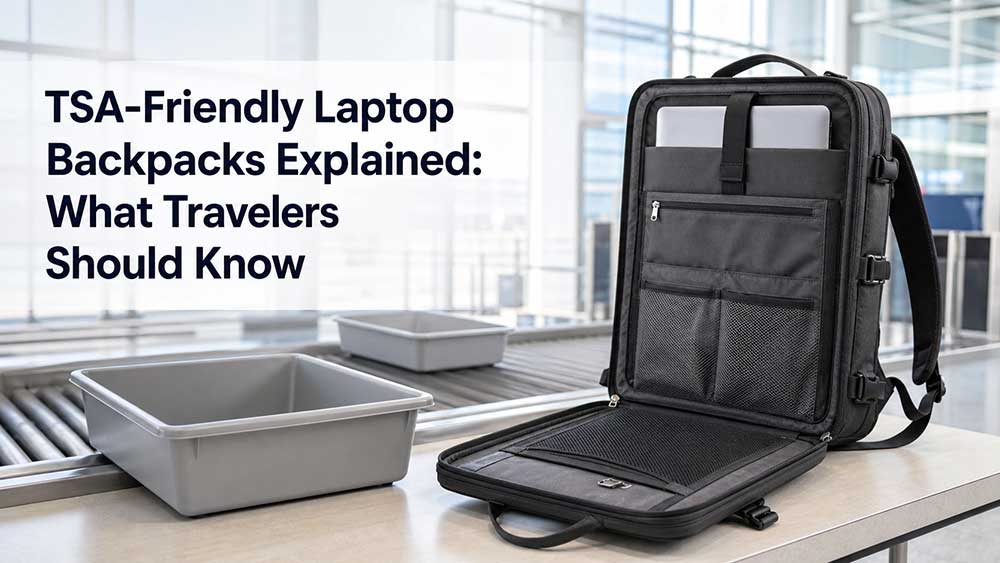
TSA-Friendly Laptop Backpacks Explained: What Travelers Should Know
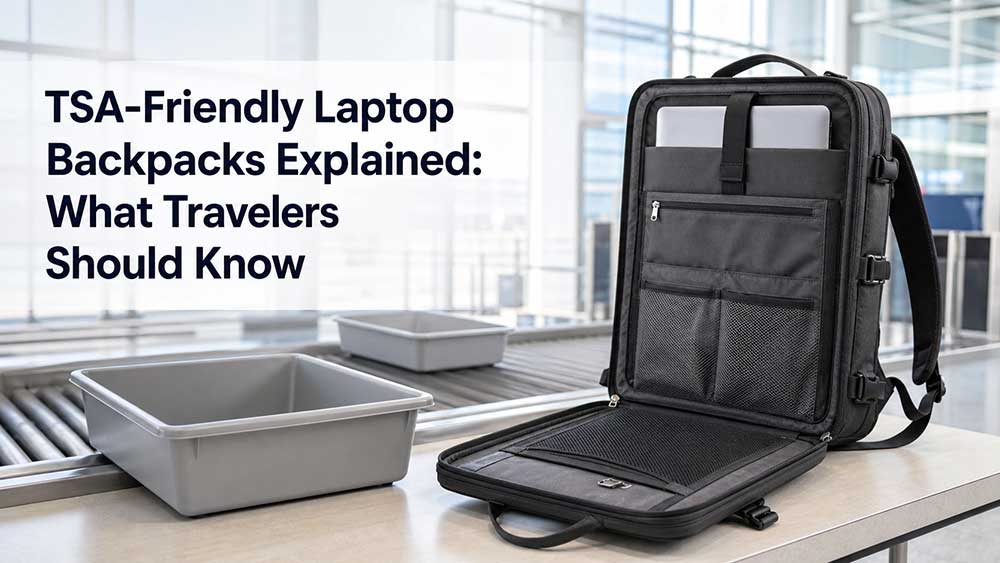
A TSA-friendly laptop backpack is designed to make airport security screening easier by using a checkpoint-friendly laptop compartment, usually a dedicated section that can open flat and keep the laptop separate from other items during screening. It does not mean the backpack is officially approved by TSA, and it does not guarantee that you will never need to remove your laptop.
The real value of a TSA-friendly laptop backpack is reducing airport handling: faster access to the laptop compartment, less digging through the main storage area, and a cleaner layout when the bag is placed on the screening belt. For business travelers, students, and frequent flyers, this can reduce stress at airport security and help protect the laptop from unnecessary handling.
However, buyers should be careful with marketing language. “TSA-friendly,” “checkpoint-friendly,” and “TSA-approved” are often used loosely in product descriptions. The safest way to understand the term is simple: a TSA-friendly laptop backpack is designed to help with airport screening, but TSA officers can still ask you to remove your laptop.
The Direct Answer: TSA-Friendly Means Checkpoint-Friendly, Not Guaranteed Approval
A TSA-friendly laptop backpack usually means the backpack has a checkpoint-friendly laptop compartment. This compartment can often unzip and lay flat, keeping the laptop in a dedicated section with fewer layers blocking the view.
But TSA-friendly does not mean every traveler can always leave the laptop inside the bag. TSA’s official guidance for laptops says travelers should remove laptops from their bags and place them in a separate bin for X-ray screening, while TSA PreCheck® travelers do not need to remove laptops during standard screening: TSA laptop screening guidance.
Some checkpoints with CT scanners may allow laptops and liquids to stay inside the bag, but travelers should still follow the instructions given at that specific checkpoint. TSA explains that the goal of CT technology is to allow laptops and 3-1-1 liquids to remain inside the bag during checkpoint screening: TSA computed tomography screening.
This means the final checkpoint decision still depends on TSA screening rules, airport equipment, the traveler’s screening lane, how the bag is packed, and the officer’s instructions.
Tip: Treat “TSA-friendly” as a convenience feature, not as a guarantee. If a TSA officer asks you to remove the laptop, follow the instruction.
What Is a TSA-Friendly Laptop Backpack?
A TSA-friendly laptop backpack is a laptop backpack designed to make airport security easier. The most common feature is a lay-flat laptop compartment that opens away from the main bag body.
Common design features include:
- Dedicated laptop compartment
- Lay-flat opening
- Clamshell or butterfly-style structure
- Laptop-only section
- Quick-access zipper
- Minimal obstruction around the laptop
- Travel-focused organization
- Luggage strap for rolling luggage
- Padded laptop protection
The idea is simple: when the laptop section opens flat, the X-ray view may be clearer than a regular backpack where the laptop is buried behind books, chargers, clothing, cables, and other items.
This design is especially useful for business travel. A traveler can open the laptop panel quickly, keep the laptop protected in its sleeve, and avoid digging through the main compartment at the checkpoint.
TSA-Friendly vs TSA-Approved: Are They the Same?
No, they are not the same.
“TSA-friendly” usually describes a backpack design that may make airport screening easier. “Checkpoint-friendly” means the same thing in many product descriptions. But “TSA-approved laptop backpack” can be misleading if it suggests that TSA has officially approved the backpack or that the laptop never needs to be removed.
A better way to describe these bags is:
- TSA-friendly laptop backpack
- Checkpoint-friendly laptop backpack
- Lay-flat laptop backpack
- Travel laptop backpack
- Airport-friendly laptop backpack
For brands and product pages, “TSA-friendly” is usually safer and more accurate than “TSA-approved.” The product should be described based on its structure, not as a guaranteed pass through airport security.
For travelers, the key point is this: a TSA-friendly backpack can make screening easier, but it does not override TSA rules, airport equipment, or officer instructions.
How a Checkpoint-Friendly Laptop Compartment Works
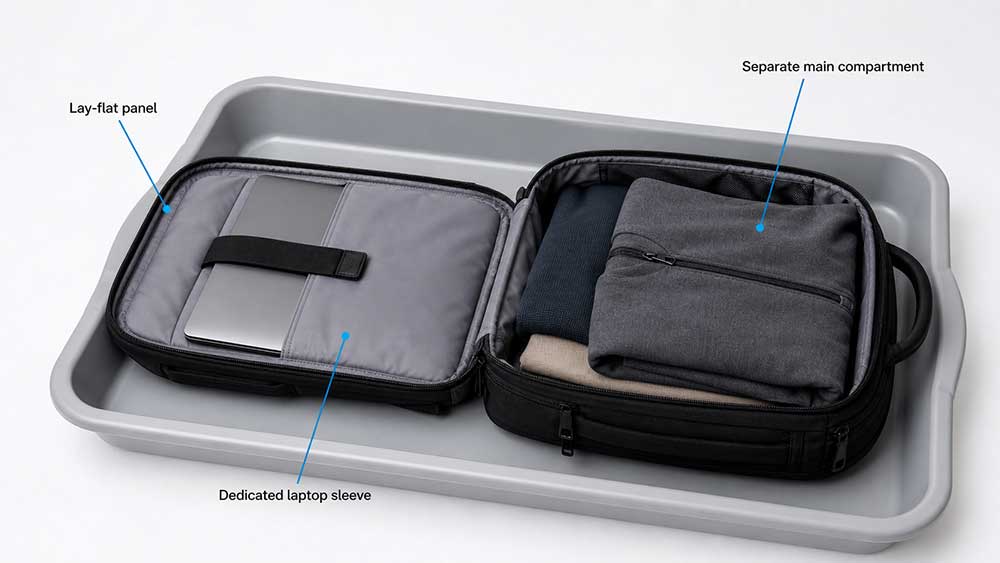
A checkpoint-friendly laptop compartment usually opens flat so the laptop can stay in a separate panel during screening. The laptop should sit alone in that section, without bulky items blocking it from above or below.
A good checkpoint-friendly laptop compartment should have:
- A dedicated laptop-only area
- A zipper path that allows the panel to open flat
- Minimal pockets directly above the laptop
- No thick accessories stacked over the laptop
- Enough padding to protect the device
- A stable fit so the laptop does not slide around
- A clean panel layout for easier inspection
The layout matters because airport screening is not only about the backpack opening flat. If the traveler packs chargers, cables, notebooks, tablets, power banks, or metal accessories over the laptop panel, the X-ray view may become less clear.
That is why a TSA-friendly design works best when the laptop section is kept simple and clean.
Tip: A lay-flat laptop compartment is only useful if the laptop section is not overpacked. Keep chargers, power banks, cables, and notebooks in a different pocket.
Key Features Buyers Should Check
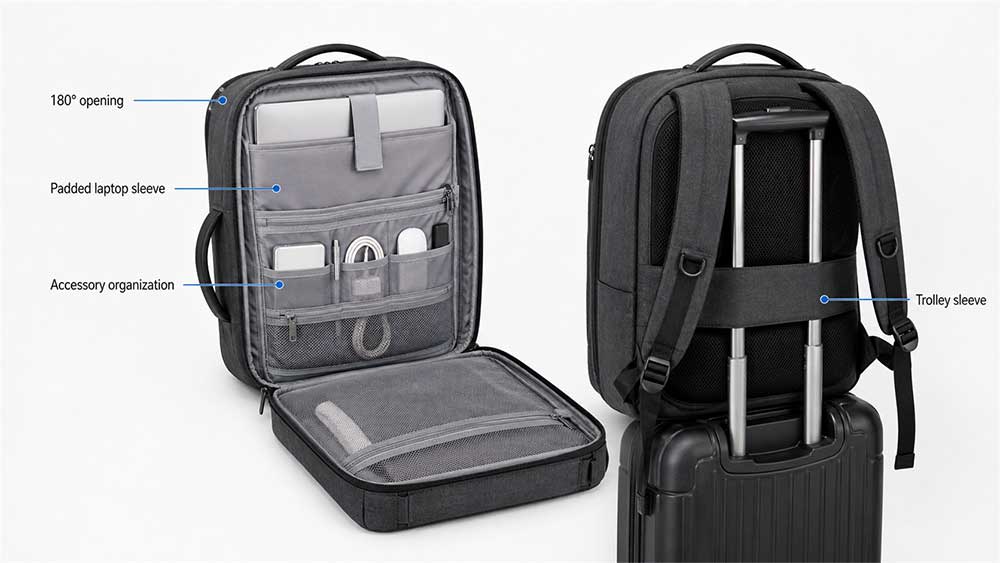
Not every travel laptop backpack with a laptop sleeve is truly TSA-friendly. Buyers should check the structure carefully.
| Feature | Why It Matters |
|---|---|
| Lay-flat laptop compartment | Helps the backpack open more clearly for screening |
| Dedicated laptop-only section | Keeps the laptop separate from other items |
| Quick-access zipper | Makes airport handling faster |
| Padded laptop sleeve | Protects the laptop during travel |
| Proper laptop fit | Reduces movement inside the compartment |
| Clean panel design | Avoids bulky layers blocking the laptop |
| Travel organization | Keeps chargers, documents, and accessories separate |
| Luggage strap | Helps business travelers attach the backpack to rolling luggage |
| Carry-on-friendly size | Helps the bag work better for flights |
| Durable handle | Useful when moving through security lines |
A TSA-friendly laptop backpack should not only open flat. It should also protect the laptop, organize travel items, and remain comfortable enough for airport walking.
If the backpack is too bulky or poorly organized, the TSA-friendly feature may not help much in real use.
TSA-Friendly Backpack vs Regular Laptop Backpack
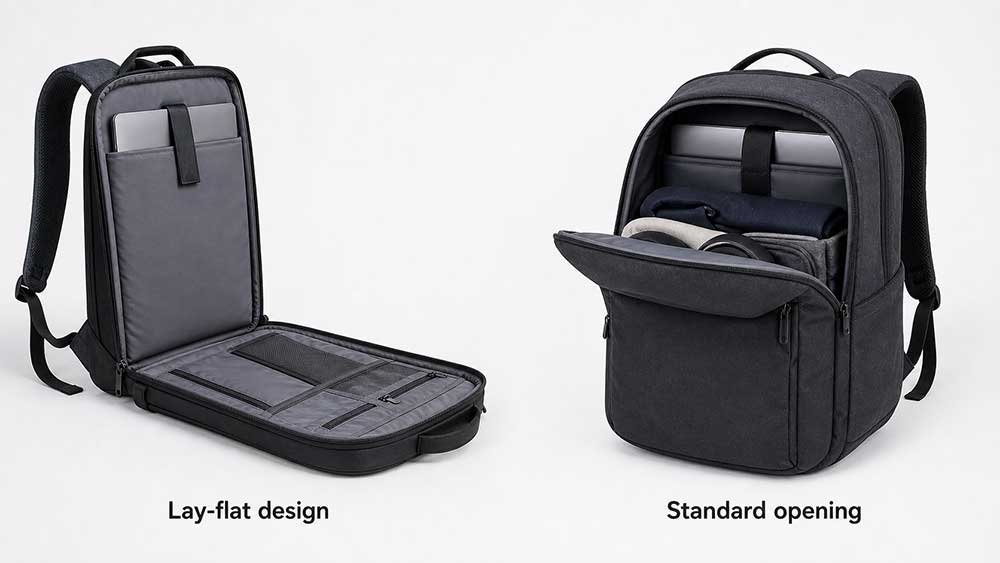
A regular laptop backpack can still work for travel, but a TSA-friendly backpack is designed to make airport screening and laptop access easier.
| Feature | TSA-Friendly Laptop Backpack | Regular Laptop Backpack |
|---|---|---|
| Laptop access | Faster, often lay-flat | Usually requires opening the main compartment |
| Airport screening | More convenient when packed correctly | Less predictable |
| Laptop compartment | Often separate and dedicated | May share space with books or accessories |
| Organization | More travel-focused | More daily-use focused |
| Best for | Business travel, frequent flyers, airport use | School, office, daily commute |
| Packing style | Laptop section should stay clean | More flexible but less checkpoint-focused |
| Main benefit | Convenience at security | General laptop carry |
A TSA-friendly backpack is most useful for travelers who fly often. A regular laptop backpack may be enough for office use, school, or daily commuting.
For buyers comparing different work bag styles, a travel-focused backpack should still match normal work needs. The bag should fit the laptop properly, carry daily accessories, and support the same features that make a good laptop bag, such as padding, comfort, organization, and durable construction.
Does TSA-Friendly Mean You Never Remove Your Laptop?
No. This is one of the biggest misunderstandings.
Even with a TSA-friendly laptop backpack, you may still need to remove your laptop if:
- TSA officers ask you to remove it
- The X-ray view is unclear
- The laptop section is overpacked
- Other electronics are stacked near the laptop
- The airport uses different screening equipment
- You are not in a TSA PreCheck lane
- The bag design does not open clearly enough
- The laptop compartment has too many extra layers
TSA PreCheck can reduce the need to remove laptops, and some CT screening lanes may allow laptops to stay inside the bag. Even then, screening officers may still inspect a bag when needed. For standard screening, travelers should be ready to remove laptops unless the airport and screening process allow otherwise.
A TSA-friendly backpack gives you a better setup, not a guarantee.
Tip: Pack as if you may need to remove the laptop. A good TSA-friendly backpack should make both situations easy.
How to Pack a TSA-Friendly Laptop Backpack for Airport Security
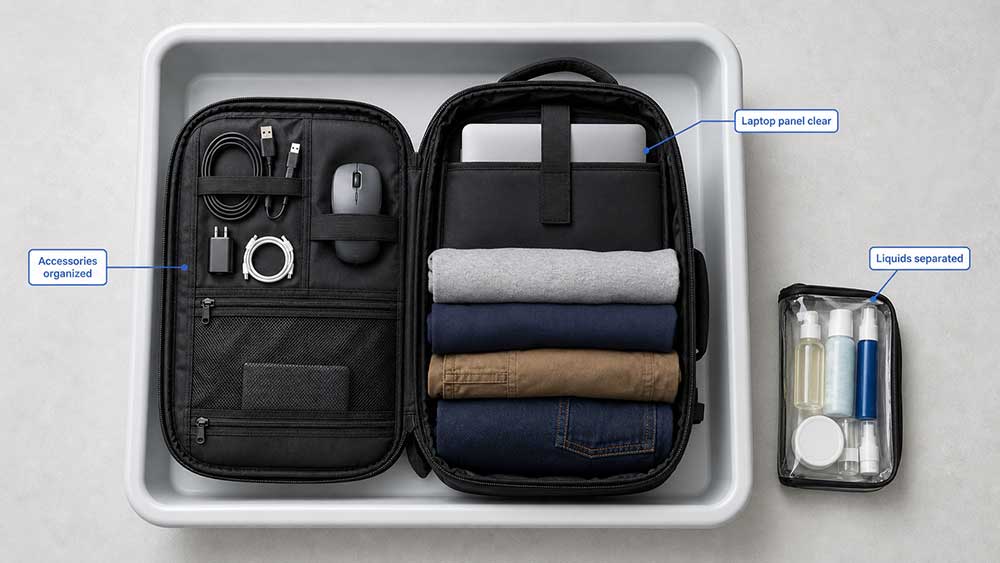
A TSA-friendly backpack works best when it is packed correctly. The goal is to keep the laptop area clean, flat, and easy to inspect.
Use these packing tips:
- Keep the laptop in the dedicated laptop compartment
- Do not place chargers directly on top of the laptop
- Keep power banks and tablets in separate pockets
- Avoid stuffing clothing around the laptop panel
- Keep liquids away from the laptop section
- Use front pockets for documents, passport, and small accessories
- Keep the laptop zipper easy to access
- Open the laptop panel before placing the bag on the belt if required
- Follow TSA officer instructions at the checkpoint
A backpack with good structure can still create screening problems if it is packed incorrectly. The laptop section should stay simple.
Choosing the right laptop size also matters. A loose laptop may slide around inside the compartment, while an oversized laptop may stretch the zipper or prevent the panel from opening smoothly. Before choosing a travel backpack, buyers should know the correct method for measuring laptop size for a bag.
Laptop Size and Fit Matter More Than Many Travelers Think
A TSA-friendly laptop backpack should fit the laptop securely. If the compartment is too large, the laptop may shift when the bag is opened flat. If it is too tight, the zipper may strain, and the backpack may not open smoothly.
For travel laptop backpacks, buyers should check:
- Maximum laptop size
- Real internal laptop compartment dimensions
- Laptop thickness allowance
- Sleeve padding
- Corner protection
- Bottom suspension
- Zipper clearance
- Compatibility with laptop cases or sleeves
A 15.6-inch laptop and a 16-inch laptop may not fit the same compartment in the same way. Some slim 17-inch laptops may fit certain bags, while thicker gaming laptops may not.
For travel-focused products, the laptop bag size guide should be considered together with backpack dimensions, airline carry-on needs, and laptop protection.
Padding and Protection Still Matter
TSA-friendly design should not reduce laptop protection. A backpack that opens flat but has poor padding is not a good travel laptop backpack.
A good laptop compartment should protect against:
- Light bumps
- Pressure from other items
- Corner impact
- Bottom impact
- Laptop movement
- Repeated airport handling
- Sliding inside the compartment
Padding is especially important for frequent travelers because the backpack may be placed on security belts, under airplane seats, in overhead bins, or beside rolling luggage.
When buyers think about laptop bag padding, they should look beyond thickness alone. Good padding should work with proper fit, suspended bottom design, soft lining, and stable compartment structure.
Tip: A TSA-friendly laptop panel should open easily, but it should not feel thin or floppy. Convenience should not replace protection.
Carry-On and Personal Item Considerations
A TSA-friendly laptop backpack is often used for business travel, so size matters. The backpack should be easy to carry through airports and practical for airplane cabins.
Buyers should consider:
- Does the backpack fit under the seat?
- Can it be used as a personal item?
- Is it too large for daily business travel?
- Does it work with rolling luggage?
- Is the laptop compartment easy to access in tight spaces?
- Does the main compartment still leave room for documents and accessories?
A TSA-friendly laptop backpack does not automatically meet every airline’s personal item or carry-on size rules. Airlines have different size limits, and travel backpacks can vary widely in shape. Buyers comparing travel bags should understand whether a laptop bag counts as carry-on luggage before choosing the size and structure.
For frequent travelers, a luggage strap, compact profile, and organized front panel can be just as important as the lay-flat laptop compartment.
Common Mistakes Buyers Make
Mistake 1: Thinking TSA-friendly means TSA-approved
TSA-friendly is usually a design description. It does not guarantee official approval or guarantee that the laptop can always stay inside the bag.
Mistake 2: Overpacking the laptop panel
A lay-flat compartment works best when the laptop sits alone. Chargers, tablets, books, and power banks can block the view.
Mistake 3: Ignoring laptop fit
If the laptop compartment is too loose or too tight, the bag may not protect the laptop properly or open smoothly.
Mistake 4: Choosing airport convenience over comfort
A backpack may open flat but still be uncomfortable for travel. Shoulder straps, back panel support, handle strength, and weight distribution still matter.
Mistake 5: Forgetting airline size rules
A TSA-friendly backpack is not automatically the right size for every airline. Cabin rules and personal item limits should still be checked.
Mistake 6: Using “TSA-approved” too aggressively in product copy
For brands, “TSA-friendly” or “checkpoint-friendly” is usually safer wording than “TSA-approved” unless there is a clear reason and verified support for that claim.
What Brands Should Consider When Designing TSA-Friendly Laptop Backpacks
For brands, wholesalers, and product development teams, TSA-friendly design should be planned from the structure stage. It is not just a zipper detail added at the end.
Important design points include:
- Laptop compartment opening angle
- Lay-flat panel structure
- Laptop-only section
- Padding thickness
- Bottom suspension
- Zipper path
- Hinge or folding area strength
- Back panel comfort
- Luggage strap placement
- Main compartment capacity
- Front pocket organization
- Carry-on-friendly proportions
- Claim wording
- Sample testing with real packing scenarios
A TSA-friendly backpack must balance travel convenience with daily usability. If the laptop panel opens flat but the backpack becomes too bulky, too heavy, or uncomfortable, it may not work well for business travelers.
For OEM and ODM laptop backpack projects, Vancharli Outdoor usually reviews laptop compartment layout, lay-flat structure, padding, zipper path, travel capacity, luggage strap placement, and claim wording together before sampling. A travel laptop backpack should be easy to screen, but it should also protect the laptop, carry business essentials, and look appropriate for work travel.
For buyers developing custom laptop backpacks, it is better to define the real use case early: airport business travel, daily commuting, student travel, tech organization, or lightweight carry-on use. Each scenario needs a different balance of capacity, protection, and access.
Tip: For product copy, “TSA-friendly” is usually safer than “TSA-approved.” The claim should describe the structure, not promise a guaranteed screening result.
Final Answer: Are TSA-Friendly Laptop Backpacks Worth It?
Yes, a TSA-friendly laptop backpack can be worth it for business travelers, frequent flyers, students who travel, and anyone who carries a laptop through airports often. The main benefit is reducing airport handling: faster access, cleaner organization, and a laptop compartment that can open flat when needed.
But TSA-friendly does not mean officially approved by TSA, and it does not guarantee that your laptop will never need to be removed. TSA screening rules, PreCheck status, CT screening availability, airport equipment, officer instructions, and packing style all matter.
The best TSA-friendly laptop backpack should have a dedicated lay-flat laptop compartment, proper laptop fit, enough padding, clean organization, comfortable carry, and realistic product wording.
A good travel backpack should make airport screening easier, not create a false promise.
FAQ
What does TSA-friendly laptop backpack mean?
A TSA-friendly laptop backpack is designed to make airport security screening easier, usually with a dedicated laptop compartment that can open flat and keep the laptop separate from other items.
Is a TSA-friendly laptop backpack the same as TSA-approved?
No. TSA-friendly usually describes a backpack design. It does not always mean the backpack is officially approved by TSA or that the laptop can always stay inside the bag.
Do I still need to remove my laptop from a TSA-friendly backpack?
You may still need to remove it. TSA officers can ask travelers to remove laptops if needed, especially if the X-ray view is unclear or the backpack is overpacked.
Can TSA PreCheck travelers keep laptops in their bags?
TSA states that TSA PreCheck travelers do not need to remove laptops during standard screening. However, officers may still inspect bags when needed.
Can CT scanners let laptops stay inside the bag?
Some CT screening lanes may allow laptops and liquids to stay inside the bag, but travelers should always follow the instructions at that specific checkpoint.
What is the best laptop compartment design for airport security?
A dedicated lay-flat laptop compartment is usually best. The laptop should sit alone in its section without chargers, books, tablets, or other bulky items blocking the view.
Is a regular laptop backpack okay for air travel?
Yes. A regular laptop backpack can work for air travel, but it may be less convenient at security because the laptop may need to be removed from the main compartment.
What should I pack in the laptop compartment?
Ideally, only the laptop should be in the checkpoint-friendly laptop section. Chargers, cables, power banks, documents, and tablets should go in separate pockets.
Are TSA-friendly laptop backpacks good for business travel?
Yes. They are useful for business travel because they can improve airport convenience, laptop access, organization, and compatibility with rolling luggage.
What size laptop backpack is best for travel?
The best size depends on your laptop size, airline rules, and how much you carry. A good travel laptop backpack should fit the laptop securely without becoming too bulky for cabin use.
Should brands use “TSA-approved” in product descriptions?
Brands should be careful with “TSA-approved.” “TSA-friendly” or “checkpoint-friendly” is usually safer because it describes a design feature without promising a guaranteed screening result.





Comments are closed