



Does a Laptop Bag Count as Carry-On Luggage? Airline Rules Explained
A laptop bag usually does not count as your main carry-on luggage if it is small enough to fit under the seat in front of you. In most cases, airlines treat a slim laptop bag, briefcase, tote, or small backpack as a personal item instead of a full carry-on bag.
The key detail is not the name of the bag. It is the size, shape, and where the bag is stored. Your main carry-on usually goes in the overhead bin. Your personal item should fit under the seat in front of you. If your laptop bag is slim and only holds your computer, charger, documents, and a few small essentials, it will usually be treated as a personal item. If it is large, overpacked, wheeled, or used like a travel backpack, it may be counted as your carry-on.
That is why the answer is not simply “yes” or “no.” A laptop bag can be a personal item, a carry-on bag, or an extra item that causes problems at the gate, depending on the airline, ticket type, aircraft size, and how full the bag is.
Carry-On Luggage vs. Personal Item: What Is the Difference?
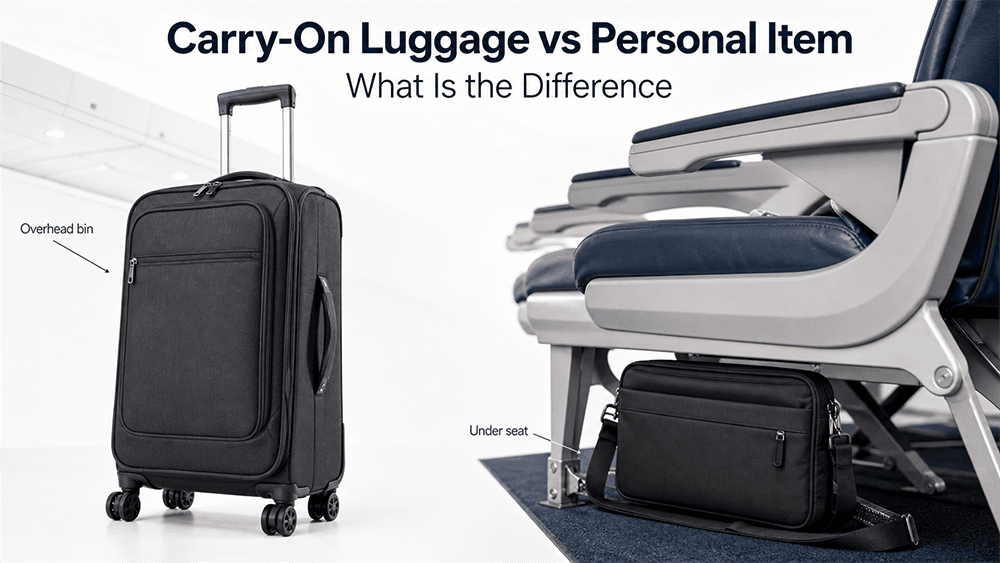
A carry-on bag is the larger cabin bag you bring onto the plane. It is usually stored in the overhead bin and may be a small suitcase, roller bag, duffel, or larger backpack. Many airlines use a carry-on size close to 22 x 14 x 9 inches, but the exact limit depends on the airline.
A personal item is smaller. It usually goes under the seat in front of you and may include a purse, briefcase, small backpack, laptop bag, camera bag, or tote. The FAA carry-on guidance also reminds travelers that personal items need to fit under the seat and that heavier items are safer under the seat than in the overhead bin.
For a laptop bag, the most practical question is this:
Can the bag fit completely under the seat in front of you without blocking the aisle, foot space, or emergency access?
If yes, it is more likely to be accepted as a personal item. If no, it may be treated as a carry-on bag or may need to be checked.
When Does a Laptop Bag Count as a Personal Item?
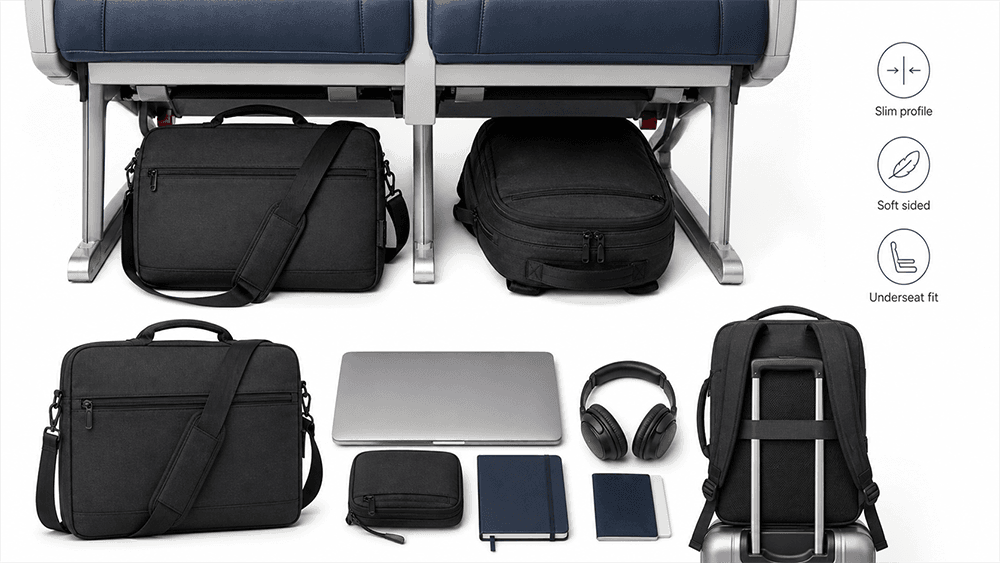
A laptop bag usually counts as a personal item when it is compact, soft-sided, and easy to place under the seat. This includes many slim laptop briefcases, laptop sleeves inside a tote, small business bags, and low-profile laptop backpacks.
For example, Delta lists a laptop bag as an approved personal item when it is similar in size to a purse, briefcase, or small backpack and can fit under the seat in front of you. You can check this directly on Delta’s official carry-on baggage allowance page.
A laptop bag is more likely to be accepted as a personal item if:
- It holds your laptop, charger, documents, and small accessories only.
- It is not expanded or overstuffed.
- It can slide under the seat without force.
- It does not have large wheels, a rigid frame, or a thick boxy structure.
- You are also carrying only one main carry-on item.
A slim shoulder laptop bag is usually safer than a bulky backpack if your goal is to keep it as a personal item. A soft-sided bag also has an advantage because it can compress slightly under the seat.
When Can a Laptop Bag Count as Carry-On Luggage?
A laptop bag can count as your carry-on luggage if it is too large to be considered a personal item. This often happens when the bag is actually being used as a travel bag, not just a computer bag.
For example, a laptop bag may be treated as a carry-on if it contains:
- Clothes for several days
- Shoes or bulky gear
- Toiletries and packing cubes
- Multiple laptops and large accessories
- Camera equipment
- A thick external pocket system
- A rigid frame or wheels
A large laptop backpack can also fall into this category. Even if it has a laptop compartment, it may still function more like a carry-on backpack if it is designed to hold clothing, electronics, documents, and travel accessories together.
This is where travelers often get confused. The name of the bag does not decide the rule. A “laptop bag” that fits under the seat may be a personal item. A “laptop bag” that is too large for the seat area may be a carry-on.
Can You Bring a Laptop Bag and a Carry-On Suitcase?
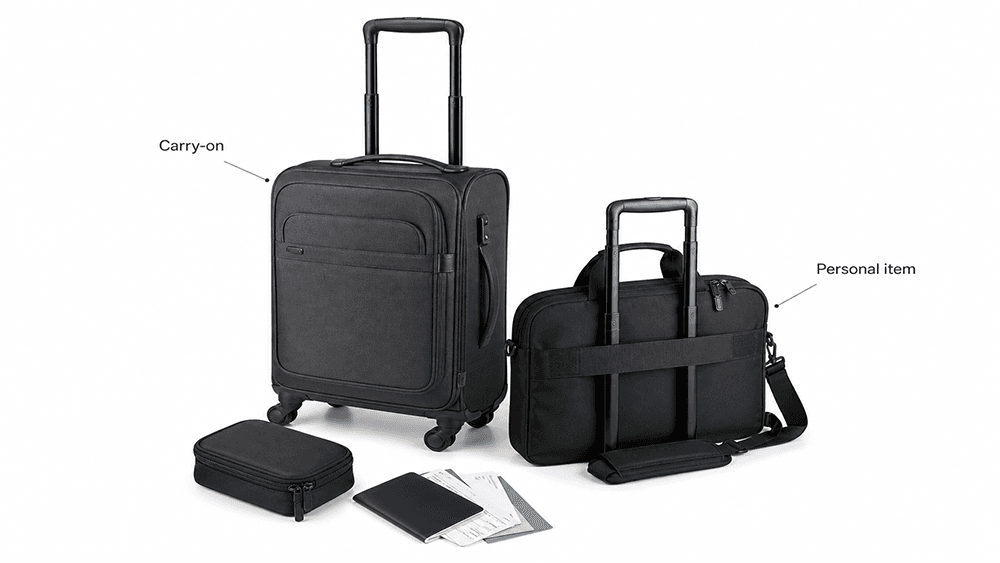
On many airlines, yes. Most standard tickets allow one carry-on bag and one personal item. That means you may be able to bring a carry-on suitcase for the overhead bin and a laptop bag for under the seat.
American Airlines, for example, says passengers may bring one carry-on item along with one personal item. It also states that the personal item should fit under the seat in front of you, with dimensions not exceeding 18 x 14 x 8 inches. You can check the current rule on the American Airlines carry-on bags page.
However, this is not guaranteed on every ticket. Low-cost airlines and basic economy fares may have stricter rules. Some fares include only one small underseat bag. Others charge extra for a full-size carry-on. International airlines may also use different size and weight limits.
Before flying, check three things:
- Does your ticket include a carry-on bag?
- Does your airline allow a separate personal item?
- Does your laptop bag fit the airline’s personal item size limit?
If the answer to all three is yes, your laptop bag should usually be fine as your personal item.
Common Carry-On and Personal Item Size Examples by Airline
Airline baggage rules can change, and enforcement may vary by route, fare type, aircraft, and airport. The table below gives a practical comparison from several well-known airline baggage pages, but you should always check your airline’s current rules before flying.
| Airline | Main Carry-On Size | Personal Item / Laptop Bag Size | What This Means for a Laptop Bag |
|---|---|---|---|
| American Airlines carry-on bags | 22 x 14 x 9 in / 56 x 36 x 23 cm | 18 x 14 x 8 in / 45 x 35 x 20 cm | A slim laptop bag can usually work as a personal item if it fits under the seat. |
| Delta carry-on baggage | 22 x 14 x 9 in / 56 x 35 x 23 cm | No fixed personal item size listed; laptop bag must fit under the seat | Delta specifically lists a laptop bag as a personal item, but it still needs to fit under the seat. |
| United carry-on bags | 9 x 14 x 22 in / 23 x 35 x 56 cm | 9 x 10 x 17 in / 22 x 25 x 43 cm | A compact laptop bag is safer than a bulky laptop backpack, especially on more restrictive fares. |
| JetBlue carry-on bags | 22 x 14 x 9 in / 55.88 x 35.56 x 22.86 cm | 17 x 13 x 8 in / 43.2 x 33 x 20.32 cm | JetBlue’s personal item limit is smaller than some U.S. airlines, so a thick laptop backpack may be risky. |
| Southwest carryon and personal item policy | 24 x 16 x 10 in / 61 x 41 x 25 cm | Must fit under the seat | Southwest allows a larger carry-on than many U.S. airlines, but the laptop bag still needs to fit under the seat if used as a personal item. |
| Air Canada carry-on baggage | 55 x 40 x 23 cm / 21.5 x 15.5 x 9 in | 43 x 33 x 16 cm / 17 x 13 x 6 in | A laptop bag with a slim depth is important because the personal item depth limit is only about 6 inches. |
| British Airways baggage essentials | 56 x 45 x 25 cm / 22 x 18 x 10 in | 40 x 30 x 15 cm / 16 x 12 x 6 in | The cabin bag allowance is generous, but the underseat handbag or backpack size is relatively compact. |
| Lufthansa carry-on baggage | 55 x 40 x 23 cm | 40 x 30 x 15 cm | A slim laptop bag or flat business bag is more suitable than a thick backpack if it needs to count as the personal item. |
| Ryanair bag policy | 55 x 40 x 20 cm with Priority / paid option | 40 x 30 x 20 cm small personal bag | A laptop bag can count as the free small bag, but it must fit Ryanair’s small underseat limit. |
| easyJet cabin bags | 56 x 45 x 25 cm for large cabin bag when included or paid | 45 x 36 x 20 cm free underseat cabin bag | A laptop bag or small backpack may work as the free underseat bag, but larger carry-ons may require the right fare or an added option. |
The pattern is clear: many full-service airlines allow one overhead carry-on plus one smaller personal item, while some budget airlines start with only a small underseat bag unless you pay for an additional cabin bag. For laptop bags, the safest design is usually slim, soft-sided, and easy to slide under the seat.
As a general rule, a laptop bag under about 17–18 inches long, 13–14 inches wide, and 6–8 inches deep will fit many airline personal item limits more easily than a thick travel backpack. But you should still check the exact airline and fare rules before flying, because size limits, included baggage, and enforcement can change.
Does a Laptop Backpack Count as a Personal Item or Carry-On?
A laptop backpack can be either one. The deciding factor is not whether it has shoulder straps. The deciding factor is whether it fits under the seat and meets the airline’s personal item rules.
A slim laptop backpack may count as a personal item if it holds a computer, charger, notebook, headphones, and small daily items. But a larger travel-style backpack with a laptop compartment may count as carry-on luggage, especially if it is packed with clothes or travel gear.
This is why a bag designed for work commuting is not always the same as a bag designed for air travel. For frequent flyers, a slim laptop backpack with a padded compartment, flat front pocket, and luggage strap is often easier to use as a personal item than a thick multi-compartment travel backpack.
If you want to avoid problems at the gate, keep the bag soft, compact, and underseat-friendly.
Can You Put a Laptop Bag in the Overhead Bin?
You can sometimes put a laptop bag in the overhead bin, but it may not be the best choice. On full flights, flight attendants often ask passengers to place smaller personal items under the seat so overhead bin space can be saved for larger carry-on bags.
If your laptop bag is your personal item, expect to keep it under the seat in front of you. This also gives you easier access to your laptop, charger, documents, passport, headphones, and medication during the flight.
There is another practical reason to keep your laptop bag close: electronics are fragile and valuable. Underseat storage usually gives you more control than placing a computer bag in a crowded overhead bin where other luggage may shift during boarding or landing.
Should You Put a Laptop in Checked Luggage?
Technically, TSA says laptops are allowed in both carry-on bags and checked bags, but you may need to remove the laptop from your bag during security screening. You can check the official TSA screening guidance for laptops before flying.
Even so, it is usually better to keep your laptop in the cabin. Laptops contain lithium batteries, and FAA guidance for portable electronic devices with batteries says devices such as laptops, smartphones, and tablets should be carried in carry-on baggage. Spare lithium batteries and power banks must also be carried in the cabin, not checked baggage.
From a practical point of view, checked baggage also creates more risk for impact, pressure, theft, loss, and temperature changes. A laptop is usually safer in a padded compartment inside your personal item or carry-on bag.
If you are traveling with a computer, it is worth reading more about protecting a laptop in a backpack so the device is not damaged by pressure, poor padding, or heavy items packed nearby.
What Size Laptop Bag Is Best for Flying?
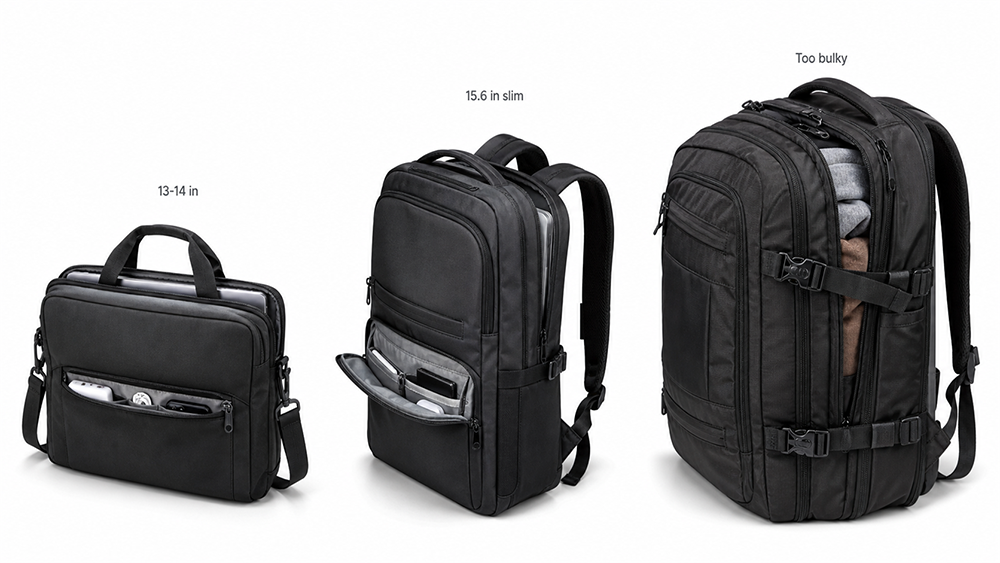
The best laptop bag for flying is small enough to fit under the seat but structured enough to protect your device. A bag that is too thin may not protect the laptop well. A bag that is too thick may be treated as carry-on luggage.
For most travelers, a good flying laptop bag should have:
- A padded laptop compartment
- A compact underseat-friendly profile
- A soft-sided structure
- Quick-access pockets for passport, boarding pass, charger, and phone
- A luggage strap for attaching to a suitcase handle
- Light but durable fabric
- Smooth zippers that can be opened easily at security
- Enough space for essentials without becoming bulky
A 13-inch or 14-inch laptop bag is usually easier to carry as a personal item. A 15.6-inch laptop bag can still work if the structure is slim. A 17-inch laptop bag needs more attention because larger laptop compartments often make the whole bag wider and deeper.
For product teams developing travel-friendly laptop bags, the most useful design is not simply the biggest possible capacity. It is the right balance between laptop protection, underseat fit, airport access, and daily business use.
What About Rolling Laptop Bags?
A rolling laptop bag is convenient for business travel, but it is more likely to be treated as carry-on luggage than as a personal item. Wheels, handles, rigid corners, and thicker structure make it harder to fit under the seat.
Some compact wheeled laptop bags may fit under certain airline seats, but you should not assume this. If the bag has wheels and is close to suitcase size, treat it as your carry-on unless your airline clearly allows it as an underseat item.
A rolling laptop bag can be useful for travelers carrying heavy laptops, documents, samples, or business equipment, but it should be planned around carry-on size rules rather than personal item assumptions.
How to Pack a Laptop Bag So It Stays Within the Rules
A laptop bag can start as a personal item and become a problem when it is overpacked. The more the bag expands, the harder it is to fit under the seat.
Use this simple packing approach:
- Place the laptop in the padded compartment.
- Keep the charger in a small pouch or flat pocket.
- Put documents in a sleeve instead of loose folders.
- Avoid packing shoes, jackets, or bulky clothing inside the laptop bag.
- Keep liquids in the correct security pouch if required.
- Leave room so the bag can compress slightly.
- Do not attach extra shopping bags, pillows, or pouches to the outside.
If you are also bringing a suitcase, keep clothing and bulky items in the suitcase. Use the laptop bag for items you need during the airport and flight.
Quick Rule Before You Fly
Before leaving for the airport, ask yourself:
- Can my laptop bag fit under the seat in front of me?
- Does my airline allow one personal item?
- Does my ticket include a carry-on bag?
- Is my laptop bag slim enough to avoid looking like a second suitcase?
- Are my laptop and batteries easy to access if security asks?
If the answer is yes, your laptop bag will usually count as your personal item, not your main carry-on luggage.
Final Thoughts
A laptop bag usually counts as a personal item, not carry-on luggage, when it fits under the seat in front of you. But if the bag is large, rigid, overpacked, wheeled, or used like a travel backpack, the airline may count it as your carry-on.
The safest approach is simple: check your airline’s size rules, keep your laptop bag compact, and pack your computer in a padded compartment that stays with you in the cabin. For frequent flyers, the best laptop bag is not just stylish or spacious. It should be protective, easy to access at security, comfortable to carry, and small enough to work smoothly with airline personal item rules.
FAQ
Is a laptop bag considered a personal item?
Yes, a laptop bag is usually considered a personal item if it fits under the seat in front of you. Many airlines allow one personal item in addition to one carry-on bag, but size limits vary by airline and ticket type.
Can I take a laptop bag and a carry-on suitcase together?
Usually yes, if your ticket includes one carry-on and one personal item. The suitcase normally goes in the overhead bin, while the laptop bag should fit under the seat.
Does a laptop backpack count as carry-on?
A laptop backpack counts as a personal item if it is small enough to fit under the seat. If it is large, bulky, or packed like a travel bag, it may count as carry-on luggage.
Can a laptop sleeve be carried separately?
A laptop sleeve may still count as an item if you carry it separately. To avoid problems, place the laptop sleeve inside your personal item or carry-on bag when boarding.
Can I carry two laptops in one laptop bag?
In most cases, yes, but the bag still needs to meet size and weight rules. Two laptops can also make the bag heavier, so make sure the compartment has enough padding and the shoulder strap is comfortable.
Do budget airlines count laptop bags differently?
Some budget airlines are stricter. A basic fare may include only one small underseat bag, and a larger carry-on may cost extra. Always check the airline’s current baggage policy before flying.
Is it safer to keep my laptop in my carry-on or checked bag?
It is usually safer to keep your laptop in the cabin, either in your personal item or carry-on. This reduces the risk of impact damage, loss, theft, and lithium battery safety issues.
What happens if my laptop bag is too big?
If your laptop bag does not fit under the seat and you already have another carry-on, the airline may ask you to check one of your bags or pay for an additional cabin bag, depending on the ticket and airline rules.





Comments are closed