Packing a laptop bag for business travel is not just about fitting everything inside. A well-packed bag should make the travel day feel easier, not heavier. It should protect your laptop, keep important documents flat, make airport security less stressful, and help you arrive at meetings without digging through a messy bag.
The simplest way to pack a laptop bag for business travel is to divide it into five zones: laptop protection, airport essentials, tech accessories, documents, and personal items. Once these zones are clear, your bag becomes easier to use from the airport gate to the meeting room.
Anyone who has tried to pull out a charger at the boarding gate while holding a passport and coffee knows why pocket placement matters.
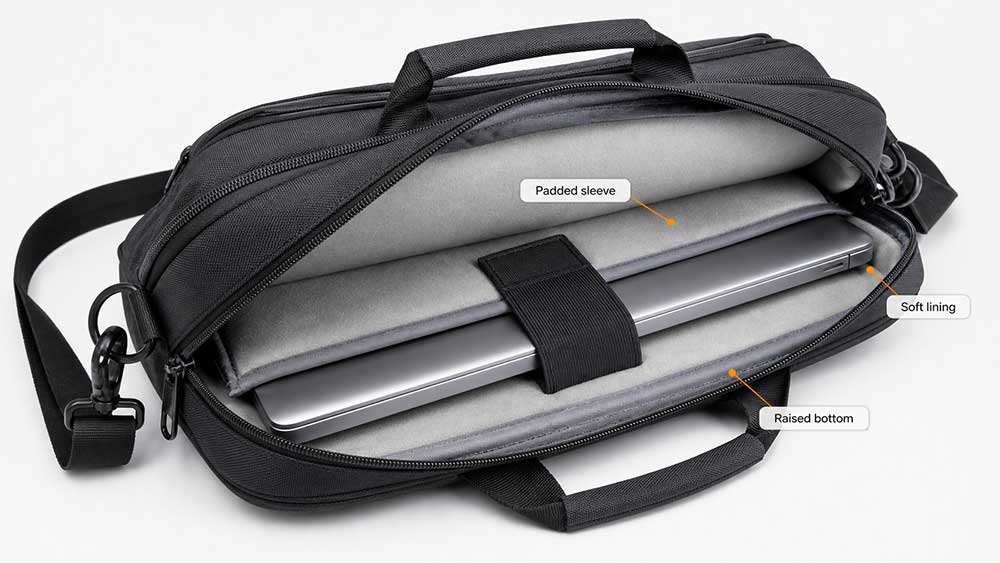
Your laptop should go into the dedicated laptop compartment first. This is the most important part of the bag, and it should not compete with chargers, pens, keys, hard drives, water bottles, or paper files.
A proper laptop compartment should hold the device close to the back panel or the center structure of the bag. This helps reduce movement when you walk through airports, place the bag under a seat, or carry it between meetings. If your bag has a suspended laptop sleeve, use it. A suspended sleeve keeps the laptop slightly above the bottom of the bag, reducing direct impact when the bag is set down.
Do not place loose metal items near the laptop. Keys, adapters, pens, and hard accessories can press against the laptop shell or screen if the bag is overloaded. If your laptop bag does not have enough padding, use a separate laptop sleeve before placing the laptop inside the main compartment.
For business travelers who carry a 13-inch, 15.6-inch, or 17-inch laptop, the fit should be snug but not forced. If the compartment is too loose, the laptop can shift. If it is too tight, the zipper, seams, or corners may put pressure on the device.
Keep Airport Essentials in a Quick-Access Pocket
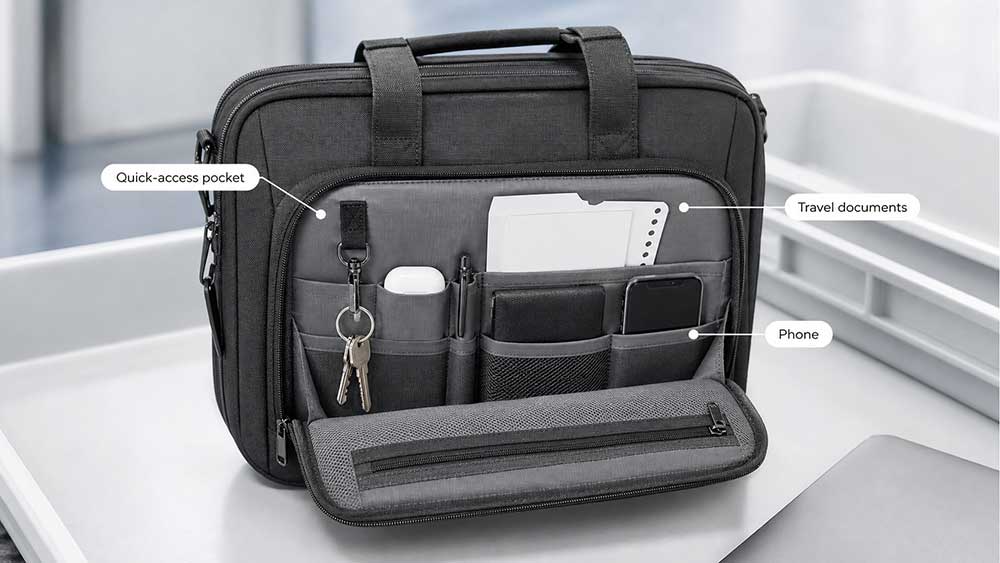
Airport items should not be buried inside the main compartment. During check-in, security, boarding, and immigration, you may need the same small items several times.
Place these items in a front pocket, top pocket, or side-access section:
Passport or ID
Boarding pass if printed
Wallet
Phone
Earbuds
Charging cable
Small power bank
Pen
Glasses or sunglasses
Small pack of tissues
Hand sanitizer
The goal is simple: you should be able to reach these items without opening the laptop compartment or disturbing your documents.
If you travel through U.S. airports, the TSA laptop screening guidance says laptops are usually removed from bags for standard screening, while TSA PreCheck® procedures may differ. Screening equipment and instructions can vary by airport, so it is still smart to keep the laptop area easy to open.
Separate Tech Accessories From Documents
A common mistake is putting chargers, cables, adapters, notebooks, contracts, and business cards in the same compartment. This creates clutter and can damage paper documents.
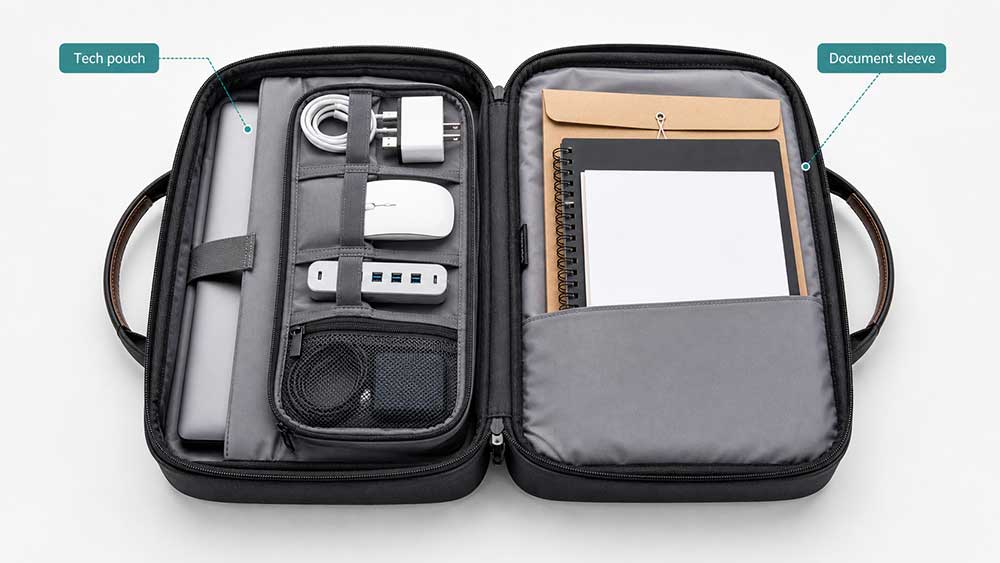
Use one small tech pouch or a dedicated accessory pocket for:
Laptop charger
USB-C cable
Phone charging cable
Travel adapter
Mouse
Portable SSD or USB drive
HDMI adapter
Ethernet adapter if needed
Small power bank
Then keep documents in a separate flat section. This may include:
Meeting agenda
Printed contracts
Brochures
Business cards
Notebook
Presentation notes
Travel itinerary
Flat items should stay flat. If your laptop bag has a document sleeve, use it for papers only. Do not mix documents with chargers or bulky accessories, because hard objects can bend paper and make your bag harder to organize.
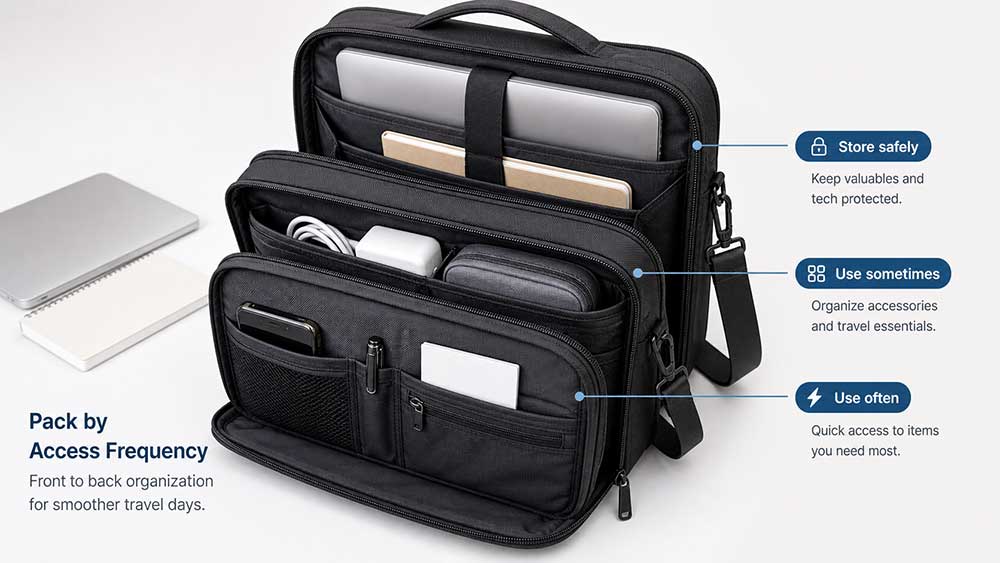
Pack by Access Frequency
A good business travel packing system is based on how often you need each item.
Items you need at the airport should go in the easiest-access pockets. Items you may use on the plane should stay near the top or front of the bag. Items you only need later can go deeper inside.
Access Level
Items
Best Location
Very frequent
Passport, wallet, phone, earbuds, charging cable
Front pocket or top pocket
Frequent
Laptop, tablet, notebook, pen, power bank
Laptop compartment or quick-access work section
Occasional
Mouse, adapter, portable SSD, business cards
Tech pouch or accessory pocket
Meeting only
Printed files, samples, brochures, contracts
Document sleeve
Needed later
Extra shirt, small toiletry pouch, backup charger
Main compartment or carry-on suitcase
This structure prevents unnecessary unpacking. It also helps you avoid opening the whole bag in public places.
Decide What Belongs in the Laptop Bag and What Belongs in the Carry-On
Your laptop bag should not become a second suitcase. For business travel, it should hold your work essentials and flight essentials. Clothing, shoes, large toiletry kits, and backup items usually belong in your carry-on suitcase.
A laptop bag is best for:
Laptop
Tablet
Chargers
Small tech accessories
Documents
Passport and wallet
Earbuds
Notebook and pen
Power bank
Light personal items
A carry-on suitcase is better for:
Clothing
Shoes
Full toiletry kit
Extra jacket
Larger electronics
Product samples
Heavy books
Backup items
This separation matters because a heavy laptop bag can become uncomfortable during long airport walks. It can also put more pressure on the laptop compartment, shoulder strap, zipper, and seams.
If you are also checking whether your bag can fit under the airplane seat, it is worth reviewing how a laptop bag fits under an airplane seat before overpacking it.
Keep Liquids Away From the Laptop
Liquids should never sit directly beside your laptop or paper documents. Even a small leak from a hand sanitizer bottle, lotion, or travel-size toiletry container can damage electronics or stain documents.
If you carry liquids in your laptop bag, place them in a sealed pouch and keep them away from the laptop sleeve. For U.S. flights, the TSA liquids rule generally limits carry-on liquids, aerosols, gels, creams, and pastes to containers of 3.4 oz / 100 ml or less, packed inside one quart-size bag.
For business travel, the safest approach is simple: keep liquids in your carry-on suitcase whenever possible. If you must carry them in your laptop bag, use a separate leak-resistant pouch.
Be Careful With Power Banks and Spare Batteries
Most business travelers carry at least one power bank. This is useful, but it should be packed correctly.
Power banks and spare lithium batteries should be kept in carry-on baggage, not checked baggage. The FAA guidance on lithium batteries explains watt-hour limits and how spare batteries should be protected during air travel. If the power bank is high-capacity, check both the Wh rating and the airline’s own battery policy before flying.
In your laptop bag, place power banks in a padded or separate pocket where they will not press directly against the laptop screen. Avoid throwing loose batteries, metal objects, and charging cables together in the same pocket.
Do Not Overpack the Front Pocket
The front pocket is useful, but it is also easy to overload. When you put too many hard items in the front pocket, the bag can bulge, lose shape, and become uncomfortable to carry.
Avoid stuffing the front pocket with:
Large charger bricks
Multiple adapters
Thick notebooks
Sunglasses without a case
Keys
Coins
Loose cables
Heavy power banks
Instead, use the front pocket for slim, high-frequency items. Heavy or bulky objects should go closer to the center of the bag, where the weight is easier to carry.
This is especially important for a laptop messenger bag, because a single-strap design can feel less balanced when one side of the bag becomes too heavy.
Pack for the Type of Business Trip
Not every business trip needs the same packing setup. A one-day meeting, overnight trip, and international business trip require different levels of organization.
One-Day Business Trip
For a one-day trip, keep the bag light. You usually need:
Laptop
Charger
Phone cable
Power bank
Notebook
Pen
Business cards
Earbuds
Wallet
ID or passport
Meeting documents
You probably do not need extra clothing, large toiletries, or multiple backup devices. The goal is speed and mobility.
Overnight Business Trip
For an overnight trip, your laptop bag may carry a few extra items, but it should still not replace your suitcase. You can add:
Small toiletry pouch
A small charger pouch
Extra shirt if the bag has room
Sleep mask or travel pillow
Medication
Portable mouse
Travel adapter if needed
If you need shoes, multiple outfits, or a full toiletry kit, use a carry-on suitcase instead.
International Business Trip
For international travel, organization becomes more important. Keep these items easy to access:
Passport
Visa documents if needed
Boarding pass
Travel insurance documents
Hotel address
Local currency or backup card
Travel adapter
Power bank
Pen for forms
Important printed documents
International travel often involves more checkpoints, forms, and waiting time. A messy laptop bag can slow you down at exactly the wrong moment.
Use Pouches Instead of Loose Storage
Small pouches make a laptop bag much easier to manage. You do not need too many. Two or three are enough.
A practical setup could be:
One tech pouch for cables and adapters
One document sleeve or folder for papers
One small personal pouch for medication, wipes, lip balm, and personal items
This keeps the main compartment clean and reduces the chance of losing small items. It also makes it easier to move items between a laptop backpack, business briefcase, or travel bag.
For brands and buyers developing work-travel collections, this is why a well-designed business bag should include practical internal organization instead of only focusing on exterior appearance.
Balance Weight Before You Leave
After packing, put the bag on your shoulder or back and walk around for one minute. If it feels heavy before you leave home, it will feel much worse at the airport.
Check three things:
Is the laptop protected and stable?
Are heavy items close to the body?
Can you reach airport essentials quickly?
If the answer is no, repack before leaving.
For laptop backpacks, heavier items should sit close to the back panel. For messenger bags and briefcases, keep the weight as centered as possible. For totes, avoid placing the laptop on one side with all accessories on the other side, because the bag may tilt and feel uncomfortable.
A good laptop backpack design should help distribute weight evenly, but the packing method still matters.
What Not to Pack in a Laptop Bag
A laptop bag should protect work essentials, not carry everything you own. Avoid packing items that increase risk, weight, or clutter.
Do not pack these directly with your laptop:
Loose keys
Water bottle without a secure closure
Full-size liquid bottles
Heavy books
Shoes
Sharp metal tools
Bulky clothing
Wet umbrella
Food that can leak or crush
Bulky charging equipment
If you need to carry a water bottle, use a side pocket that keeps it away from the laptop compartment. If your bag does not have a safe bottle pocket, put the bottle in your suitcase instead.
A Simple Laptop Bag Packing Checklist
Before leaving for a business trip, use this checklist:
Laptop
Laptop charger
Phone charger
USB-C cable
Power bank
Earbuds or headphones
Mouse
Travel adapter
Notebook
Pen
Business cards
Printed documents
Passport or ID
Wallet
Boarding pass if printed
Glasses or sunglasses
Medication
Small personal pouch
Sealed liquid pouch if needed
You do not need every item for every trip. The best packing list is the one that matches your meeting schedule, flight time, and work style.
Final Thoughts
A well-packed laptop bag should help you move through the day with fewer interruptions. Your laptop needs protection, your documents need a flat space, your tech accessories need separation, and your airport essentials need quick access.
The best system is simple: protect the laptop first, keep frequent-use items easy to reach, separate tech from documents, and avoid turning the laptop bag into a suitcase. When each item has a clear place, business travel feels more organized before you even leave home.
FAQ
Should I put my laptop in my carry-on or laptop bag?
For business travel, it is usually better to keep your laptop in your laptop bag because it stays close to you and is easier to access at security, during the flight, or before a meeting. The laptop should be placed in a padded compartment, not loose inside the main bag.
Can I pack clothes in a laptop bag for business travel?
You can pack a light shirt or small overnight item if the bag has enough space, but a laptop bag should not be treated as a full suitcase. Clothing, shoes, and larger toiletries are usually better packed in a carry-on suitcase.
Where should I put my charger in a laptop bag?
Put your charger in a tech pouch or accessory pocket, not directly beside the laptop screen. Charger bricks are hard and can press against the laptop if the bag is overloaded.
Is a backpack better than a messenger bag for business travel?
A backpack is usually better for long airport walks because it distributes weight across both shoulders. A messenger bag can look more professional in some business settings, but it works best when packed light.
Should documents go in the laptop compartment?
No. Documents should go in a flat document sleeve or separate section. The laptop compartment should mainly hold the laptop or tablet, because mixing documents with electronics can cause bending, clutter, and pressure.
How do I avoid overpacking my laptop bag?
Start with the laptop, charger, documents, and airport essentials. Then remove anything you do not need before your first meeting or flight. If an item is only needed later at the hotel, it probably belongs in the suitcase.
Can I keep a water bottle in my laptop bag?
Only if the bag has a secure side pocket or bottle pocket that keeps the bottle away from the laptop compartment. Avoid placing liquids directly inside the laptop section.
What is the best laptop bag layout for business travel?
The best layout includes a padded laptop compartment, a flat document sleeve, a quick-access front pocket, a tech accessory area, and comfortable carrying straps. This structure keeps work items protected and easy to reach.








Comments are closed