Anti-Theft Laptop Bags: Useful Feature or Marketing Gimmick?
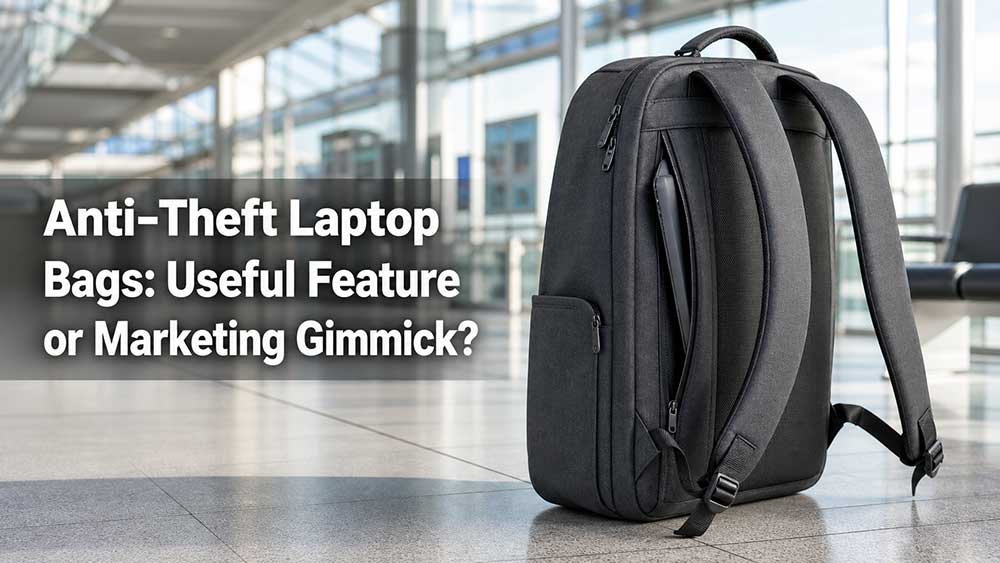
Anti-theft laptop bags can be useful, but not every “anti-theft” claim deserves the same trust. A hidden zipper, lockable puller, rear security pocket, cut-resistant strap, slash-resistant panel, tracker pocket, or well-protected laptop compartment can make a real difference in crowded places. A vague label that only says “secure design” may not mean much at all.
The honest answer is this: an anti-theft laptop bag is not theft-proof. It cannot stop every thief, protect you from every situation, or replace basic travel awareness. What it can do is make quick theft harder, slower, and more noticeable.
That difference matters when you carry a laptop through airports, train stations, subways, cafés, coworking spaces, school campuses, trade shows, and busy city streets. But the feature only has value when the structure actually supports it.
The Direct Answer: Useful When the Feature Solves a Real Problem
An anti-theft laptop bag is useful when it reduces a real risk. If you often carry your laptop in crowded public spaces, travel with a passport and wallet, work in cafés, or commute by subway, some anti-theft features can be worth it.
The most useful features usually solve physical problems:
Someone opening your zipper from behind
Someone grabbing a wallet from an exposed front pocket
A strap being cut quickly in a crowded place
A laptop sliding out of a weak compartment
Valuables being too easy to access in public
A bag being left beside a chair or under a table
A backpack being grabbed from rolling luggage during travel
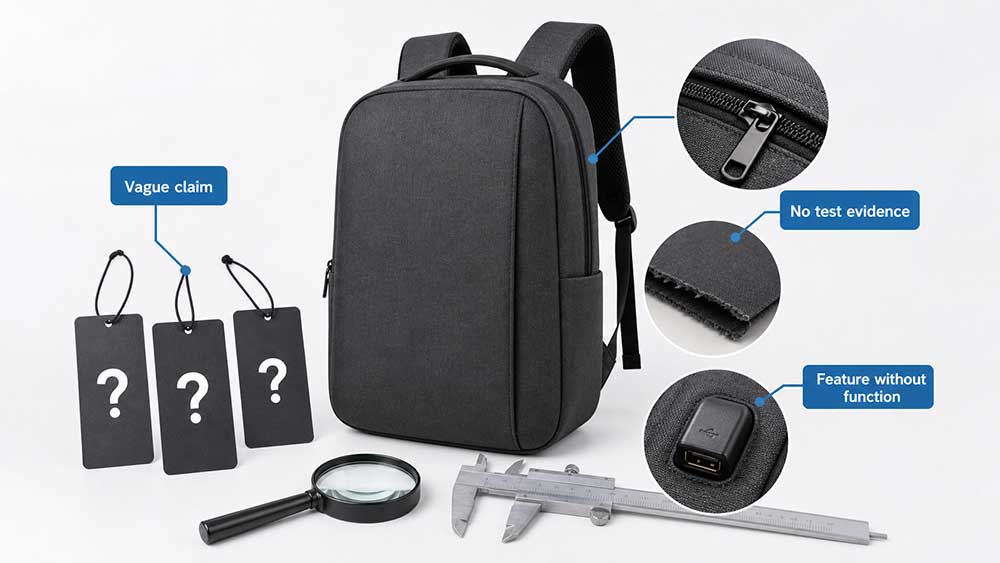
But anti-theft becomes a marketing gimmick when the feature sounds secure but does not improve real use. A decorative lock, a hidden pocket in the wrong place, a weak zipper with a lockable puller, or a vague “RFID protection” label should not be treated as full security.
A good anti-theft laptop bag should not make the user feel paranoid. It should quietly add friction: harder to open from behind, harder to grab quickly, harder to cut, and easier to control in real travel or commuting situations.
What Does “Anti-Theft” Mean in a Laptop Bag?
In a laptop bag, “anti-theft” usually refers to design details that make unauthorized access more difficult. These features may protect the laptop, wallet, passport, phone, keys, work documents, access cards, or other valuables.
Common anti-theft features include:
Hidden zippers
Lockable zipper pullers
Rear-facing pockets
Back-panel security pockets
Cut-resistant straps
Slash-resistant fabric panels
RFID-blocking pockets
Tracker pockets
Secure laptop compartments
Luggage strap security
Reduced external pocket exposure
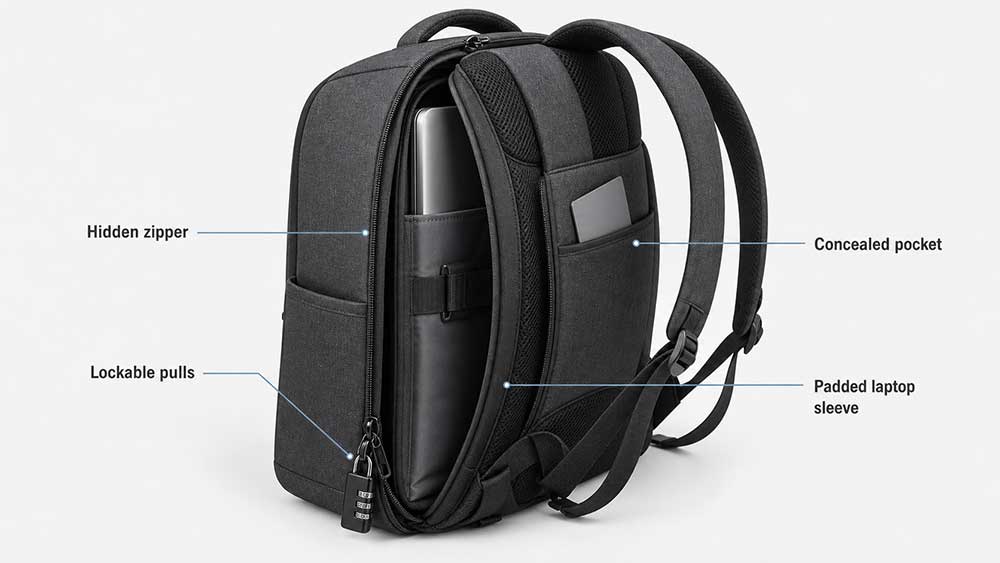
The best anti-theft bags do not depend on one feature. They use several small design choices together. A rear security pocket protects a passport better than a front pocket. A hidden zipper is harder to open casually. A lockable zipper can slow down theft in airports or cafés. A padded laptop compartment protects the device if the bag is grabbed, dropped, or pushed.
Anti-theft design is not about making a bag impossible to steal. It is about reducing easy opportunities.
How Anti-Theft Laptop Bag Features Actually Work
Anti-theft design works best when it blocks quick, casual access. Many everyday bag-theft risks are not about someone spending several minutes breaking into a bag. They often happen when a pocket is easy to open, a wallet is placed in an exposed front compartment, or a bag is left loosely beside a chair.
Here is how real anti-theft features work in practice.
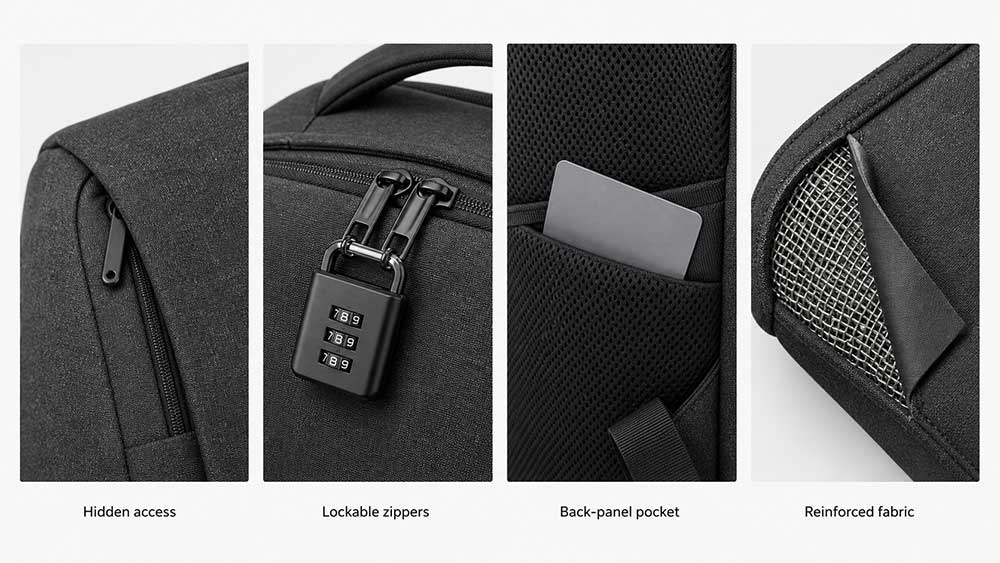
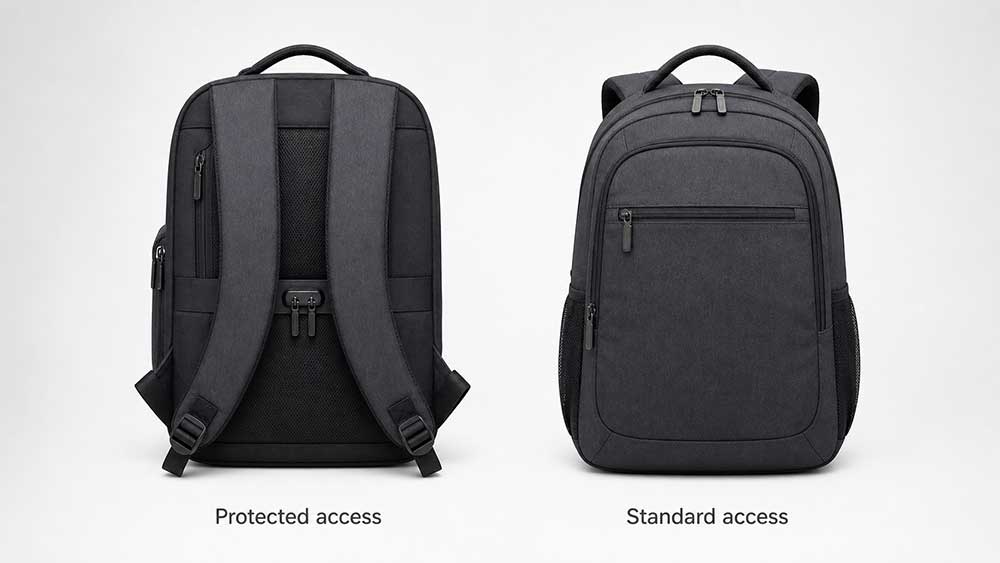
A hidden zipper helps because the zipper opening is not directly exposed when the bag is worn. For example, if the main zipper sits close to the back panel or is covered by a fabric flap, someone standing behind the user cannot easily unzip the bag in a subway line without being noticed.
A lockable zipper helps by slowing access. It does not make the bag impossible to open, but it can stop someone from quickly opening the laptop compartment in an airport lounge, train station, café, or shared workspace. This is useful when the bag is beside your chair or attached to rolling luggage.
A rear security pocket works because it places valuables against the user’s body. A passport, wallet, phone, or travel card stored in a back-panel pocket is much harder to reach than the same item placed in a front pocket.
A cut-resistant strap or slash-resistant panel helps in crowded travel areas where quick cutting can be a risk. These features usually add stronger internal reinforcement so the strap or panel is harder to cut quickly. They are not magic protection, but they make fast theft more difficult.
A secure laptop compartment helps because the laptop is not sitting in a loose, easy-access outer pocket. When the laptop compartment is placed closer to the back panel, padded, and properly closed, it is harder for someone to remove the device casually while the bag is being carried.
A luggage strap can also reduce grab-and-go risk during travel. If the laptop bag is fixed over a suitcase handle, it is harder for someone to quickly pull the bag away while you are moving through an airport. It does not replace attention, but it improves control.
A tracker pocket does not prevent theft, but it helps after the bag is lost or taken. A hidden pocket for an AirTag or similar tracker gives the user a better chance of locating the bag, especially during travel.
The key point is that anti-theft features should create friction. They should make the bag harder to open quickly, harder to access from behind, harder to cut, harder to grab, or easier to track. If a feature does not do any of these things, it may be more marketing than real protection.
Features That Actually Help
Some anti-theft laptop bag features are practical because they match real theft scenarios.
Feature
How It Helps
Example Scenario
Hidden zipper
Keeps the main opening away from direct public access
Someone standing behind you in a subway line cannot easily unzip the main compartment
Lockable zipper pullers
Slows down quick opening
Useful when the bag is beside your chair in a café or airport lounge
Rear security pocket
Keeps valuables close to your body
Passport or wallet is harder to reach than if placed in a front pocket
Cut-resistant strap
Makes quick strap cutting harder
Helpful in crowded streets, train stations, or tourist areas
Slash-resistant panel
Makes fast cutting attempts more difficult
Adds protection when the bag is carried in crowded public spaces
Secure laptop compartment
Keeps the laptop stable and less exposed
Laptop is not sitting in an easy-access outer pocket
Luggage strap
Keeps the bag attached to rolling luggage
Reduces grab-and-go risk while moving through an airport
Tracker pocket
Helps locate the bag if lost or taken
Hidden AirTag pocket inside the bag
Smart organization
Reduces the need to expose valuables in public
Charger, wallet, passport, and laptop each have safer storage positions
Low-profile exterior pockets
Makes the bag less tempting and less easy to access
Front pockets do not bulge with obvious valuables
The most useful anti-theft features are often simple. A pocket placed against the user’s back can be more valuable than a complicated lock. A zipper hidden from direct view can be more useful than a flashy metal clasp. A laptop compartment that fits securely can be more important than a large “anti-theft” label.
The feature should make the bag easier to trust, not harder to use.
Features That Can Become Marketing Gimmicks
Some anti-theft claims sound impressive but add little value in daily use.
Be careful with bags that rely on:
Vague “secure design” wording
A small hidden pocket that is still easy to access
Decorative locks that do not secure the zipper properly
RFID-blocking as the main selling point
Weak zippers with lockable pullers
Thin fabric with an “anti-theft” label
Too many complicated openings
Claims like “theft-proof” or “impossible to steal”
Anti-theft features that replace comfort and padding
High price increases without visible structure changes
The biggest warning sign is when the product page says “anti-theft” many times but does not explain how the bag actually reduces theft risk.
A real feature can be described clearly. For example: “rear hidden pocket,” “lockable zipper pullers,” “cut-resistant shoulder strap,” “slash-resistant panel,” or “laptop compartment placed against the back panel.” If the claim cannot be connected to a real structure, it is probably more marketing than function.
Is RFID Blocking Really Important?
RFID-blocking can be useful as a secondary feature, especially for passports, access cards, hotel cards, and some contactless cards. But it should not be treated as the main reason to buy an anti-theft laptop bag.
AARP notes that RFID skimming scams are largely unheard of and that many experts do not see RFID wallet protection as necessary for most users: AARP on RFID-blocking wallets.
That does not mean RFID pockets are useless. It means they should be kept in perspective.
For a laptop bag, the bigger everyday risks are usually physical:
Exposed zipper access
Crowded commuting
Café or coworking theft
Passport or wallet access
Bag grabbing
Laptop impact or drop damage
Forgetting the bag in a public place
RFID-blocking is a nice extra. It is not the core of a good anti-theft laptop bag.
Tip: If a bag talks more about RFID than zipper placement, laptop protection, pocket layout, or strap strength, look carefully before trusting the anti-theft claim.
Anti-Theft Laptop Bag vs Regular Laptop Bag
A regular laptop bag can work well for office or school use. An anti-theft laptop bag is more useful when the user carries valuables in public places or travels often.
Feature
Anti-Theft Laptop Bag
Regular Laptop Bag
Zipper access
More controlled or hidden
Often exposed
Valuables pocket
Rear-facing or close to the body
Often front-facing
Laptop protection
Usually more secure, but still depends on padding
Depends on design
Travel use
Better for airports, trains, cafés, and crowded places
Better for simple daily carry
Weight
May be slightly heavier
Usually lighter
Cost
Usually higher
Usually lower
Convenience
Can be slower to access
Usually faster to open
Best for
Travel, commuting, public spaces
Office, school, car commuting
The better choice depends on use case. If you drive from home to the office and the bag rarely leaves your side, a regular laptop bag may be enough. If you take public transport, travel internationally, work in cafés, or carry a passport and laptop together, anti-theft features may be worth the added cost.
When an Anti-Theft Laptop Bag Is Worth It
An anti-theft laptop bag is usually worth considering when your laptop and valuables spend time in public or semi-public spaces.
It is especially useful for:
Business travel
International travel
Airports and train stations
Subway and bus commuting
Coffee shop work
Coworking spaces
College campuses
Trade shows and exhibitions
Crowded tourist areas
Carrying a passport, wallet, and laptop together
Carrying an expensive work laptop
Using the bag as a personal item during flights
Travel security guidance often reminds travelers to keep valuables controlled and stay alert in crowded or distracting environments. OSAC’s petty crime guidance describes how thieves may take advantage when a target is distracted or unaware: OSAC petty crime basics.
In those situations, anti-theft features are not just decoration. They give the user more control.
When It May Not Be Worth It
Anti-theft features are not necessary for every user.
They may not be worth the added cost if:
You only drive to the office
The bag is rarely used in crowded areas
The laptop never leaves your sight
You need fast access more than security
The locks make daily use annoying
The bag becomes too heavy
The anti-theft features replace laptop padding
The price is much higher but the structure is unclear
A bag should not become frustrating just to feel secure. If the user has to unlock three zippers just to take out a charger, the design may be too complicated for daily use.
Good anti-theft design should feel natural. It should protect valuables without slowing down every simple action.
Laptop Protection Still Matters
A laptop bag can have hidden zippers and lockable pockets but still fail at the most basic job: protecting the laptop.
Do not let the anti-theft label distract from the laptop compartment.
A good anti-theft laptop bag should still include:
Padded laptop compartment
Stable laptop fit
Soft lining
Bottom protection
Corner protection
Secure closure
Back panel support
Shock-absorbing structure
Enough room for charger and accessories
Comfortable straps or handles
If the laptop compartment is weak, the bag is not a good laptop bag, even if it has many anti-theft details. Buyers should still check the same features that make a good laptop bag, including protection, comfort, materials, organization, and daily usability.
Good laptop bag padding is especially important for travel and commuting because a stolen laptop is not the only risk. Drops, bumps, pressure, and rough handling can also damage the device.
Anti-Theft Should Not Make the Bag Hard to Use
A practical anti-theft laptop bag must balance security and access. If the bag is too difficult to open, users may stop using the security features correctly.
For example:
A hidden zipper is useful if it is still easy for the owner to reach.
A lockable zipper is useful if it does not slow down normal access too much.
A rear pocket is useful if it fits a passport or wallet comfortably.
A cut-resistant strap is useful if it does not make the strap stiff or uncomfortable.
A secure laptop compartment is useful if the laptop can still be removed smoothly.
The best anti-theft design feels quiet. It does not scream “security.” It simply places openings, pockets, straps, and valuables in smarter locations.
This is especially important for business users. A business laptop bag should look professional, not tactical or overly complicated, unless the target customer specifically wants that style.
What Buyers Should Check Before Choosing One
Before choosing an anti-theft laptop bag, buyers should look beyond the product name.
Check these details:
Where are the main zippers located?
Can the zippers be locked?
Are the zipper pullers strong?
Is there a rear security pocket?
Does the laptop compartment sit close to the back panel?
Is the laptop compartment padded?
Can the user still open the laptop compartment quickly when needed?
Are the straps reinforced?
Is the fabric strong enough for daily travel?
Does the bag stay comfortable when packed?
Can the user access essentials quickly?
Is the RFID pocket clearly placed and useful?
Is there a hidden tracker pocket?
Are the claims realistic?
Does the bag still look suitable for work or travel?
If a product says “anti-theft” but does not show the zipper layout, pocket placement, strap structure, or laptop compartment, the buyer should be cautious.
Tip: A real anti-theft laptop bag should answer two questions: what is being protected, and how is the bag protecting it?
Anti-Theft Features by Use Case
Different users need different levels of anti-theft design.
This is why one anti-theft design does not fit every market. A business commuter may prefer a clean hidden zipper and rear pocket. A travel user may care more about lockable zippers and passport storage. A student may care more about laptop padding, durability, and price.
What Brands Should Consider When Designing Anti-Theft Laptop Bags
For brands, wholesalers, and product development teams, anti-theft design should start with the user’s real environment. A commuter bag, business travel bag, student laptop backpack, and airport personal item do not need the same security structure.
Important design points include:
Zipper placement
Zipper quality
Lockable zipper compatibility
Rear security pocket structure
Passport and wallet pocket size
Laptop compartment padding
Suspended bottom design
Strap strength
Fabric strength
Slash-resistant material options
Hardware durability
Tracker pocket placement
RFID pocket placement
Weight control
Comfort when fully packed
Claim wording
The claim wording matters. “Anti-theft” should be supported by specific features. “Theft-proof” is usually too strong and should be avoided unless the product can genuinely support that claim, which most bags cannot.
For OEM and ODM anti-theft laptop bag projects, Vancharli Outdoor usually reviews zipper placement, back pocket structure, laptop compartment padding, fabric strength, hardware quality, weight, and claim wording together before sampling. The goal is not to add security features for decoration, but to create a bag that is practical, comfortable, and credible.
For buyers developing custom laptop bags, it is better to define the main scenario early: daily commute, business travel, airport use, school, retail collection, or corporate gifting. Each scenario needs a different balance of security, access, cost, and appearance.
Final Answer: Useful Feature or Marketing Gimmick?
Anti-theft laptop bags can be useful, but only when the features solve real problems.
Hidden zippers, lockable zipper pullers, rear security pockets, cut-resistant straps, slash-resistant panels, tracker pockets, luggage straps, and secure laptop compartments can add real value for travel, commuting, cafés, airports, and crowded public spaces.
But anti-theft becomes a gimmick when the bag relies on vague wording, decorative locks, weak materials, or RFID-blocking as the main selling point. RFID pockets can be helpful, but they should not replace physical security, laptop padding, comfort, or smart pocket placement.
The best anti-theft laptop bag is not the one with the most dramatic claim. It is the one that makes theft harder while still being comfortable, professional, and easy to use every day.
If the feature protects a real item from a real risk, it is useful. If it only sounds secure on a product page, it is probably marketing.
FAQ
Are anti-theft laptop bags worth it?
Yes, they can be worth it if you travel often, commute in crowded areas, work in cafés, or carry a laptop with valuables such as a passport, wallet, or work documents.
Do anti-theft laptop bags really work?
They can reduce easy theft opportunities, but they are not theft-proof. Good anti-theft bags make unauthorized access harder, slower, and more noticeable.
What is the most useful anti-theft feature in a laptop bag?
Hidden zippers, rear security pockets, lockable zipper pullers, and a secure padded laptop compartment are usually more useful than vague anti-theft wording.
How do hidden zippers prevent theft?
Hidden zippers reduce direct access. If the zipper is placed against the back panel or covered by a flap, someone standing behind the user cannot easily open the main compartment without being noticed.
Is RFID blocking important in a laptop bag?
RFID-blocking can be useful as an extra feature, especially for passports or access cards, but it should not be the main reason to buy an anti-theft laptop bag.
Can an anti-theft bag stop pickpocketing?
It cannot stop every attempt, but it can make quick zipper access, pocket theft, or bag grabbing more difficult in crowded places.
Are lockable zippers necessary?
They are useful for airports, cafés, trains, hostels, and shared spaces, but they are not always necessary for simple office commuting.
Is a slash-resistant laptop bag worth it?
It can be worth it for travel or crowded urban use, especially if the bag may be carried in public spaces where quick cutting is a concern. For low-risk office use, it may be less important.
Should a business laptop bag have anti-theft features?
It depends on the user. A business traveler may benefit from rear pockets, lockable zippers, and luggage strap security. A simple office user may only need good laptop protection and organization.
What is the difference between anti-theft and theft-proof?
Anti-theft means the bag has features that reduce theft risk. Theft-proof suggests the bag cannot be stolen or opened, which is usually an unrealistic claim.
What should brands avoid when marketing anti-theft laptop bags?
Brands should avoid vague claims, exaggerated “theft-proof” wording, decorative security details, and overemphasizing RFID while ignoring zipper placement, laptop padding, and real usability.










Comments are closed