Backpack With USB Charging Port: How Does It Work?
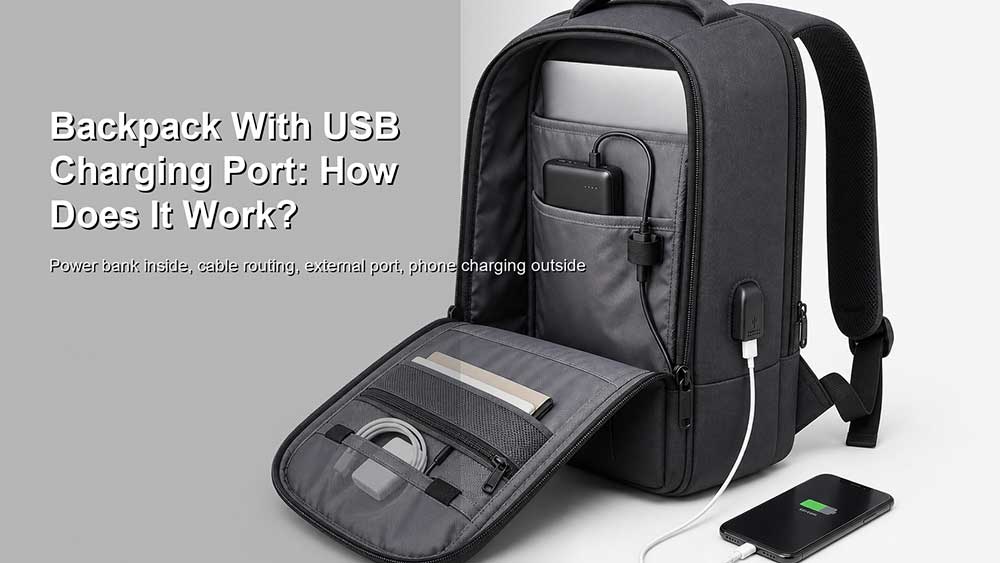
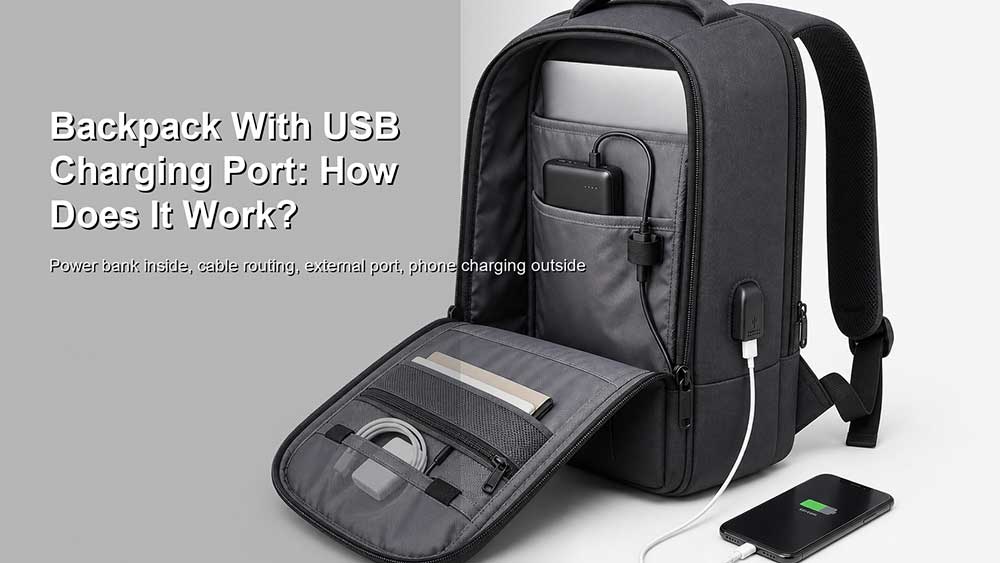
A backpack with a USB charging port can look more advanced than a regular backpack, but the idea is actually simple. In most cases, the backpack does not charge your phone by itself. The power comes from a power bank placed inside the bag. The USB port on the outside only gives you an easier way to connect your device without opening the backpack every time.
That means a USB charging backpack is not the same as a backpack with a built-in battery. It is usually a backpack with an external charging port, an internal cable, and a pocket or space for your own portable charger.
The practical answer is simple: the power bank does the charging; the backpack only helps route the cable.
The Direct Answer: The Backpack Does Not Charge by Itself
Most backpacks with USB charging ports do not have their own power source. They usually come with a built-in USB port on the outside and a short cable inside the bag. To use the feature, you need to place your own power bank inside the backpack and connect it to the internal cable.
Then you plug your phone cable into the external USB port and charge your device while walking, commuting, traveling, or waiting at the airport.
In other words, the backpack works more like a cable extension than a charger.
A simple setup looks like this:
Put a power bank inside the backpack.
Connect the power bank to the internal USB cable.
Plug your phone cable into the external USB port.
Charge your phone without opening the bag.
This is why some product descriptions can be confusing. A “USB charging backpack” usually does not mean the bag includes a battery. It means the bag has a charging connection built into its structure.
What Is a Backpack With a USB Charging Port?
A backpack with a USB charging port is a backpack designed with an external USB interface, usually placed on the side panel, shoulder area, front panel, or near an easy-access pocket. Inside the bag, that port connects to a cable. The user connects that cable to a power bank stored inside the backpack.
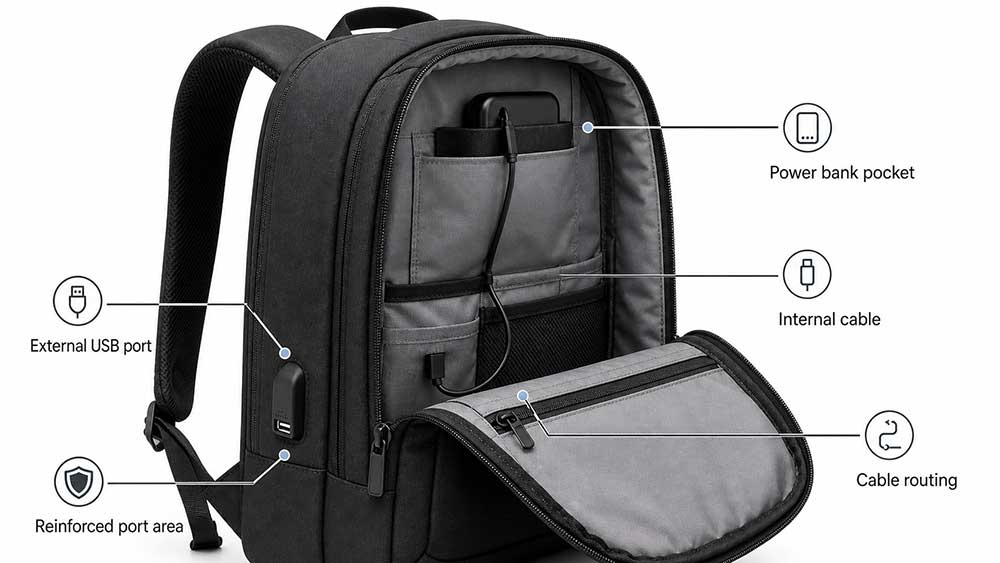
Common parts include:
External USB port
Internal USB cable
Power bank pocket or storage area
Cable routing channel
Reinforced port area
USB-A, USB-C, or both, depending on the model
Sometimes a headphone port on older designs
The purpose is convenience. Instead of taking out the power bank, unzipping the bag, and holding the charger in your hand, the user can keep the power bank inside the backpack and connect the phone from the outside.
This can be useful for commuting, school, business travel, trade shows, airports, and city walking. It is especially useful when the user wants to keep both hands free.
How Does the USB Charging Port Work?
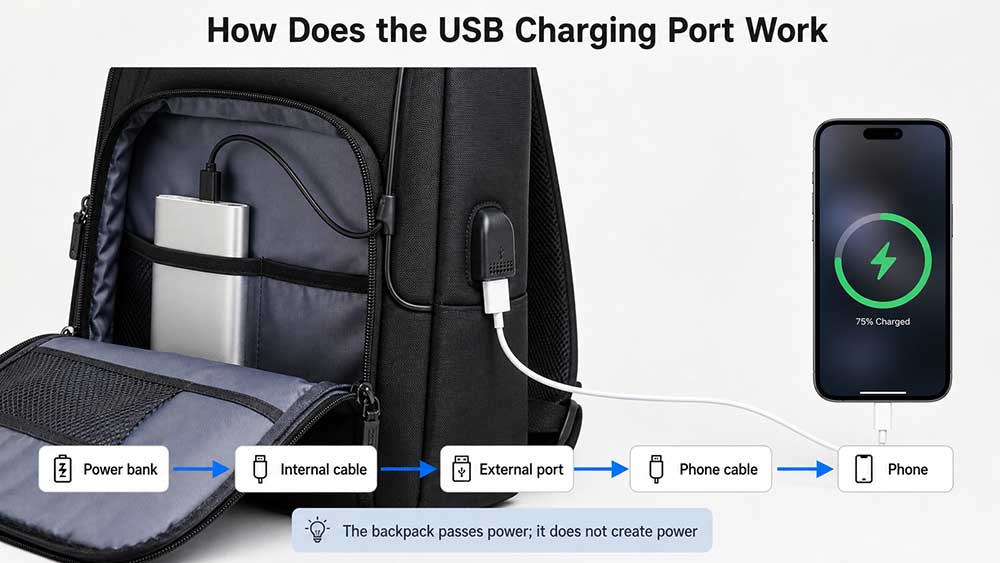
The USB charging port works by connecting your device to a power bank through the backpack’s built-in cable system.
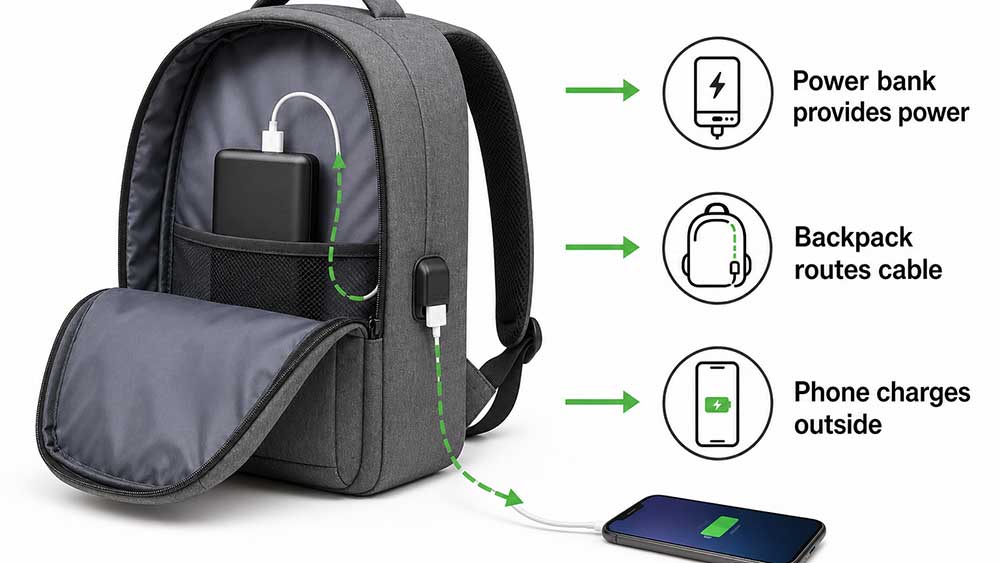
The flow is:
Power bank inside the bag → internal cable → external USB port → phone charging cable → phone
The backpack is not producing electricity. It is only passing power from the power bank to your device.
For example, if your power bank is inside the main compartment, the internal cable connects the power bank to the external port. When you plug your phone into the outside port, the power bank sends power through the backpack’s cable and into your phone.
This design is convenient because the power bank stays protected inside the bag. You do not need to carry it in your hand, place it in your pocket, or leave the backpack open.
However, charging speed depends on several things:
Power bank output
USB port type
Internal cable quality
Phone charging cable
Device charging limit
Whether the backpack supports USB-C or only USB-A
Whether fast charging protocols are supported
A backpack with a USB port does not automatically mean fast charging. The full charging path must support it.
Does It Come With a Power Bank?
Usually, no.
Most USB charging backpacks do not include a power bank. The bag includes the port and cable, but the user needs to provide the portable charger separately.
This is important because many buyers misunderstand the product name. A backpack described as “USB charging” may sound like it has a battery built in, but in most cases it does not.
There are good reasons for this:
Power banks add cost.
Batteries create shipping and storage restrictions.
Battery capacity varies by user need.
Airline rules apply to lithium batteries.
Some brands prefer to let users choose their own charger.
Built-in batteries are harder to replace if they fail.
For most business, school, and travel backpacks, a removable power bank is more practical than a permanently built-in battery.
Tip: If a product page says “USB charging backpack,” check whether it says “power bank included.” If it does not clearly say that, assume you need to use your own power bank.
USB-A vs USB-C Charging Ports
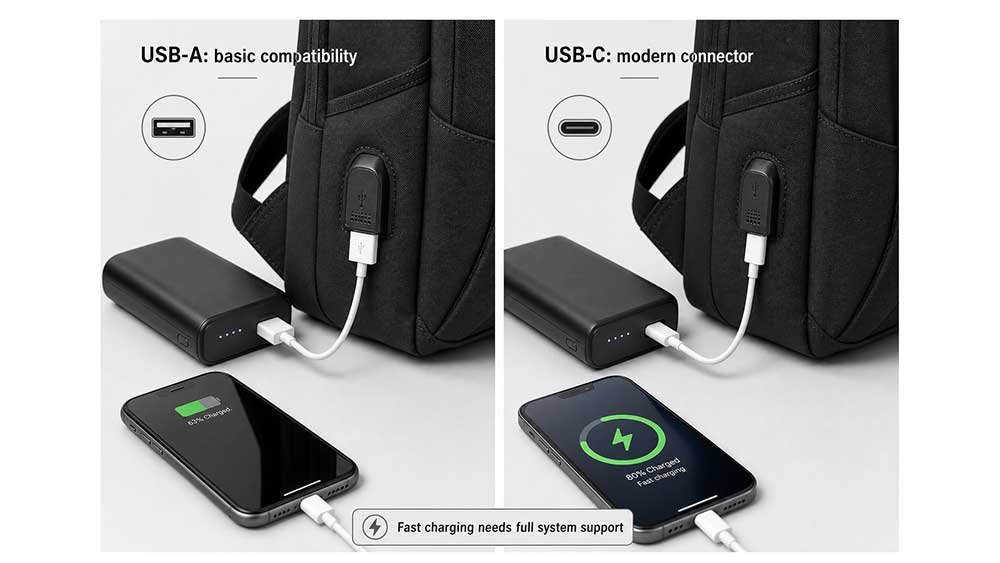
Older USB charging backpacks usually use USB-A ports. Newer designs may use USB-C, or a combination of USB-A and USB-C.
Port Type
Common Use
Main Advantage
Limitation
USB-A
Older phones, cables, basic charging
Familiar and widely compatible
Slower and less future-focused
USB-C
Newer phones, tablets, some laptops
Reversible plug, better fast-charging potential
Only useful if the full system supports it
USB-A + USB-C
Mixed users
More flexible
Slightly more complex and may cost more
USB-C is often seen as a better option for modern backpacks, but USB-C alone does not guarantee fast charging. The power bank, cable, port, and device must all support the right charging standard.
For example, USB Power Delivery can support higher power over a full-featured USB Type-C cable and connector, but a backpack port must be designed correctly to support that kind of use: USB-IF USB Power Delivery.
So the buyer should not only ask, “Does the backpack have USB-C?” A better question is:
What charging performance does the full system support?
Can a USB Charging Backpack Charge a Laptop?
Usually, a basic USB charging backpack is designed for phones, earbuds, small tablets, and similar devices. It may not be suitable for charging a laptop.
Charging a laptop requires much more power than charging a phone. Many backpacks with USB-A ports are not designed for laptop charging. Even if a backpack has a USB-C port, laptop charging depends on:
Power bank wattage
USB-C Power Delivery support
Cable rating
Port design
Laptop charging requirements
Heat and safety control
A small phone power bank may not be enough for a laptop. Some modern high-output power banks can charge laptops, but the backpack’s internal cable and external port must also support the required power.
For this reason, brands should be careful with wording. A backpack should not be marketed as “laptop charging” unless the full cable and port system can support laptop-level charging safely.
For most users, a USB charging backpack is best understood as a phone-charging convenience feature, not a replacement for a laptop charger.
Why Charging May Be Slow Through the Backpack Port
If your phone charges slowly through a backpack USB port, the backpack itself is not “charging slowly.” The power still comes from the power bank. The issue is usually somewhere in the full connection path between the power bank and the phone.
Common reasons include:
Low-output power bank
Older USB-A port
Thin or low-quality internal cable
Low-quality phone charging cable
Device battery management
No fast-charging protocol support
Loose port connection
Dust or wear inside the port
Low power bank battery level
This is why two backpacks with similar-looking USB ports may perform differently. The outside port is only one visible part of the system. The internal cable, connector quality, and power bank matter just as much.
A good backpack with a USB charging port should have a stable cable path, a reinforced port, and enough space to hold the power bank without bending the cable sharply.
Is a USB Charging Backpack Safe?
A USB charging backpack is generally safe when used correctly with a reliable power bank and undamaged cables. The biggest safety concerns usually come from the power bank or cable, not from the fabric backpack itself.
Users should avoid:
Damaged power banks
Swollen batteries
Overheating chargers
Frayed cables
Cheap uncertified charging accessories
Charging near spilled liquids
Leaving the power bank under heavy pressure
Forcing a cable into a tight angle
The USB port should also be protected from water, dust, and repeated pulling. A loose or poorly reinforced port can wear out quickly.
For backpacks used in commuting or travel, the USB port should not be placed where it is easily crushed, scraped, or exposed to rain. A side port may be convenient, but it should still be protected by good construction.
Can You Take a USB Charging Backpack on a Plane?
Yes, you can usually take a backpack with a USB charging port on a plane. The USB port itself is not the problem. The important part is the power bank.
Power banks contain lithium batteries, so they must follow airline and safety rules. TSA states that portable chargers or power banks containing lithium-ion batteries must be packed in carry-on bags: TSA power bank rules.
FAA guidance also says spare lithium batteries, including power banks and portable chargers, must be carried in carry-on baggage only. If a carry-on bag is checked at the gate or planeside, power banks must be removed and kept with the passenger in the cabin: FAA PackSafe lithium batteries.
So the rule is simple:
The backpack can usually go through airport security.
The power bank should stay in carry-on baggage.
Do not leave the power bank in checked luggage.
If the backpack is gate-checked, remove the power bank first.
Check airline rules for power bank capacity limits.
This is especially important for travel backpacks and laptop backpacks. If the USB charging backpack is used as a personal item, the power bank can usually stay inside the bag while the bag stays with you in the cabin. If the bag is checked, the power bank should be removed.
For travelers who often fly, a USB charging feature should be designed so the power bank pocket is easy to access quickly.
Is a USB Charging Port Actually Useful?
Yes, it can be useful, but only in the right situation.
A USB charging port is useful when:
You commute with your phone in hand.
You travel through airports often.
You attend trade shows or events.
You walk around campus all day.
You use maps, tickets, or ride-share apps frequently.
You want to keep your power bank inside the backpack.
You do not want to open your bag every time your phone battery is low.
But it can become a marketing gimmick when:
The backpack has a cheap, loose port.
The internal cable is low quality.
The port is placed in an awkward location.
The product does not explain that a power bank is required.
The port does not support modern charging needs.
The bag is advertised as “charging” without explaining how it works.
The power bank pocket is hard to reach.
The port is not protected from water or wear.
The feature is useful when it improves real convenience. It becomes a gimmick when it only looks technical on a product page.
What Buyers Should Check Before Choosing One
The USB port is easy to notice, but it should not be the only reason to choose the bag. Before buying a backpack with a USB charging port, buyers should look beyond the word “USB.”
Check these details:
Does the backpack include a power bank, or do you need your own?
Is the port USB-A, USB-C, or both?
Is the internal cable removable or fixed?
Can the cable be replaced if it breaks?
Is the power bank pocket easy to access?
Does the port feel reinforced?
Is the port protected from rain and dust?
Does the cable bend too sharply inside the bag?
Can the backpack still be cleaned safely?
Does the port support the charging speed you need?
Is the backpack comfortable when a power bank is inside?
Can you remove the power bank quickly before gate-checking a bag?
Buyers should also consider whether the bag itself is good without the USB feature. A USB port cannot make up for weak stitching, poor laptop padding, uncomfortable straps, or low-quality fabric.
For laptop users, the USB port should be treated as an extra convenience feature. The bag still needs strong structure, good organization, and proper protection. Buyers should still check the basic features that make a good laptop bag before focusing on charging features.
What Product Descriptions Really Mean
Product wording can be confusing when it comes to USB charging backpacks. A backpack that says “built-in USB charging port” usually does not mean the bag has a built-in battery. It usually means the bag has an external USB port and an internal cable for connecting your own power bank.
Here is how to read common product wording:
Product Wording
What It Usually Means
Built-in USB charging port
The backpack has an external USB port
External USB port with internal cable
The bag can connect to a power bank inside
Power bank not included
You need to use your own portable charger
Designed for convenient phone charging
Usually suitable for phones and small devices
USB-C port available
The backpack may support newer cables, but not always fast charging
Fast charging
Only reliable if the power bank, cable, port, and device all support it
Laptop charging backpack
Should be checked carefully because most USB backpacks are not designed for laptop charging
The most important phrase to look for is “power bank included” or “power bank not included.” If the product page does not clearly say a power bank is included, assume you need to provide your own.
Best Use Cases for USB Charging Backpacks
A USB charging backpack is not necessary for everyone. It makes the most sense when the user carries a phone, power bank, and other electronics throughout the day.
Use Case
Why USB Charging Helps
Daily commuting
Keeps phone charged while using maps, messages, or transit apps
Business travel
Useful during airports, layovers, and long travel days
School and campus use
Helps students keep phones charged between classes
Trade shows
Useful for buyers, exhibitors, and sales teams using phones all day
Urban walking
Keeps the power bank inside the bag while the phone stays outside
Travel backpack use
Helps manage phone battery without opening the backpack repeatedly
Laptop backpack use
Adds convenience for phone charging, not usually laptop charging
For many users, the USB port is not the main reason to buy the backpack. It is one useful feature among many others, such as laptop protection, comfort, water resistance, pocket layout, and underseat-friendly size.
Travelers who fly often may also want to understand power banks and checked baggage before using a USB charging backpack with a portable charger.
What Brands Should Consider When Designing USB Charging Backpacks
For brands, wholesalers, and product development teams, a USB charging backpack should be designed as a complete system, not just a port added to the side panel.
Important design points include:
USB-A or USB-C port selection
Internal cable quality
Replaceable cable design
Power bank pocket placement
Cable routing path
Reinforced port stitching
Port cover or dust protection
Water ingress risk
Heat and pressure around the power bank pocket
Ease of removing the power bank
Cleaning and maintenance
Compatibility with laptop backpack structure
Claim wording on product pages
Testing with real devices and power banks
The most common mistake is treating the USB port as a decoration. If the cable route is poor, the port is loose, or the power bank pocket is hard to access, users may stop using the feature.
Product wording should also be clear. If the backpack only includes an external USB port and internal cable, the product page should not suggest that the bag charges devices by itself or includes a built-in battery.
For OEM and ODM backpack projects, Vancharli Outdoor usually reviews the USB port type, internal cable routing, power bank pocket placement, port reinforcement, water-resistance risk, and user access before sampling. For custom laptop backpacks, the USB charging feature should support daily use without weakening the laptop compartment, shoulder comfort, or overall bag durability.
For buyers developing custom laptop bags, it is better to define the charging scenario early: phone charging during commute, airport travel, school use, business gifting, or retail electronics-friendly backpack collections. Each scenario may need a different port type, pocket position, cable length, and price level.
Final Answer: How Does a Backpack With USB Charging Port Work?
A backpack with a USB charging port usually works by connecting a power bank inside the bag to an external USB port through an internal cable. The backpack itself does not generate power or charge your phone by itself. The power bank provides the electricity, and the backpack makes the connection easier to use.
The feature is useful for commuting, travel, school, trade shows, and daily phone charging. But it is not magic. Charging speed depends on the power bank, cable, port, and device. USB-C may offer better charging potential, but only when the full system supports it.
For travel, the most important rule is that the power bank should stay in carry-on baggage, not checked luggage. If the backpack is gate-checked, remove the power bank first.
A USB charging backpack is worth it when the port is well placed, the cable is reliable, the power bank pocket is easy to reach, and the product clearly explains how the feature works. If the port is weak, the claim is vague, or the buyer is led to believe the backpack charges by itself, the feature becomes more marketing than real value.
FAQ
Does a backpack with a USB charging port charge by itself?
Usually, no. Most backpacks with USB charging ports do not have a built-in battery. You need to connect your own power bank inside the bag.
How do you use a USB charging backpack?
Place a power bank inside the backpack, connect it to the internal USB cable, and plug your phone cable into the external USB port.
Does a USB backpack come with a power bank?
Most models do not include a power bank. Always check the product description. If it does not clearly say “power bank included,” assume you need to provide your own.
Can a USB charging backpack charge a laptop?
Most USB charging backpacks are designed for phones and small devices, not laptops. Laptop charging requires higher power, USB-C Power Delivery support, and the right cable and power bank.
Is USB-C better than USB-A on a backpack?
USB-C is more modern and may support better charging potential, but it does not guarantee fast charging by itself. The power bank, cable, port, and device must all support the right standard.
Why is charging slow through my backpack USB port?
Slow charging may come from a weak power bank, low-quality internal cable, older USB-A port, poor phone cable, loose connector, or a device that limits charging speed.
Can I take a USB charging backpack on a plane?
Yes, the backpack itself is usually fine. The power bank must stay in carry-on baggage and should be removed if the bag is checked at the gate.
Can I put a USB charging backpack in checked luggage?
The backpack can usually be checked, but the power bank should not stay inside checked luggage. Remove the power bank and carry it in the cabin.
Is a USB charging backpack safe in the rain?
The backpack fabric may be water-resistant, but the USB port should still be protected from direct water exposure. Avoid charging in heavy rain unless the design is specifically protected for that use.
Is a USB charging port on a backpack worth it?
It is worth it if you use a power bank often and want easier phone charging while commuting, traveling, or walking. It is less important if you rarely charge devices away from outlets.
What should brands check before adding a USB port to backpacks?
Brands should check port type, cable quality, power bank pocket placement, cable routing, port reinforcement, water-resistance risk, replacement options, and honest product wording.










Comments are closed