




How Much Padding Does a Laptop Bag Need?
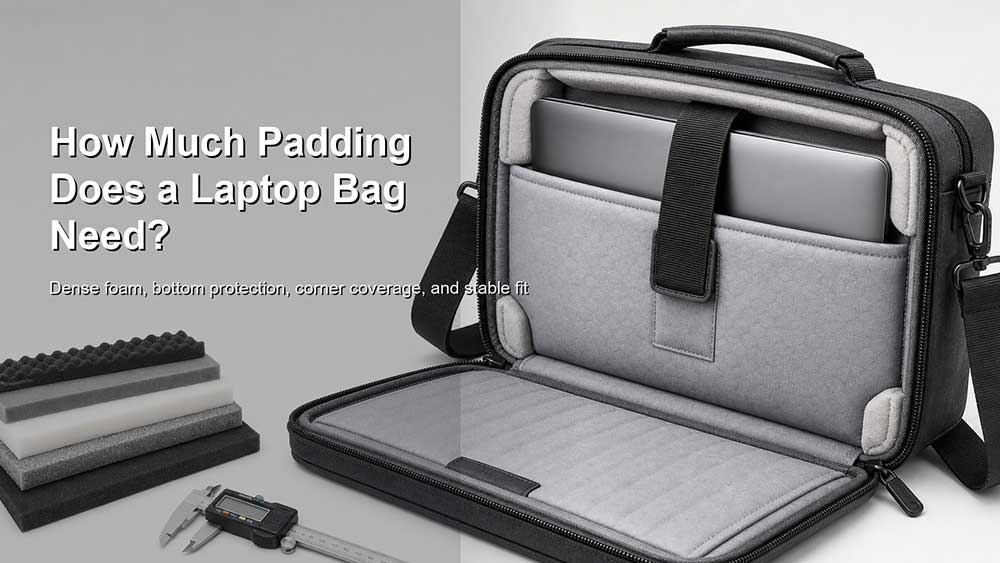
A laptop bag needs enough padding to protect the device from daily bumps, pressure, and impact, but it does not need to be excessively thick. For most daily laptop bags, 5–10 mm of dense padding is enough for light office or commuter use. For backpacks, business travel bags, student bags, or heavier laptops, 10–15 mm of padding is usually a safer range, especially when the bottom and corners are reinforced.
But padding thickness is only one part of laptop protection. A good laptop bag should also have dense foam, a soft lining, side protection, a secure fit, and ideally a raised or suspended laptop compartment. A bag with 15 mm of soft, loose padding may protect worse than a bag with 8 mm of firm foam and a well-structured laptop sleeve.
That is why the better question is not only “how thick should the padding be?” but also “where is the padding placed, what kind of foam is used, and does the laptop move inside the bag?”
A Simple Answer: 5–15 mm Is Usually Enough
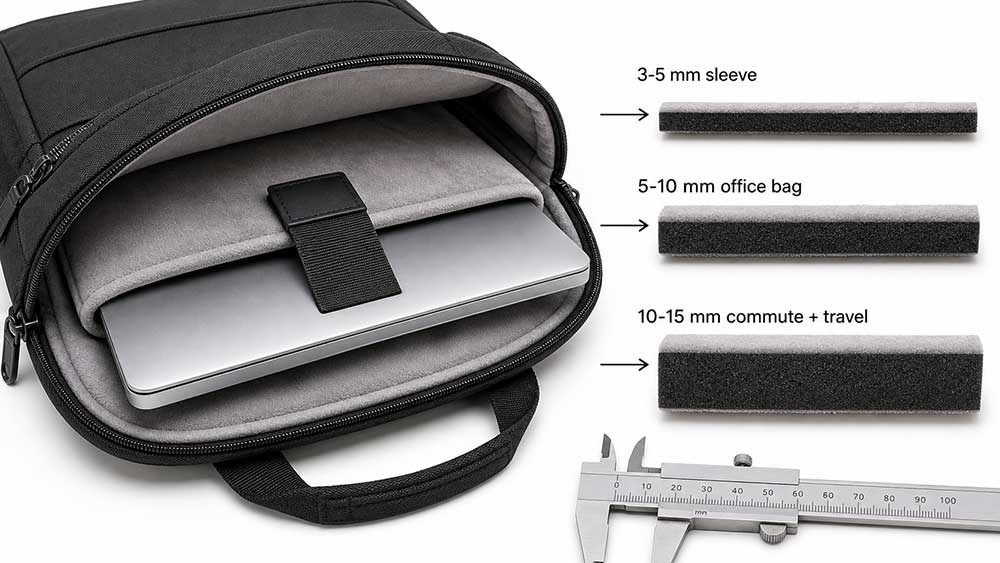
For most laptop bags, the practical padding range is between 5 mm and 15 mm.
A slim laptop sleeve may use around 3–5 mm of neoprene or soft foam because it is designed mainly for scratch protection and light bumps. A daily office laptop bag usually needs around 5–10 mm of dense foam around the laptop compartment. A commuter laptop backpack or business travel bag is better with 10–15 mm of padding, especially around the back panel, bottom, and side walls.
For heavier 15.6-inch, 16-inch, or 17-inch laptops, padding thickness becomes more important, but structure matters even more. The bag should prevent the laptop from hitting the ground when the bag is placed down, squeezed in a car trunk, stored under an airplane seat, or carried with chargers and other hard objects inside.
A practical guide looks like this:
| Use Case | Suggested Padding | What Matters Most |
|---|---|---|
| Slim laptop sleeve | 3–5 mm | Scratch protection, soft lining, close fit |
| Light office laptop bag | 5–10 mm | Front and back padding, smooth lining |
| Daily commuter laptop backpack | 10–15 mm | Bottom padding, side walls, laptop stability |
| Business travel laptop bag | 10–15 mm+ | Raised sleeve, pressure protection, organized storage |
| Student backpack | 10–20 mm in impact zones | Bottom, corners, charger separation |
| Outdoor or field laptop bag | Reinforced padding system | Dense foam, structure, water-resistant shell |
If you want one easy rule, choose a laptop bag with at least 10 mm of dense padding for regular commuting and travel. For very light office use, 5–8 mm may be enough if the laptop compartment is well built.
Why Padding Thickness Alone Is Not Enough
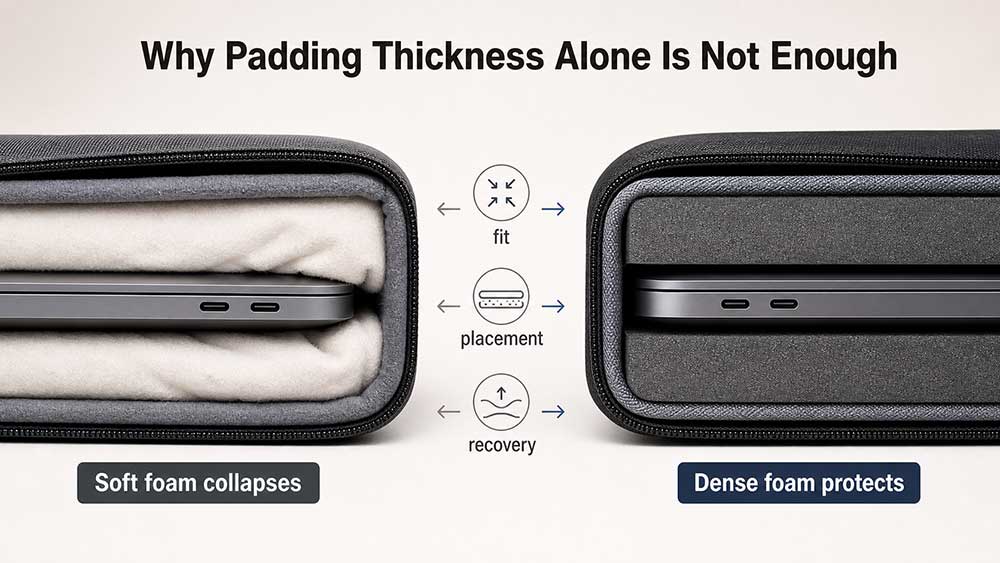
Many buyers judge a laptop bag by touching the compartment and asking, “Does it feel thick?” That is useful, but it is not enough.
Laptop protection depends on several things working together:
- Foam density
- Padding thickness
- Padding placement
- Bottom structure
- Corner coverage
- Laptop fit
- Lining material
- Separation from chargers, keys, bottles, and accessories
Dense foam absorbs impact better than thin fabric lining. Firm EVA or PE foam can protect better than soft sponge-like padding, even if the soft padding feels thicker at first touch. A laptop bag also needs the padding to recover after compression. If the foam collapses quickly and stays flat, it may not protect the laptop well after repeated use.
Placement is just as important. Padding on the front and back panels helps, but the bottom of the laptop compartment is often where real damage happens. When a backpack is placed on the floor, dropped slightly, or pushed into a luggage compartment, the bottom edge and corners of the laptop take the impact first.
ASUS recommends choosing a well-padded laptop bag with a dedicated compartment and reminds users to check the bottom padding, because it is often overlooked during travel or commuting.
Where Padding Matters Most in a Laptop Bag
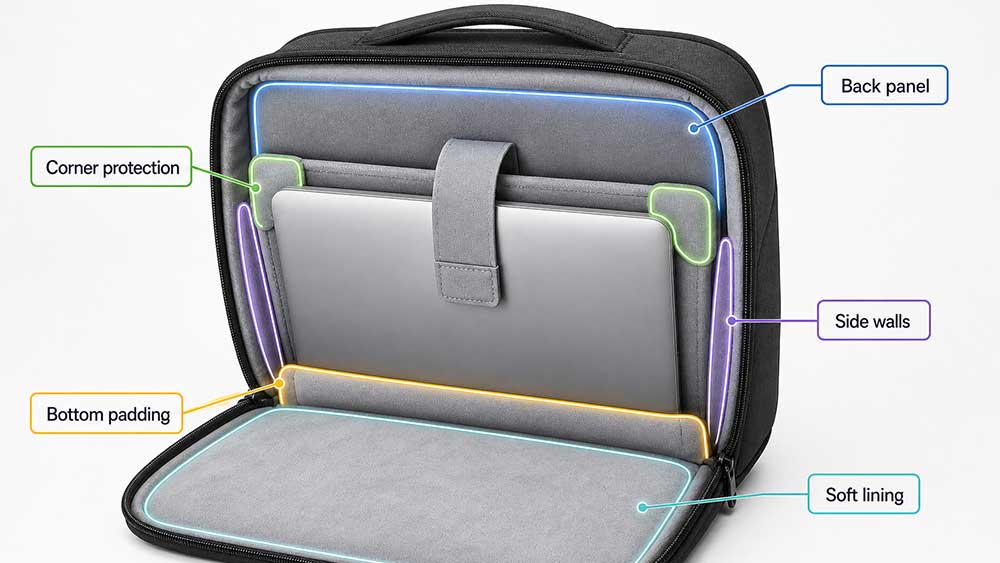
Not every part of the bag needs the same amount of padding. In fact, adding too much padding everywhere can make the bag bulky, heavy, and less comfortable. The most important areas are the places where the laptop is most likely to hit, press, or rub against something.
1. Bottom Padding
The bottom is the most important area. A laptop can survive many small bumps, but a hard impact on the bottom edge can damage the frame, hinge area, screen, or internal components.
A good laptop bag should have either thick bottom padding or a raised laptop sleeve that keeps the laptop from touching the actual base of the bag. This is especially important for backpacks because people often place them on the ground without thinking.
2. Corner Protection
Laptop corners are vulnerable because impact force concentrates in a small area. Even if the main panels are padded, weak corners can still allow damage during drops or compression.
A better laptop bag should wrap the padding around the corners instead of only placing a flat foam sheet on the back panel. For backpacks and travel bags, corner protection is more important than simply making the flat back panel thicker.
3. Back Panel Padding
For laptop backpacks, the back panel usually sits between the laptop and the user’s back. This area needs enough padding to protect the laptop and make the bag comfortable to carry.
A padded back panel also helps reduce pressure from the laptop against the body. However, back comfort padding and laptop protection padding are not always the same thing. A backpack can feel soft on the back but still have weak laptop protection if the internal sleeve is thin.
4. Side Wall Padding
Side wall padding helps protect the laptop when the bag is placed sideways, leaned against a wall, or squeezed next to other bags. This is especially useful for messenger bags, briefcases, and laptop totes.
Side padding does not always need to be very thick, but it should be firm enough to prevent direct pressure on the laptop edges.
5. Front Panel Padding
The front panel protects the laptop from objects outside the bag and from items in front compartments. If a bag has charger pockets, organizer panels, notebooks, pens, or power banks in front of the laptop compartment, the front panel should have enough structure to stop those items from pressing into the laptop.
6. Soft Interior Lining
Soft lining does not replace impact padding, but it helps prevent scratches. Materials such as brushed polyester, microfiber, fleece-like lining, or smooth woven lining can reduce surface abrasion.
A laptop compartment should not have rough seams, exposed zipper tape, sharp hardware, or hard internal edges touching the laptop surface.
What Is a Suspended Laptop Compartment?
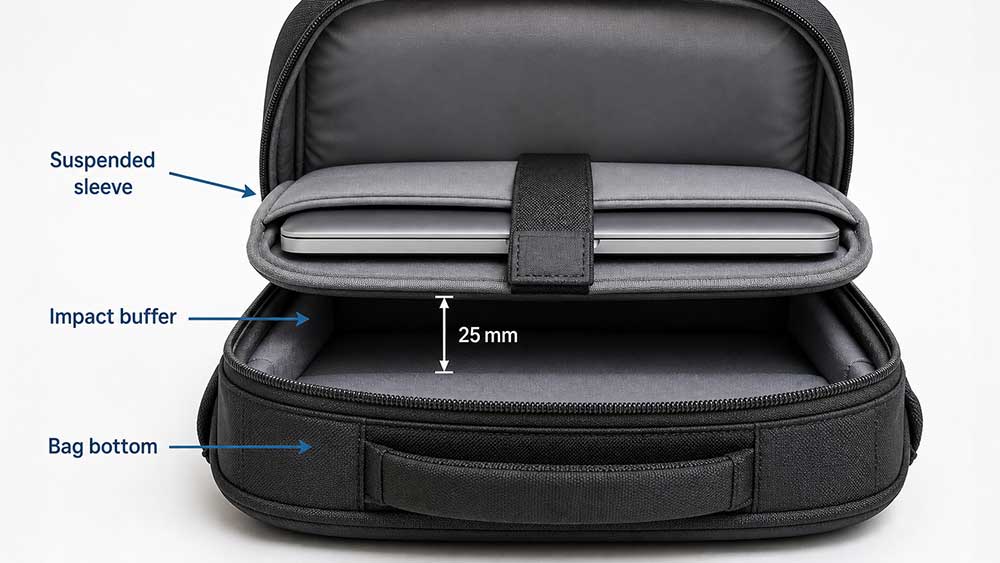
A suspended laptop compartment is one of the best protection features in a laptop backpack or travel laptop bag. It means the laptop sleeve does not directly touch the bottom of the bag. Instead, the laptop is held slightly above the base, leaving a small buffer zone underneath.
This design is sometimes also called a raised laptop sleeve or false bottom.
The purpose is simple: when the bag hits the ground, the laptop does not take the full impact immediately. The base of the bag absorbs the first contact, and the laptop stays slightly elevated.
A suspended compartment is especially useful for:
- Laptop backpacks
- Travel backpacks
- Student backpacks
- Rolling laptop bags
- 15.6-inch and larger laptops
- Bags used for commuting, flights, and daily public transport
For a slim laptop sleeve, a suspended bottom is usually not possible because the sleeve itself is thin and close-fitting. But for a padded laptop backpack design, this feature can make a major difference.
Is Thicker Padding Always Better?
No. Thicker padding is not always better.
A laptop bag that is too heavily padded can become bulky, heavy, and less practical. It may reduce internal space, make the bag look too puffy, and create a less professional appearance for business use. If the padding is soft and low-density, extra thickness may also give a false sense of protection.
Lenovo explains that laptop compartment padding can affect both protection and bulk, and that buyers should check whether the sleeve is reinforced on the bottom and sides while holding the device securely without shifting. That is why it is better to evaluate the best laptop bag for different tasks instead of judging padding by thickness alone.
This balance is important. A good laptop bag should not simply use the thickest possible foam. It should use the right foam in the right place.
For example, a professional laptop briefcase may need a clean shape and moderate padding. A student backpack may need stronger bottom and corner protection. A travel backpack may need a raised sleeve, structured back panel, and organized storage to keep hard items away from the laptop.
In other words, padding should match the use case.
Best Padding Materials for Laptop Bags
Different laptop bags use different padding materials. The right choice depends on the bag type, target price, weight, structure, and user scenario.
EVA Foam
EVA foam is firm, structured, and commonly used in protective bags. It works well for bottom panels, back panels, and structured laptop compartments. EVA can provide better shape retention than soft sponge foam.
PE Foam
PE foam is lightweight and cost-effective. It is often used in laptop bags, backpacks, and sleeves where the goal is to balance protection, weight, and price.
EPE Foam
EPE foam is light and cushioning. It is often used in bags that need basic protection without too much weight. It can work well in everyday laptop bags, but the density and thickness should be selected carefully.
PU Foam
PU foam is softer and more flexible. It can make a laptop compartment feel comfortable and padded, but very soft PU foam may compress easily. It is better when combined with structure or denser foam.
Neoprene
Neoprene is common in slim laptop sleeves. It provides light cushioning, flexibility, and scratch protection. However, neoprene alone may not be enough for heavy travel, drops, or rough handling.
Soft Lining Materials
Microfiber, brushed tricot, fleece-like lining, and smooth polyester linings help protect the laptop surface. They are important for scratch prevention, but they should not be confused with impact padding.
For protective laptop sleeve projects, neoprene or foam thickness can be adjusted based on laptop size, retail price, and the level of protection the brand wants to offer.
Padding Needs by Laptop Size
Laptop size affects padding needs because larger laptops are heavier, wider, and more exposed to bending pressure.
13-Inch Laptops
A 13-inch laptop is usually light and compact. For daily office carry, 5–8 mm of dense padding may be enough if the compartment fits well and has a soft lining.
A slim sleeve can work well for a 13-inch laptop when the user carries it inside another bag. But if the sleeve is used alone, stronger padding is safer.
14-Inch Laptops
A 14-inch laptop is still easy to carry, but it often needs slightly better side and bottom protection. A daily laptop bag with 8–10 mm of dense foam is usually suitable.
15.6-Inch Laptops
A 15.6-inch laptop is one of the most common laptop sizes, but it is also more likely to hit the corners or bottom of a bag. For this size, 10–15 mm of padding is a practical range for commuting and travel.
A raised laptop compartment is strongly recommended for backpacks.
16-Inch and 17-Inch Laptops
Larger laptops need more structural support. The bag should not only have thick padding, but also a stable compartment that prevents bending and shifting.
For gaming laptops, workstations, or heavier business laptops, the padding should be combined with reinforced bottom construction, strong side walls, and a secure strap or sleeve closure.
How to Check If a Laptop Bag Has Enough Padding
You do not need lab equipment to judge whether a laptop bag has enough padding. A simple hands-on check can tell you a lot.
First, press the laptop compartment with your fingers. The padding should feel dense, not empty or paper-thin. If you can easily feel the outside surface through the foam, the protection may be weak.
Second, check the bottom. Many bags look padded on the back panel but have little protection at the base. If the laptop directly touches the bottom seam, the bag may not protect well when placed on the floor.
Third, place the laptop inside and see if it shifts. A laptop compartment should hold the device securely without being too tight. If the laptop moves side to side, impact protection becomes less effective.
Fourth, check the corners. The laptop should not sit in a loose fabric pocket with no corner coverage.
Fifth, look at the storage layout. Chargers, adapters, keys, pens, water bottles, and power banks should not press directly against the laptop. A well-designed laptop bag separates hard accessories from the device.
Finally, check the zipper path. The zipper should not rub against the laptop edge, especially when the bag is full.
Laptop Bag, Backpack, Sleeve, or Messenger Bag: Do They Need Different Padding?
Yes. Different laptop bag styles need different padding structures.
A laptop sleeve usually needs a close fit, soft lining, and flexible padding. It is often used inside another bag, so it does not always need the same structure as a backpack.
A laptop backpack needs stronger bottom protection because the bag is often placed vertically on the ground. It also needs back panel comfort, side wall protection, and a stable sleeve.
A laptop messenger bag needs side protection and compartment stability because the bag may swing while walking. It should hold the laptop securely so it does not slide toward one side.
A laptop tote bag often needs a padded internal sleeve because the outer body may be softer and less structured.
A rolling laptop bag needs strong bottom construction because the laptop may sit near a wheeled base, handle system, and heavier travel items.
If a brand is developing a full custom laptop bag collection, padding should not be copied across every style. A slim sleeve, a commuter backpack, a laptop messenger bag, and a rolling laptop bag all need different protection logic.
Common Mistakes When Choosing Laptop Bag Padding
One common mistake is choosing a bag only because the padding feels soft. Softness can feel premium, but it does not always mean better protection. A laptop needs cushioning and structure, not only a soft touch.
Another mistake is ignoring the bottom. Many laptop bags have padded walls but little protection at the base. For backpacks, this is a serious weakness.
A third mistake is choosing a compartment that is too large. If the laptop moves inside the bag, padding cannot work properly. The laptop should fit close enough to stay stable.
Some users also assume that any laptop sleeve is protective enough. A thin neoprene sleeve can protect against scratches and light bumps, but it may not be enough for travel, drops, or heavy commuting.
Finally, some bags place hard organizer pockets directly in front of the laptop. If a charger or power bank presses against the laptop screen area, the risk of pressure damage increases.
What Brands Should Consider When Designing Laptop Bag Padding
For brands, wholesalers, and product development teams, laptop bag padding should be decided early in the design process. It affects product weight, cost, structure, appearance, user experience, and perceived quality.
The right padding depends on several questions:
- What laptop size is the bag designed for?
- Is the product for office, school, travel, outdoor use, or business commuting?
- Does the laptop compartment need a raised bottom?
- Should the foam be EVA, PE, EPE, PU, neoprene, or a layered structure?
- Will the bag hold chargers, documents, bottles, or tablets near the laptop?
- Does the target market prefer slim design or stronger protection?
- What retail price range does the product need to meet?
For a premium business bag, the padding should be protective but clean-looking. For a student backpack, the bottom and corners may need stronger reinforcement. For a travel laptop backpack, the structure should protect the laptop from pressure, movement, and repeated ground contact.
Vancharli Outdoor supports OEM and ODM laptop bag development for brands that need different padding levels, sleeve structures, materials, pocket layouts, and private label options. The goal is not to make every bag thicker, but to match the protection system to the real use scenario.
Final Answer: How Much Padding Is Enough?
For most users, a laptop bag needs 5–10 mm of dense padding for light daily carry and 10–15 mm for commuting, school, business travel, or heavier laptops.
However, the best laptop protection does not come from thickness alone. A good laptop bag should have:
- Dense foam instead of thin fabric lining
- Strong bottom protection
- Corner coverage
- Side wall padding
- Soft interior lining
- A secure laptop fit
- Separation from hard accessories
- A raised or suspended sleeve for backpacks and travel bags
If the bag is only used for light office carry, moderate padding may be enough. If the bag is used for daily commuting, flights, school, or heavier laptops, stronger bottom and corner protection are worth choosing.
The safest choice is a laptop bag with firm padding, a well-fitted compartment, and a protected bottom. That combination matters more than simply choosing the thickest padding available.
FAQ
Is 5 mm padding enough for a laptop bag?
5 mm padding can be enough for a slim sleeve or light office carry, especially if the laptop is also placed inside another bag. For daily commuting, travel, or larger laptops, 5 mm may feel too light unless the foam is dense and the fit is secure.
Is 10 mm padding good for a laptop compartment?
Yes. 10 mm of dense padding is a good practical level for many daily laptop bags. It gives better protection than thin lining without making the bag too bulky. For backpacks and travel bags, bottom and corner protection should also be checked.
Do laptop sleeves need the same padding as laptop backpacks?
No. A laptop sleeve is usually slimmer and closer fitting, while a backpack needs stronger bottom and side protection. A sleeve may use 3–5 mm of neoprene or foam, but a commuter laptop backpack often needs 10–15 mm of padding and a raised compartment.
What part of a laptop bag needs the most padding?
The bottom and corners usually need the most protection because they take the strongest impact when the bag is placed down or dropped. The back panel, side walls, and front panel are also important, but the bottom should not be ignored.
Is neoprene enough to protect a laptop?
Neoprene can protect a laptop from scratches and light bumps, but it may not be enough for heavy travel, hard drops, or rough commuting. For stronger protection, neoprene should be combined with dense foam, structure, or an additional padded compartment.
Should a laptop bag have a false bottom?
A false bottom or suspended laptop compartment is very useful, especially in backpacks. It keeps the laptop slightly above the base of the bag, reducing direct impact when the bag is placed on the ground.
Can too much padding make a laptop bag worse?
Yes. Too much padding can make a bag bulky, heavy, and less practical. If the foam is too soft, extra thickness may not provide real protection. The best design uses dense padding in key areas instead of simply adding thickness everywhere.
How do I know if my laptop bag is protective enough?
Check the bottom, corners, side walls, and laptop fit. The compartment should feel dense, hold the laptop securely, and keep hard accessories away from the device. If the laptop touches the bag bottom directly or moves around inside, the protection may not be enough.





Comments are closed