Безопасны ли рюкзаки для ноутбуков для ежедневных поездок на работу?
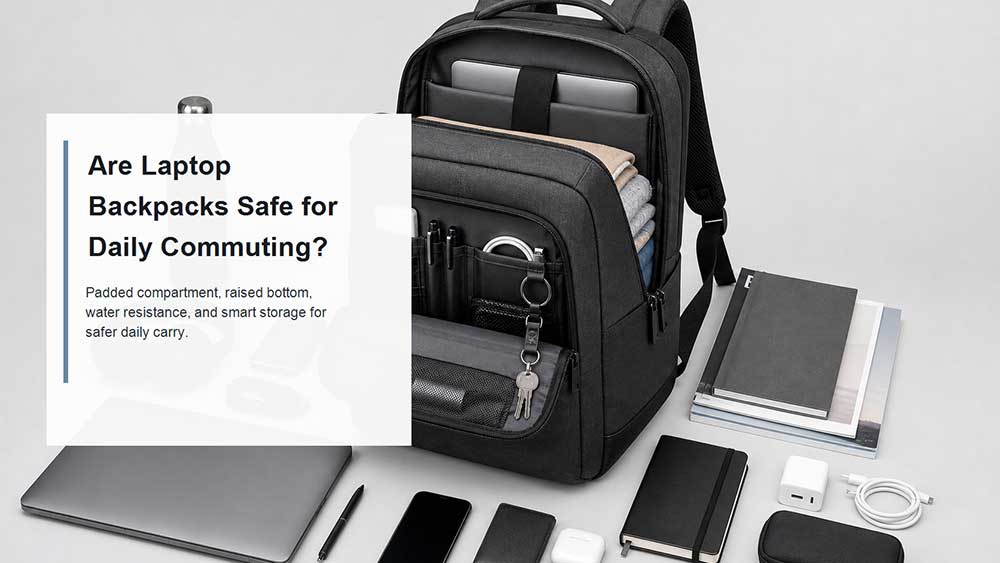
Yes, laptop backpacks are generally safe for daily commuting if they are designed with a dedicated padded laptop compartment, strong bottom protection, a secure fit, water-resistant materials, and enough separation between the laptop and hard or liquid items.
The real question is not whether a laptop can go inside a backpack. The real question is whether the backpack is built for daily laptop carry. A normal backpack with a thin fabric sleeve may not protect your device well during a crowded train ride, rainy walk, bike commute, or daily office routine. A well-designed laptop backpack, on the other hand, can make commuting safer, more organized, and more comfortable.
Daily commuting creates different risks than occasional travel. Your backpack may be placed on the floor, squeezed between people, pushed under a desk, carried in the rain, or packed with chargers, bottles, books, and other hard items. A safe commuter laptop backpack should protect the laptop from repeated bottom impact, side pressure, screen pressure, moisture, and movement inside the compartment.
The Direct Answer: Yes, If the Backpack Is Built for Laptop Carry
A laptop backpack is safe for daily commuting when it protects the laptop from four common risks: impact, pressure, moisture, and movement.
Impact usually happens when the backpack is placed on the ground or bumped against a hard surface. Pressure happens when books, chargers, lunch boxes, or other items press against the laptop. Moisture can come from rain, wet umbrellas, leaking bottles, or spilled coffee. Movement happens when the laptop compartment is too large and the device slides around inside the bag.
A good commuter laptop backpack should reduce all four risks in a practical way. The laptop should sit in its own padded compartment, stay slightly above the bag bottom, remain stable when you walk, and stay separated from chargers, keys, bottles, umbrellas, and other items that can create pressure or moisture risk.
If your backpack is just a regular school bag with a loose internal pocket, the laptop may still be at risk. If it is a purpose-built padded laptop backpack, it is much more suitable for daily commuting.
What Makes Daily Commuting Risky for Laptops?
Daily commuting is repetitive. A single careful trip may not damage your laptop, but small risks can build up over time.
When you commute by train or bus, your backpack may be pressed against seats, doors, or other passengers. When you drive, the bag may slide on the car seat or sit in the trunk with other items. When you walk or bike, the backpack moves with your body and may swing if the fit is poor. When you arrive at the office or classroom, the bag is often placed under a desk, beside a chair, or directly on the floor.
These everyday actions create common laptop risks:
The bottom edge of the laptop hits the floor when the backpack is set down.
A charger or power bank presses against the screen.
A water bottle leaks inside the main compartment.
The laptop shifts inside an oversized sleeve.
Heavy books or documents create bending pressure.
Rain enters through exposed zippers or wet fabric.
The backpack becomes overpacked and loses its protective shape.
This is why a commuter laptop backpack should not be judged only by capacity. A 25L backpack with a loose, thin laptop sleeve may be less protective than a smaller backpack with a raised laptop compartment, dense padding, and better accessory separation.
Dedicated Laptop Compartment: The First Feature to Check
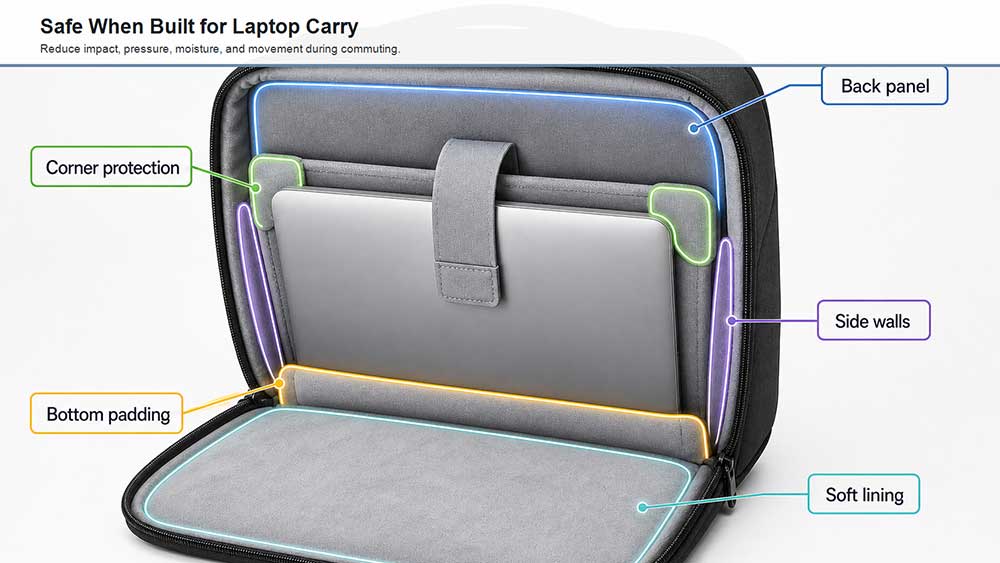
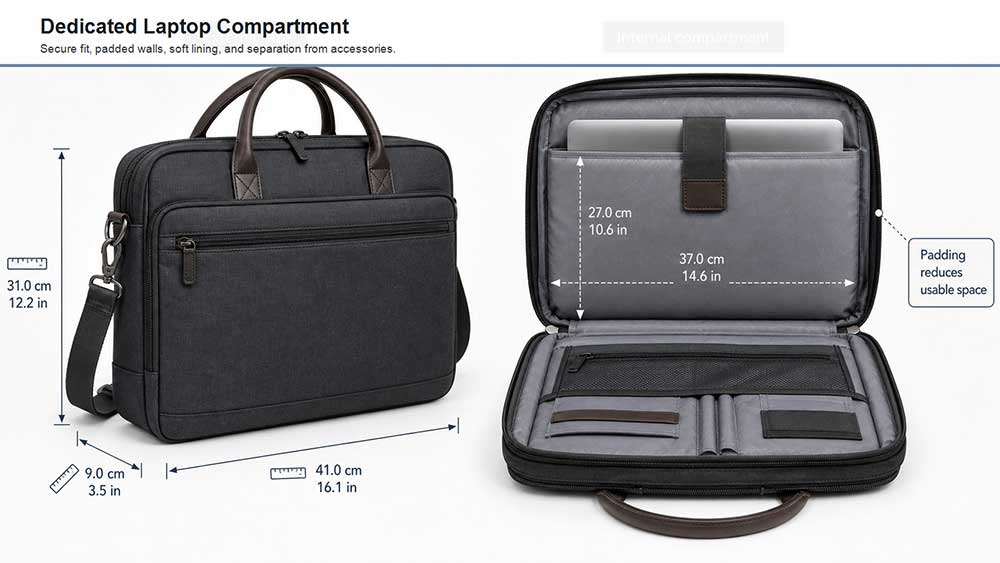
The most important safety feature is a dedicated laptop compartment. A laptop should not float freely in the main compartment with books, cables, bottles, and accessories.
For commuting or travel, a well-padded laptop bag with a dedicated compartment is the safer starting point. The same principle applies to daily laptop backpacks: the compartment should have padding on both sides, and the bottom should not be ignored.
A good laptop compartment should:
Fit the intended laptop size closely.
Sit near the back panel for better stability.
Have dense padding on the inside and outside walls.
Keep the laptop upright and flat.
Prevent the device from shifting side to side.
Use a soft lining to reduce scratches.
Keep the laptop separated from chargers and hard accessories.
If the laptop sleeve is too loose, the device may move every time you walk, run for a bus, or place the backpack down. If the sleeve is too tight, the laptop corners or zipper area may be under pressure. The best fit is secure without forcing the laptop into the compartment.
Bottom Protection Matters More Than Most Commuters Think
For daily commuting, bottom protection is one of the most important parts of laptop backpack safety.
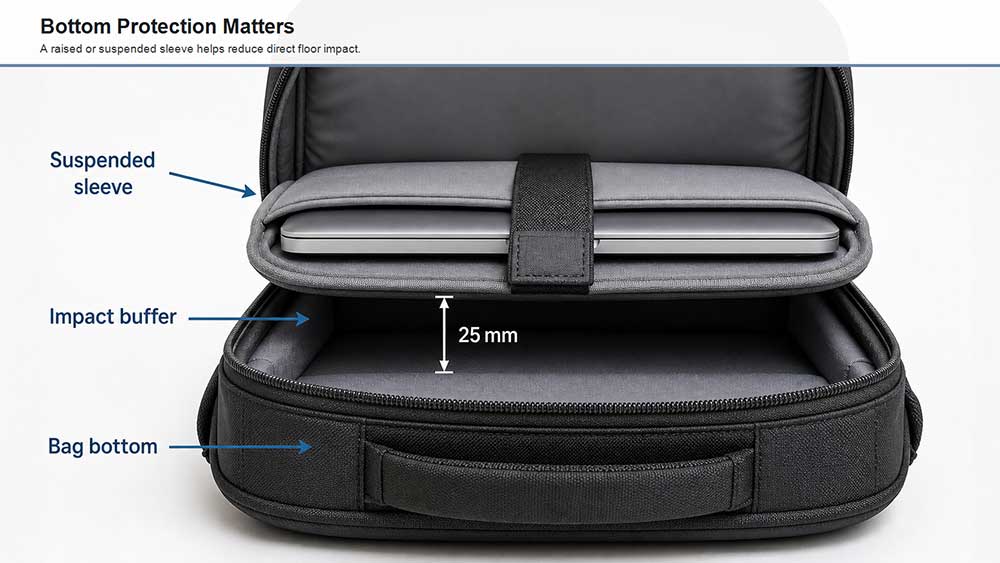
Many people place their backpack on the floor several times a day. They set it down at home, in the car, at the office, in a café, on a train, or beside a classroom desk. If the laptop compartment reaches all the way to the base of the bag, the bottom edge of the laptop may take repeated impact.
A safer commuter backpack should have one of these structures:
A raised laptop sleeve
A suspended laptop compartment
Thick bottom padding
A false bottom design
A structured base panel
A raised or suspended laptop compartment keeps the laptop slightly above the bottom of the backpack. This creates a buffer zone between the laptop and the ground. Even a small gap can help reduce direct impact when the backpack is placed down.
If you open a backpack and see that the laptop sleeve ends directly at the bottom seam, be careful. That design may look clean, but it gives the laptop less protection during daily commuting.
Padding, Suspension, and Structure Work Together
Padding is important, but padding alone does not make a laptop backpack safe.
A safe commuter laptop backpack usually combines three things: padding, suspension, and structure.
Padding helps absorb small bumps and pressure. Suspension helps keep the laptop away from the bottom of the bag. Structure helps the backpack keep its shape when it is full, squeezed, or placed under a desk.
Laptop compartment padding affects both protection and bulk, so buyers should evaluate the best laptop bag for different tasks instead of judging by padding thickness alone. For commuting, it is especially important to check whether the sleeve is reinforced on the bottom and sides, and whether the laptop stays secure without shifting.
For commuting, the safest design is not always the thickest one. A backpack with moderate dense padding, a raised laptop sleeve, a stable back panel, and good internal organization may protect better than a bulky bag with soft padding but no real structure.
Keep Chargers, Bottles, and Hard Items Away From the Laptop
A laptop is not only damaged by drops. It can also be damaged by pressure from objects inside the backpack.
Chargers, power banks, keys, adapters, headphones, camera gear, notebooks, and metal pens can press against the laptop if the backpack layout is poor. A water bottle or coffee cup can create an even bigger risk if it leaks near the computer compartment.
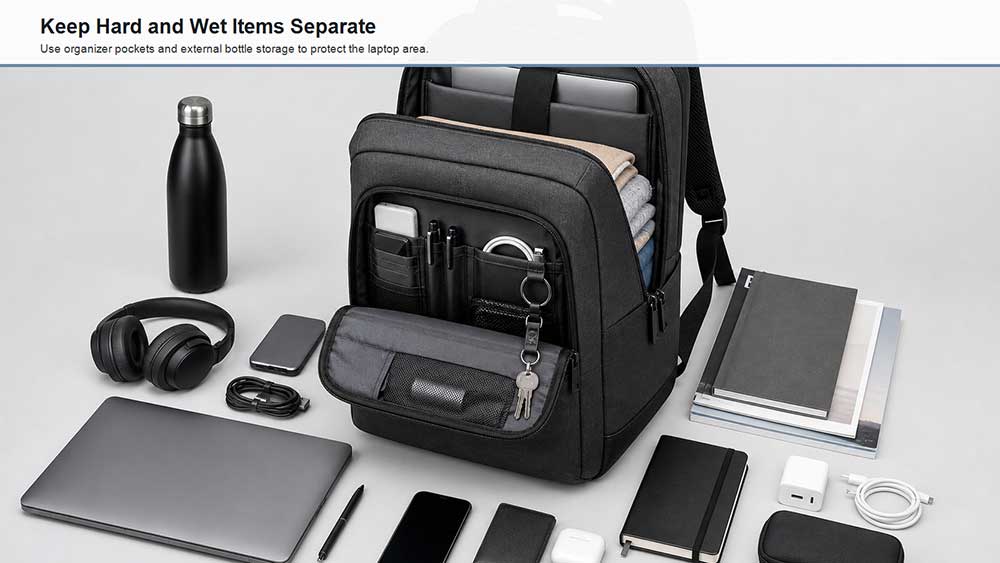
For daily commuting, the backpack should have separate storage zones. The laptop should sit in its own padded compartment. Chargers and adapters should go into an organizer pocket or cable pouch. Bottles should stay in external side pockets. Wet umbrellas should not be placed next to the laptop compartment.
The goal is simple: nothing hard, sharp, wet, or heavy should press directly against the laptop.
A good commuter layout usually includes:
A dedicated laptop compartment
A separate charger pocket
A document section
Front organizer pockets
External bottle pockets
Enough space to avoid overpacking
A stable main compartment that does not collapse into the laptop area
If you often carry a charger, notebook, tablet, mouse, phone cable, lunch box, and water bottle, the backpack’s internal layout matters as much as its padding.
Is a Laptop Backpack Safe in Rain?
A laptop backpack can be safe in light rain if it uses water-resistant fabric, protected zippers, and a sensible storage layout. But water-resistant does not mean waterproof.
Water-resistant fabric can help protect against light rain or short exposure. It does not guarantee protection if the backpack is soaked, left in heavy rain, or exposed to leaking liquids inside the bag. The zipper area is especially important because water often enters through openings rather than through the main fabric.
For daily commuting, check for:
Водоотталкивающая внешняя ткань
Covered or protected zippers
A laptop compartment away from bottle pockets
External water bottle storage
A rain cover for heavy rain
A separate area for wet umbrellas
A leaking bottle may be more dangerous than rain. Many commuters place water bottles, coffee tumblers, or umbrellas inside the main compartment. If liquid spreads into the laptop area, padding can absorb moisture and hold it near the device.
The safer habit is to keep liquids outside the main laptop compartment whenever possible.
Comfort Also Affects Laptop Safety
Comfort may not sound like a laptop safety feature, but it matters for daily commuting.
When a backpack is uncomfortable, users are more likely to carry it carelessly, drop it quickly, swing it around, or place it roughly on the ground. A backpack that fits well is easier to control.
Comfort also affects how the laptop sits inside the bag. If the shoulder straps are unstable, the backpack may swing while walking or cycling. If the back panel is too soft, the laptop may press against the body or bend slightly under load. If the backpack is too large, the laptop may move inside the sleeve. If it is too small, the laptop corners may be forced against the seams.
For daily commuting, look for:
Мягкие наплечные ремни
A stable back panel
Хорошее распределение веса
A laptop compartment close to the back
A size that matches the laptop and daily load
A sternum strap for heavier commuting loads, if needed
For daily commuting, comfort and laptop safety work together. When the backpack sits close to the body, distributes weight evenly, and keeps the laptop stable, the device is less likely to swing, hit hard surfaces, or shift inside the compartment.
Laptop Backpack vs Regular Backpack for Commuting
A regular backpack can carry a laptop, but it is not always the safest choice for daily commuting. The main difference is that a laptop backpack is designed around device protection, while a regular backpack is usually designed for general storage.
Характеристика
Обычный рюкзак
Рюкзак для ноутбука
Отделение для ноутбука
Often missing or thin
Dedicated padded sleeve
Нижняя защита
Обычно ограничено
More likely to have raised or padded bottom
Устройство подходит
Laptop may shift
Лучший контроль размера
Хранение аксессуаров
General pockets
Separate charger and organizer pockets
Water bottle placement
May be inside main compartment
Often has external bottle pockets
Задняя панель
Базовая структура
More stable for daily carry
Laptop safety
Depends on added sleeve
Safer if properly designed
If you already use a regular backpack, a защитный чехол для ноутбука can help. However, a sleeve cannot fully replace a well-structured laptop backpack, especially if the backpack has weak bottom protection or poor internal organization.
For daily commuting, a purpose-built laptop backpack is usually the safer and more practical choice.
Common Mistakes That Make Laptop Backpacks Less Safe
Even a good laptop backpack can become less safe if it is used poorly. These mistakes are common during daily commuting.
The first mistake is overpacking. When the backpack is too full, pressure transfers into the laptop compartment. If the zipper is difficult to close, the laptop may be under unnecessary stress.
The second mistake is placing the charger next to the laptop screen. A charger brick may seem harmless, but it can create a concentrated pressure point.
The third mistake is using a backpack that is too large for the laptop. If a 13-inch laptop sits inside a loose 17-inch compartment, it may slide and hit the edges.
The fourth mistake is ignoring the bottom of the backpack. Many commuters focus on shoulder comfort and exterior style but forget that the laptop may hit the floor every time the bag is placed down.
The fifth mistake is carrying liquids too close to electronics. Coffee, water, rain, and wet umbrellas should be kept away from the laptop area.
The sixth mistake is assuming that soft padding always means strong protection. Soft padding can feel comfortable, but it may compress too easily. Dense foam, proper structure, and secure fit are more important.
A 30-Second Safety Check Before Buying a Commuter Laptop Backpack
Before buying a commuter laptop backpack, do a quick hands-on check if possible. Put your laptop or a similar-sized object into the laptop compartment, then check whether the device sits above the bottom of the bag, whether the corners are covered, and whether the compartment holds the laptop without side-to-side movement.
Press the front of the laptop area lightly with your hand. If you can feel hard objects from the organizer pocket pushing into the laptop space, the layout may not be safe for daily commuting. Then check the bottom seam, zipper path, and bottle pocket position.
A safe commuter backpack should protect the laptop even when the bag is full, placed on the floor, carried in light rain, or used in a crowded train or bus. If the laptop touches the bag bottom directly, moves inside the sleeve, or sits next to liquid storage, the design needs closer review.
How to Choose a Safe Laptop Backpack for Daily Commute
When choosing a laptop backpack for daily commuting, do not only check the laptop size label. A backpack may say “fits 15.6-inch laptops,” but that does not automatically mean it protects them well.
Используйте этот контрольный список:
Функция безопасности
Почему это имеет значение
Специальное отделение для ноутбука
Keeps the laptop separate from other items
Dense padding
Helps absorb bumps and pressure
Raised or suspended bottom
Reduces direct bottom impact
Reinforced side walls
Protects laptop edges
Мягкая подкладка
Уменьшает количество царапин
Надежная посадка
Prevents laptop movement
Отдельный карман для зарядного устройства
Keeps hard accessories away from the screen
Внешний карман для бутылки
Reduces liquid risk
Водостойкая ткань
Helps during light rain
Stable back panel
Reduces bending and pressure
Удобные ремни
Improves control during commuting
Правильный размер
Prevents loose movement or tight pressure
If you commute every day, bottom protection, compartment fit, and internal organization are more important than decorative features. A slim-looking backpack can still be protective if the structure is well designed. A large backpack can still be unsafe if the laptop compartment is loose and poorly padded.
What Brands Should Consider When Designing Commuter Laptop Backpacks
For brands, wholesalers, and product development teams, commuter laptop backpack safety should be designed as a full system rather than a single padding layer.
The laptop compartment, suspended bottom, foam density, back panel structure, zipper layout, water bottle placement, organizer pockets, and overall bag shape all affect how safe the backpack feels during daily commuting.
A commuter backpack should also balance protection with comfort. If the bag is too heavy, too stiff, or too bulky, users may not want to carry it every day. If it is too soft or too minimal, the laptop may not be protected well enough.
For a work-focused backpack, the design should look clean while keeping the laptop stable. For a student or travel commuter backpack, the design may need stronger bottom protection, more storage separation, and better water resistance.
Vancharli Outdoor supports OEM and ODM laptop backpack development for brands that need custom laptop compartments, padding structures, materials, logo options, private label solutions, and production-ready commuter backpack layouts. The goal is not simply to add more padding, but to design the laptop area, bottom structure, bottle placement, organizer pockets, and back panel as one protection system for real commuting conditions.
Final Answer: Are Laptop Backpacks Safe for Daily Commuting?
Laptop backpacks are safe for daily commuting when they are designed for laptop protection and used correctly. The safest options have a dedicated padded laptop compartment, raised or reinforced bottom, secure fit, water-resistant materials, separate accessory storage, and comfortable carry structure.
They are less safe when the laptop sleeve is thin, loose, unpadded, or placed directly against the bottom of the backpack. They also become riskier when users overpack the bag, place chargers against the screen, carry leaking bottles inside, or use a backpack that does not fit the laptop properly.
For most students, office workers, and business commuters, a well-designed laptop backpack is one of the safest and most practical ways to carry a laptop every day. Just make sure the backpack is built for commuting, not just for general storage.
FAQ
Are laptop backpacks safer than regular backpacks?
Yes, a laptop backpack is usually safer than a regular backpack because it has a dedicated padded compartment, better device separation, and often stronger bottom protection. A regular backpack can still work if you use a protective laptop sleeve, but it may not offer the same structure.
Can daily commuting damage a laptop inside a backpack?
Yes, it can if the backpack has poor padding, weak bottom protection, or a loose laptop compartment. Common risks include bottom impact, pressure from chargers or books, rain, bottle leaks, and laptop movement inside the bag.
Is a suspended laptop sleeve necessary for daily commuting?
It is not always necessary, but it is highly useful. A suspended laptop sleeve keeps the laptop slightly above the bottom of the backpack, reducing direct impact when the bag is placed on the floor.
Should I use a laptop sleeve inside a laptop backpack?
You can use a laptop sleeve for extra protection, especially if the backpack compartment is thin or loose. However, a sleeve should not replace a properly designed laptop backpack with bottom protection and a secure compartment.
Can rain damage a laptop in a commuter backpack?
Yes. Light rain may not be a problem if the backpack is water-resistant, but heavy rain, exposed zippers, wet umbrellas, or leaking bottles can damage a laptop. Keep liquids away from the laptop compartment and use a rain cover in bad weather.
Where should I put my charger in a laptop backpack?
The charger should go in a separate organizer pocket or cable pouch, not directly against the laptop screen. Hard accessories can create pressure points if they are packed too close to the device.
Is a laptop backpack good for train or bus commuting?
Yes, a laptop backpack is usually a good choice for train or bus commuting because it keeps your hands free and distributes weight across both shoulders. Choose one with a secure laptop compartment, bottom protection, and a stable profile that does not swing too much.
What size laptop backpack is best for work commuting?
The best size depends on your laptop and daily load. For most work commuters, a backpack that fits a 13-inch to 15.6-inch laptop with room for documents, charger, bottle, and small accessories is enough. Avoid oversized backpacks if they allow the laptop to move inside the compartment.










комментарии закрыты