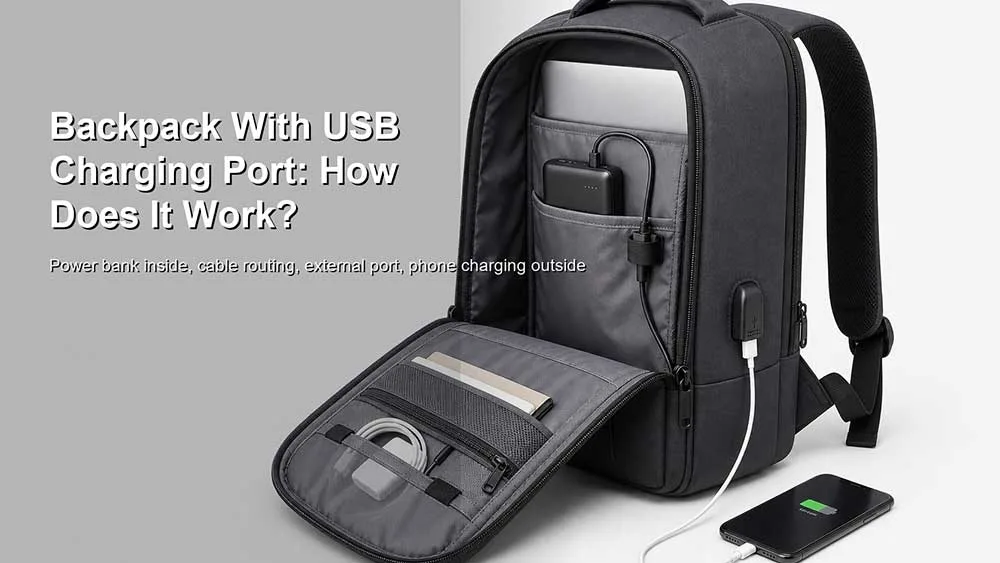
Una mochila con puerto de carga USB puede parecer más moderna que una mochila común, pero la idea es sencilla. En la mayoría de los casos, la mochila no carga el teléfono por sí sola. La energía proviene de una batería externa ubicada en su interior. El puerto USB externo simplemente facilita la conexión del dispositivo sin tener que abrir la mochila cada vez.
Esto significa que una mochila con carga USB no es lo mismo que una mochila con batería integrada. Generalmente, se trata de una mochila con un puerto de carga externo, un cable interno y un bolsillo o espacio para tu propia batería externa.
La respuesta práctica es sencilla: la batería externa se encarga de la carga; la mochila solo ayuda a guiar el cable.
La respuesta directa: La mochila no se carga sola.
La mayoría de las mochilas con puertos de carga USB no tienen su propia fuente de alimentación. Suelen tener un puerto USB externo y un cable corto en el interior. Para usar esta función, necesitas colocar tu propia batería externa dentro de la mochila y conectarla al cable interno.
Luego, conectas el cable de tu teléfono al puerto USB externo y cargas tu dispositivo mientras caminas, te desplazas al trabajo, viajas o esperas en el aeropuerto.
En otras palabras, la mochila funciona más como una extensión de cable que como un cargador.
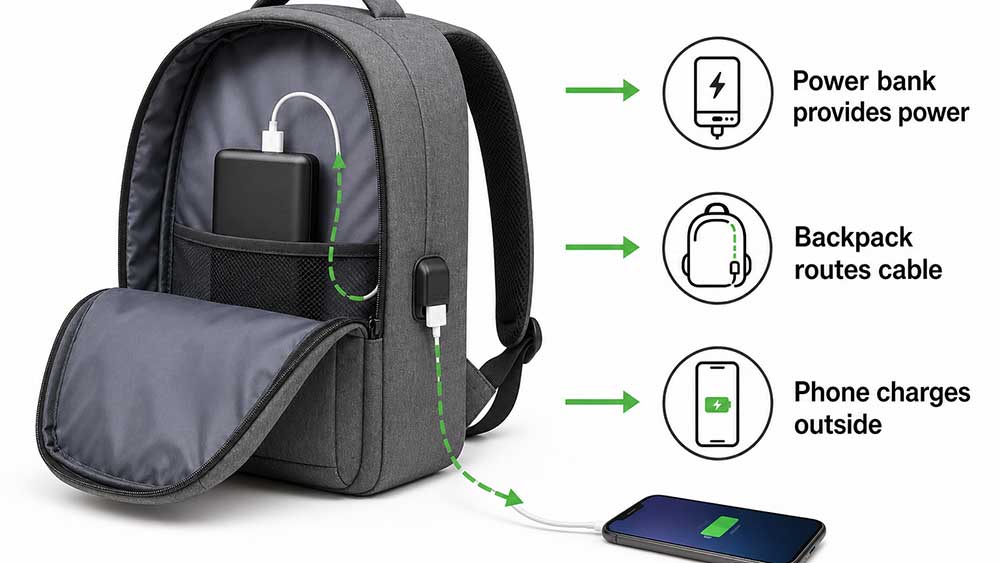
Una configuración sencilla se ve así:
Coloca una batería externa dentro de la mochila.
Conecta la batería externa al cable USB interno.
Conecta el cable de tu teléfono al puerto USB externo.
Carga tu teléfono sin abrir la mochila.
Por eso, algunas descripciones de productos pueden resultar confusas. Una «mochila con carga USB» normalmente no significa que incluya una batería, sino que tiene una conexión de carga integrada en su estructura.
¿Qué es una mochila con puerto de carga USB?
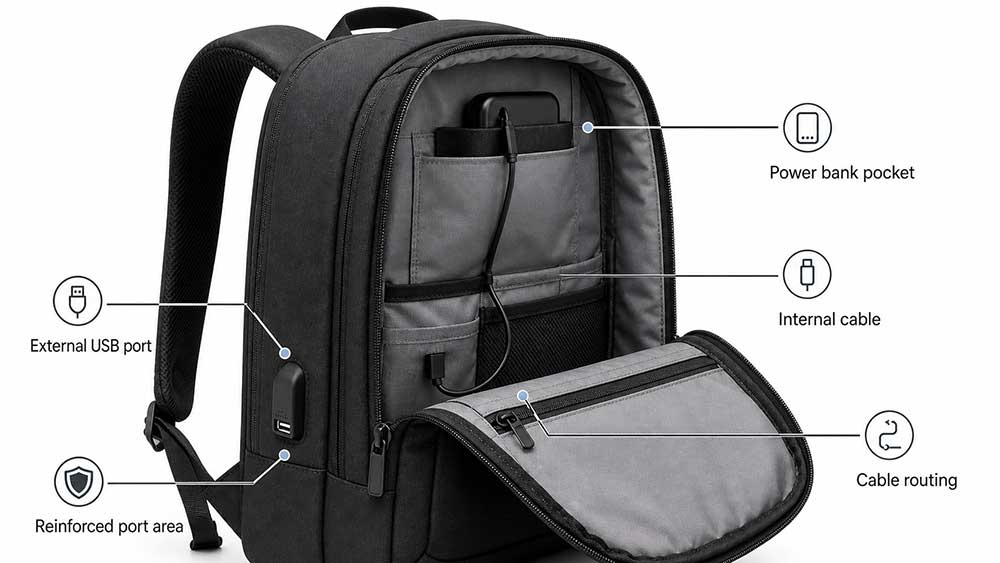
Una mochila con puerto de carga USB es aquella que incorpora una interfaz USB externa, generalmente ubicada en el lateral, la zona del hombro, el panel frontal o cerca de un bolsillo de fácil acceso. Dentro de la mochila, este puerto se conecta a un cable. El usuario conecta dicho cable a una batería externa que guarda en el interior de la mochila.
Las partes comunes incluyen:
Puerto USB externo
Cable USB interno
Bolsillo o compartimento para la batería externa
canal de enrutamiento de cables
Zona reforzada alrededor del puerto
USB-A, USB-C o ambos, según el modelo.
A veces, un puerto para auriculares en diseños más antiguos.
El objetivo es la comodidad. En lugar de sacar la batería externa, abrir la cremallera de la mochila y sujetar el cargador con la mano, el usuario puede guardar la batería externa dentro de la mochila y conectar el teléfono desde fuera.
Esto puede resultar útil para ir al trabajo, a la escuela, a viajes de negocios, ferias comerciales, aeropuertos y para pasear por la ciudad. Es especialmente útil cuando el usuario desea tener ambas manos libres.
¿Cómo funciona el puerto de carga USB?
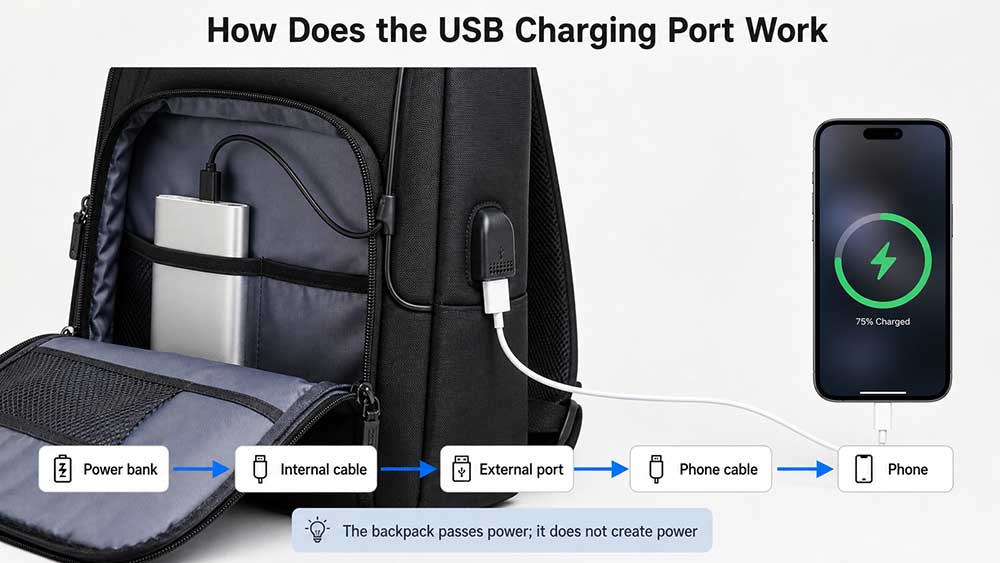
El puerto de carga USB funciona conectando tu dispositivo a una batería externa mediante el sistema de cables integrado en la mochila.
El flujo es:
Batería externa dentro de la bolsa → cable interno → puerto USB externo → cable de carga del teléfono → teléfono
La mochila no genera electricidad. Simplemente transfiere la energía de la batería externa a tu dispositivo.
Por ejemplo, si tu batería externa está dentro del compartimento principal, el cable interno la conecta al puerto externo. Cuando conectas tu teléfono al puerto externo, la batería externa envía energía a través del cable de la mochila hasta tu teléfono.
Este diseño es práctico porque la batería externa queda protegida dentro de la mochila. No es necesario llevarla en la mano, guardarla en el bolsillo ni dejar la mochila abierta.
Sin embargo, la velocidad de carga depende de varios factores:
Potencia de salida de la batería externa
Tipo de puerto USB
Calidad del cable interno
Cable de carga del teléfono
Límite de carga del dispositivo
Si la mochila admite USB-C o solo USB-A.
Si se admiten los protocolos de carga rápida
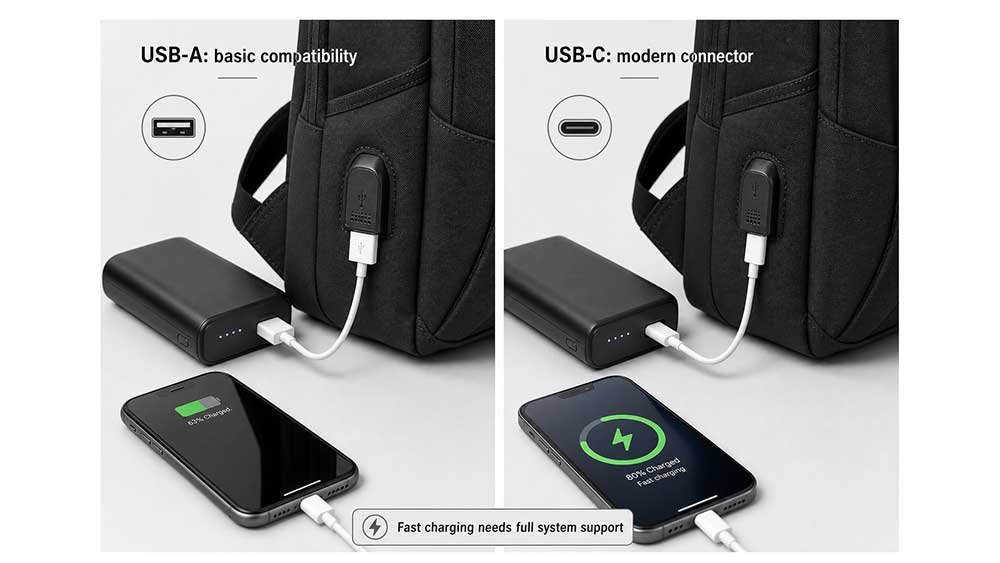
Una mochila con puerto USB no implica automáticamente carga rápida. El sistema de carga completo debe ser compatible con esta función.
¿Viene con una batería externa?
Por lo general, no.
La mayoría de las mochilas con cargador USB no incluyen una batería externa. La mochila incluye el puerto y el cable, pero el usuario debe adquirir el cargador portátil por separado.
Esto es importante porque muchos compradores malinterpretan el nombre del producto. Una mochila descrita como "con carga USB" puede dar la impresión de que tiene una batería incorporada, pero en la mayoría de los casos no es así.
Hay buenas razones para ello:
Los cargadores portátiles aumentan el costo.
Las baterías imponen restricciones de envío y almacenamiento.
La capacidad de la batería varía según las necesidades del usuario.
Las normas de las aerolíneas se aplican a las baterías de litio.
Algunas marcas prefieren que los usuarios elijan su propio cargador.
Las baterías integradas son más difíciles de reemplazar si fallan.
Para la mayoría de las mochilas de negocios, escolares y de viaje, una batería externa extraíble es más práctica que una batería integrada de forma permanente.
Consejo: Si en la página del producto dice "mochila con carga USB", comprueba si también indica "batería externa incluida". Si no lo especifica claramente, asume que tendrás que usar tu propia batería externa.
Puertos de carga USB-A frente a puertos USB-C
Las mochilas con carga USB más antiguas suelen utilizar puertos USB-A. Los diseños más recientes pueden incorporar USB-C o una combinación de USB-A y USB-C.
Tipo de puerto
Uso común
Ventaja principal
Limitación
USB-A
Teléfonos antiguos, cables, carga básica
Familiar y ampliamente compatible
Más lento y menos enfocado en el futuro
Cable
Teléfonos más nuevos, tabletas, algunos portátiles
Enchufe reversible, mayor potencial de carga rápida.
Solo es útil si el sistema completo lo admite.
USB-A + USB-C
Usuarios con necesidades variadas
Mas flexible
Un poco más complejo y puede costar más
El USB-C suele considerarse la mejor opción para las mochilas modernas, pero por sí solo no garantiza la carga rápida. La batería externa, el cable, el puerto y el dispositivo deben ser compatibles con el estándar de carga adecuado.
Por ejemplo, USB Power Delivery puede admitir mayor potencia a través de un cable y conector USB Type-C con todas las funciones, pero un puerto de mochila debe estar diseñado correctamente para admitir ese tipo de uso: USB-IF USB Power Delivery.
Por lo tanto, el comprador no solo debería preguntar: "¿Tiene la mochila USB-C?". Una pregunta mejor sería:
¿Qué rendimiento de carga admite el sistema completo?
¿Puede una mochila con carga USB cargar un portátil?
Por lo general, una mochila de carga USB básica está diseñada para teléfonos, auriculares, tabletas pequeñas y dispositivos similares. Puede que no sea adecuada para cargar una computadora portátil.
Cargar una computadora portátil requiere mucha más energía que cargar un teléfono. Muchas mochilas con puertos USB-A no están diseñadas para cargar computadoras portátiles. Incluso si una mochila tiene un puerto USB-C, la carga de la computadora portátil depende de:
Potencia de la batería externa
Compatibilidad con suministro de energía USB-C
Clasificación del cable
Diseño del puerto
Requisitos de carga del portátil
Control de calor y seguridad
Una batería externa pequeña para teléfono puede no ser suficiente para una computadora portátil. Algunas baterías externas modernas de alta potencia pueden cargar computadoras portátiles, pero el cable interno y el puerto externo de la mochila también deben proporcionar la energía necesaria.
Por este motivo, las marcas deben cuidar la redacción. Una mochila no debe promocionarse como «capaz de cargar portátiles» a menos que el sistema completo de cables y puertos permita hacerlo de forma segura.
Para la mayoría de los usuarios, una mochila con carga USB se entiende mejor como una función práctica para cargar el teléfono, no como sustituto del cargador del portátil.
¿Por qué la carga puede ser lenta a través del puerto de la mochila?
Si tu teléfono se carga lentamente a través del puerto USB de la mochila, la mochila en sí no se está cargando lentamente. La energía sigue proviniendo de la batería externa. El problema suele estar en algún punto de la conexión entre la batería externa y el teléfono.
Las razones comunes incluyen:
batería externa de baja potencia
Puerto USB-A antiguo
Cable interno delgado o de baja calidad
Cable de carga para teléfono de baja calidad
Gestión de la batería del dispositivo
No admite protocolos de carga rápida.
Conexión del puerto inestable
Polvo o desgaste en el interior del puerto
Nivel bajo de batería del power bank
Por eso, dos mochilas con puertos USB de aspecto similar pueden tener un rendimiento diferente. El puerto externo es solo una parte visible del sistema. El cable interno, la calidad del conector y la batería externa son igual de importantes.
Una buena mochila con puerto de carga USB debe tener un recorrido estable para el cable, un puerto reforzado y espacio suficiente para guardar la batería externa sin doblar el cable bruscamente.
¿Es segura una mochila con carga USB?
Una mochila con cargador USB es generalmente segura si se usa correctamente con una batería externa fiable y cables en buen estado. Los principales riesgos de seguridad suelen provenir de la batería externa o del cable, no de la mochila en sí.
Los usuarios deben evitar:
Baterías de alimentación dañadas
Baterías hinchadas
Cargadores sobrecalentados
Cables deshilachados
Accesorios de carga baratos y no certificados
Carga cerca de líquidos derramados
Dejar la batería externa bajo una fuerte presión
Forzar un cable a un ángulo muy cerrado.
El puerto USB también debe protegerse del agua, el polvo y los tirones repetidos. Un puerto suelto o mal reforzado puede desgastarse rápidamente.
En las mochilas para ir al trabajo o de viaje, el puerto USB no debe estar ubicado en un lugar donde pueda aplastarse, rayarse o mojarse fácilmente. Un puerto lateral puede ser práctico, pero aun así debe estar protegido por una buena construcción.
¿Se puede llevar una mochila con cargador USB en un avión?
Sí, normalmente puedes llevar una mochila con puerto de carga USB en el avión. El puerto USB en sí no es el problema. Lo importante es la batería externa.
Los cargadores portátiles contienen baterías de litio, por lo que deben cumplir con las normas de seguridad y las regulaciones de las aerolíneas. La TSA indica que los cargadores portátiles o baterías externas que contienen baterías de iones de litio deben transportarse en el equipaje de mano: Normas de la TSA para cargadores portátiles.
Las directrices de la FAA también indican que las baterías de litio de repuesto, incluidos los cargadores portátiles y las baterías externas, deben transportarse únicamente en el equipaje de mano. Si se factura una maleta de mano en la puerta de embarque o junto al avión, las baterías externas deben retirarse y guardarse con el pasajero en la cabina: baterías de litio PackSafe de la FAA.
Así que la regla es simple:
Normalmente, la mochila puede pasar sin problemas por el control de seguridad del aeropuerto.
La batería externa debe ir en el equipaje de mano.
No deje la batería externa en el equipaje facturado.
Si la mochila se factura en la puerta de embarque, retire primero la batería externa.
Consulta las normas de la aerolínea sobre los límites de capacidad de las baterías portátiles.
Esto es especialmente importante para mochilas de viaje y mochilas para portátiles. Si la mochila con cargador USB se usa como artículo personal, la batería externa generalmente puede permanecer dentro de la mochila mientras esta permanece contigo en la cabina. Si la mochila se factura, la batería externa debe retirarse.
Para los viajeros que vuelan con frecuencia, la función de carga USB debería diseñarse de manera que el bolsillo para la batería externa sea de fácil acceso y rápido.
¿Realmente es útil un puerto de carga USB?
Sí, puede ser útil, pero solo en la situación adecuada.
Un puerto de carga USB es útil cuando:
Te desplazas al trabajo con el teléfono en la mano.
Viajas con frecuencia por aeropuertos.
Asistes a ferias comerciales o eventos.
Caminas por el campus todo el día.
Utilizas con frecuencia mapas, billetes o aplicaciones para compartir coche.
Quieres guardar tu batería externa dentro de la mochila.
No quieres abrir la mochila cada vez que la batería del teléfono esté baja.
Pero puede convertirse en una estrategia de marketing cuando:
La mochila tiene un puerto barato y suelto.
El cable interno es de baja calidad.
El puerto está ubicado en un lugar poco práctico.
El producto no explica que se necesita una batería externa.
El puerto no admite las necesidades de carga modernas.
La mochila se anuncia como de carga sin explicar cómo funciona.
El bolsillo para la batería externa es de difícil acceso.
El puerto no está protegido del agua ni del desgaste.
Esta función resulta útil cuando mejora la comodidad real. Se convierte en un truco publicitario cuando solo tiene un aspecto técnico en la página del producto.
Qué deben comprobar los compradores antes de elegir uno
El puerto USB es fácil de identificar, pero no debería ser el único motivo para elegir la mochila. Antes de comprar una mochila con puerto de carga USB, conviene fijarse en algo más que la palabra "USB".
Comprueba estos detalles:
¿La mochila incluye una batería externa o necesitas llevar la tuya?
¿El puerto es USB-A, USB-C o ambos?
¿El cable interno es extraíble o fijo?
¿Se puede reemplazar el cable si se rompe?
¿Es fácil acceder al bolsillo para la batería externa?
¿El puerto se siente reforzado?
¿Está el puerto protegido de la lluvia y el polvo?
¿El cable se dobla demasiado bruscamente dentro de la bolsa?
¿Todavía se puede limpiar la mochila de forma segura?
¿El puerto admite la velocidad de carga que necesitas?
¿Es cómoda la mochila cuando lleva una batería externa dentro?
¿Puedes extraer rápidamente la batería externa antes de facturar el equipaje en la puerta de embarque?
Los compradores también deberían considerar si la mochila en sí es buena sin la función USB. Un puerto USB no compensa las costuras débiles, el acolchado deficiente para el portátil, las correas incómodas o la tela de baja calidad.
Para los usuarios de portátiles, el puerto USB debe considerarse una comodidad adicional. La bolsa debe tener una estructura robusta, una buena organización y una protección adecuada. Antes de centrarse en las funciones de carga, conviene revisar las características básicas que definen una buena bolsa para portátil.
Qué significan realmente las descripciones de los productos
La descripción de los productos en el caso de las mochilas con carga USB puede resultar confusa. Una mochila que indica "puerto de carga USB integrado" generalmente no significa que tenga una batería incorporada. Normalmente, significa que tiene un puerto USB externo y un cable interno para conectar una batería externa.
Aquí te explicamos cómo interpretar la terminología común de los productos:
Texto del producto
Lo que suele significar
Puerto de carga USB incorporado
La mochila tiene un puerto USB externo.
Puerto USB externo con cable interno
La bolsa se puede conectar a una batería externa en su interior.
Batería externa no incluida
Necesitas usar tu propio cargador portátil
Diseñado para una carga cómoda del teléfono.
Generalmente apto para teléfonos y dispositivos pequeños.
Puerto USB-C disponible
La mochila puede ser compatible con cables más modernos, pero no siempre con carga rápida.
La carga rápida
Solo es fiable si la batería externa, el cable, el puerto y el dispositivo lo admiten.
Mochila de carga para portátil
Debe revisarse cuidadosamente porque la mayoría de las mochilas USB no están diseñadas para cargar computadoras portátiles.
La frase más importante que debes buscar es "batería externa incluida" o "batería externa no incluida". Si en la página del producto no se indica claramente que incluye una batería externa, asume que debes conseguir la tuya.
Mejores casos de uso para mochilas con carga USB
Una mochila con cargador USB no es necesaria para todo el mundo. Resulta más útil cuando el usuario lleva consigo un teléfono, una batería externa y otros dispositivos electrónicos durante todo el día.
Uso
¿Por qué ayuda la carga USB?
Desplazamientos diarios
Mantiene el teléfono cargado mientras usas mapas, mensajes o aplicaciones de transporte público.
Viaje de negocios
Útil durante las escalas, los viajes largos y los días de viaje.
Uso de la escuela y del campus
Ayuda a los estudiantes a mantener sus teléfonos cargados entre clases.
Las ferias comerciales
Útil para compradores, expositores y equipos de ventas que utilizan el teléfono todo el día.
Caminata urbana
Mantiene la batería externa dentro de la bolsa mientras el teléfono permanece fuera.
Uso de mochila de viaje
Ayuda a gestionar la batería del teléfono sin tener que abrir la mochila repetidamente.
Uso de mochila para portátil
Proporciona comodidad para cargar el teléfono, no para cargar el portátil.
Para muchos usuarios, el puerto USB no es la razón principal para comprar la mochila. Es una característica útil entre muchas otras, como la protección para el portátil, la comodidad, la resistencia al agua, la distribución de los bolsillos y su tamaño que permite guardarla debajo del asiento.
Qué deben tener en cuenta las marcas al diseñar mochilas con carga USB
Para las marcas, los mayoristas y los equipos de desarrollo de productos, una mochila con cargador USB debe diseñarse como un sistema completo, no solo como un puerto añadido al panel lateral.
Los puntos de diseño importantes incluyen:
Selección de puerto USB-A o USB-C
Calidad del cable interno
Diseño de cable reemplazable
Ubicación del bolsillo del cargador portátil
Ruta de enrutamiento de cables
Costuras reforzadas en los puertos
Cubierta del puerto o protección contra el polvo
Riesgo de entrada de agua
Calor y presión alrededor del bolsillo del cargador portátil
Facilidad para extraer la batería externa.
Limpieza y mantenimiento
Compatibilidad con la estructura de la mochila para portátil
Texto de las afirmaciones en las páginas de productos
Pruebas con dispositivos reales y baterías externas.
El error más común es tratar el puerto USB como un elemento decorativo. Si el recorrido del cable es deficiente, el puerto está suelto o el bolsillo para la batería externa es de difícil acceso, los usuarios pueden dejar de usar esta función.
La descripción del producto también debe ser clara. Si la mochila solo incluye un puerto USB externo y un cable interno, la página del producto no debe sugerir que carga dispositivos por sí sola ni que incluye una batería integrada.
Para proyectos de mochilas OEM y ODM, Vancharli Outdoor suele revisar el tipo de puerto USB, el enrutamiento interno del cable, la ubicación del bolsillo para la batería externa, el refuerzo de los puertos, el riesgo de impermeabilidad y el acceso del usuario antes de realizar el muestreo. En el caso de las mochilas para portátiles personalizadas , la función de carga USB debe permitir el uso diario sin comprometer el compartimento para el portátil, la comodidad para los hombros ni la durabilidad general de la mochila.
Para los compradores que diseñan bolsos personalizados para portátiles , es mejor definir con antelación el escenario de carga: carga del teléfono durante los desplazamientos, viajes al aeropuerto, uso escolar, regalos corporativos o colecciones de mochilas para dispositivos electrónicos. Cada escenario puede requerir un tipo de puerto, una posición del bolsillo, una longitud de cable y un precio diferentes.
Respuesta final: ¿Cómo funciona una mochila con puerto de carga USB?
Una mochila con puerto de carga USB generalmente funciona conectando una batería externa (power bank) dentro de la mochila a un puerto USB externo mediante un cable interno. La mochila en sí no genera energía ni carga el teléfono por sí sola. La batería externa proporciona la electricidad y la mochila facilita la conexión.
Esta función es útil para ir al trabajo, viajar, estudiar, asistir a ferias comerciales y cargar el teléfono a diario. Pero no es milagrosa. La velocidad de carga depende de la batería externa, el cable, el puerto y el dispositivo. El USB-C puede ofrecer una mejor capacidad de carga, pero solo si el sistema lo admite por completo.
Para viajar, la regla más importante es que la batería externa debe ir en el equipaje de mano, no en el equipaje facturado. Si la mochila se factura en la puerta de embarque, retire primero la batería externa.
Una mochila con carga USB vale la pena cuando el puerto está bien ubicado, el cable es fiable, el bolsillo para la batería externa es fácil de alcanzar y el producto explica claramente cómo funciona. Si el puerto es débil, la afirmación es vaga o se hace creer al comprador que la mochila se carga por sí sola, la función aporta más marketing que valor real.
Preguntas frecuentes
¿Una mochila con puerto de carga USB se carga sola?
Normalmente, no. La mayoría de las mochilas con puertos de carga USB no tienen batería integrada. Necesitas conectar tu propia batería externa dentro de la mochila.
¿Cómo se utiliza una mochila con carga USB?
Coloca una batería externa dentro de la mochila, conéctala al cable USB interno y enchufa el cable de tu teléfono al puerto USB externo.
¿Las mochilas USB incluyen una batería externa?
La mayoría de los modelos no incluyen batería externa. Consulta siempre la descripción del producto. Si no indica claramente que incluye batería externa, asume que tendrás que comprar una por separado.
¿Puede una mochila con carga USB cargar un portátil?
La mayoría de las mochilas con cargador USB están diseñadas para teléfonos y dispositivos pequeños, no para portátiles. Para cargar un portátil se necesita mayor potencia, compatibilidad con USB-C Power Delivery y el cable y la batería externa adecuados.
¿Es mejor el USB-C que el USB-A en una mochila?
El USB-C es más moderno y puede ofrecer una mejor capacidad de carga, pero no garantiza la carga rápida por sí solo. La batería externa, el cable, el puerto y el dispositivo deben ser compatibles con el estándar adecuado.
¿Por qué la carga a través del puerto USB de mi mochila es lenta?
La carga lenta puede deberse a una batería externa débil, un cable interno de baja calidad, un puerto USB-A antiguo, un cable de teléfono defectuoso, un conector suelto o un dispositivo que limita la velocidad de carga.
¿Puedo llevar una mochila con carga USB en el avión?
Sí, la mochila en sí no suele dar problemas. La batería externa debe ir en el equipaje de mano y debe retirarse si la mochila se factura en la puerta de embarque.
¿Puedo llevar una mochila con carga USB en el equipaje facturado?
Normalmente, la mochila se puede facturar, pero la batería externa no debe permanecer dentro del equipaje facturado. Retírela y llévela en la cabina.
¿Es segura una mochila con carga USB bajo la lluvia?
Aunque el tejido de la mochila sea resistente al agua, el puerto USB debe protegerse de la exposición directa al agua. Evite cargarla bajo la lluvia intensa, a menos que el diseño esté específicamente protegido para ese uso.
¿Merece la pena que una mochila tenga un puerto de carga USB?
Merece la pena si usas una batería externa con frecuencia y quieres cargar tu teléfono fácilmente mientras te desplazas, viajas o caminas. Es menos importante si rara vez cargas tus dispositivos fuera de los enchufes.
¿Qué deberían comprobar las marcas antes de añadir un puerto USB a las mochilas?
Las marcas deben comprobar el tipo de puerto, la calidad del cable, la ubicación del bolsillo para la batería externa, el enrutamiento del cable, el refuerzo del puerto, el riesgo de resistencia al agua, las opciones de reemplazo y la honestidad en la descripción del producto.







los comentarios están cerrados